Back to FS2004 SDK Overview

Microsoft
Flight Simulator 2004
Software Development Kit
© 2003 Microsoft Corporation. All rights reserved.
Special Effects
December 2003

Contents
Special Effects.................................................................................................................................................1
December 2003................................................................................................................................................1
Contents...........................................................................................................................................................2
Introduction.....................................................................................................................................................3
The Effects File: .fx.........................................................................................................................................3
Overview......................................................................................................................................................3
Min/Max Values.......................................................................................................................................3
Texture Types...........................................................................................................................................4
Extrusions.................................................................................................................................................4
Other Notes ..............................................................................................................................................4
Effects File Properties..................................................................................................................................4
The Controller...............................................................................................................................................10
Effects File Properties................................................................................................................................11
Effects.........................................................................................................................................................12

Introduction
Microsoft
Flight Simulator 2004 introduces a special effects system, which had its debut
in Microsoft Combat Flight Simulator 2. Simply put, the special effects system places
emitter points in the Microsoft Flight Simulator world, which then spew forth particles.
These particles can have rules of physics applied selectively and creatively to
approximate a variety of real-world effects—from wakes on pontoons to fireworks above
Las Vegas. This particle-based effects system has been improved from the previous
version, especially with the introduction of the “controller effect.” A controller is an
effect that can emit other effects, creating a great degree of subtlety and variety.
This document describes the special effects file format, the .fx files. These files are used
by the simulator to portray various effects, playing a programmed sequence of particle
emission, rather like a score of music.
To use these tools, you must edit or create effects files (.fx files) that contain data about
the emitters and the particles being emitted. You can edit these .fx files with any text
editor, such as Microsoft Notepad. No programming knowledge is needed; however, it
may take some practice using the parameters to understand how they control the effects.
This document will help you to:
• Edit an existing Flight Simulator 2004 effects file (.fx).
• Create a new Flight Simulator 2004 effects file (.fx).
This document will not help you to:
• Place an effects file (.fx) into the Flight Simulator 2004 world. (For information
about placing an effects file, see the tutorial How to Place Effects in Flight
Simulator.)
• Use new Flight Simulator 2004 effects features in previous versions of Flight
Simulator.
• Add new special effects to aircraft.
The Effects File: .fx
Overview
Effects files can be opened and edited in Microsoft Notepad or another editor that reads
and saves plain text files. You will usually create a separate .fx file for each special effect
that you want to create.
Min/Max Values
Many of the effects file parameters require two values separated by a comma. The first
value is the minimum number that the simulation engine will use; the second value is the
maximum number. Every second, the simulation engine randomly chooses a number
somewhere between these two values, thus randomizing effects. For example, if you have
a lifetime of 5.00, 7.00, some sprites will live for 5 seconds while others may live for 6,
7, or 5.2 seconds. The first number must be less than the second number, or the effect
won’t work.
Texture Types
Two texture types can be used in special effects: alpha and additive. Alpha textures are
full color and include a transparency mask (alpha channel). Additive textures, on the
other hand, have no alpha channel. The transparency of an additive texture is based off of
color values within the texture. Color values in the texture are added to the background
color. If an additive texture is triggered against pure white, nothing happens because the
values are already maximized at 255, 255, 255, which represents the RGB value for
white. Any part of the texture that you want to be invisible must be pure black (or else
you’ll just get expanding squares). Additive textures are best used when the effect is
simulating something bright—like fire or a light.
Extrusions
Extrusions are generally effects of great length, such as wakes and contrails. Extrusions
work, but they can be very processor intensive. As a result, using extrusions can easily
turn a smooth-running simulation into a slide show. For the best results, start with very
long extrusion lengths and short times, and then tweak as necessary.
Static sprites underwent a code change from the effects engine that shipped with Combat
Flight Simulator 2 that limited their functionality. Sprites become static before they get
any of their offset values, and as a result, particle offsets do not work on static sprites.
Instead, you must use emitter offsets.
Other Notes
• For on/off switches, 1 is on and 0 is off.
• All distance units are in meters, unless otherwise specified.
• Certain parameters used in Combat Flight Simulator 2, such as forces and
damage, are not operational in Flight Simulator 2004.
Effects File Properties
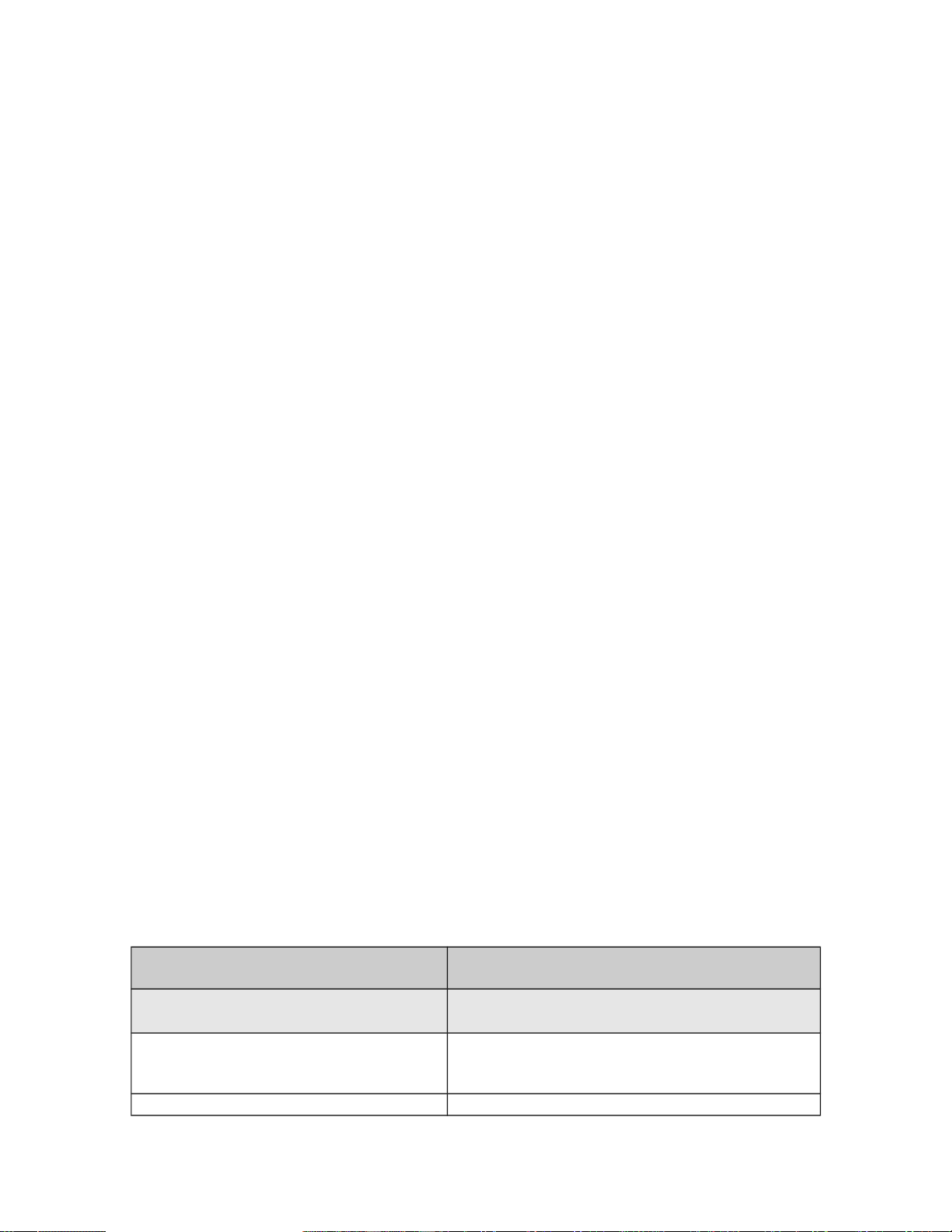
The following table lists and describes the effects file sections and properties.
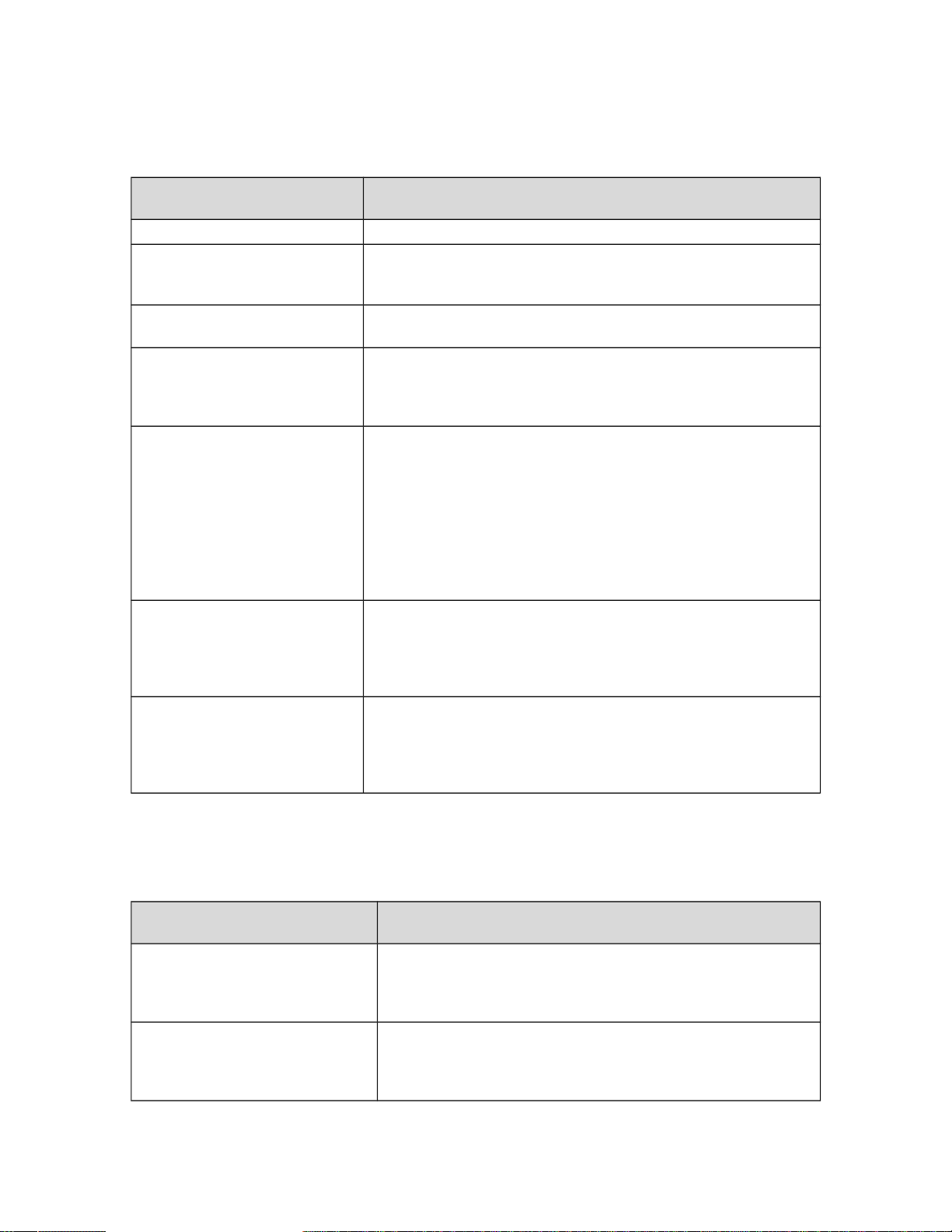
Effects file section or property Description
[Library Effect]
The [Library Effect] section defines several
general parameters.
Lifetime=5
A value that is part of an internal (reserved)
process. Do not edit this parameter. Lifetime=5 is
the only value recognized by Flight Simulator.
Version=2.00
The version number of the internal effects tool used
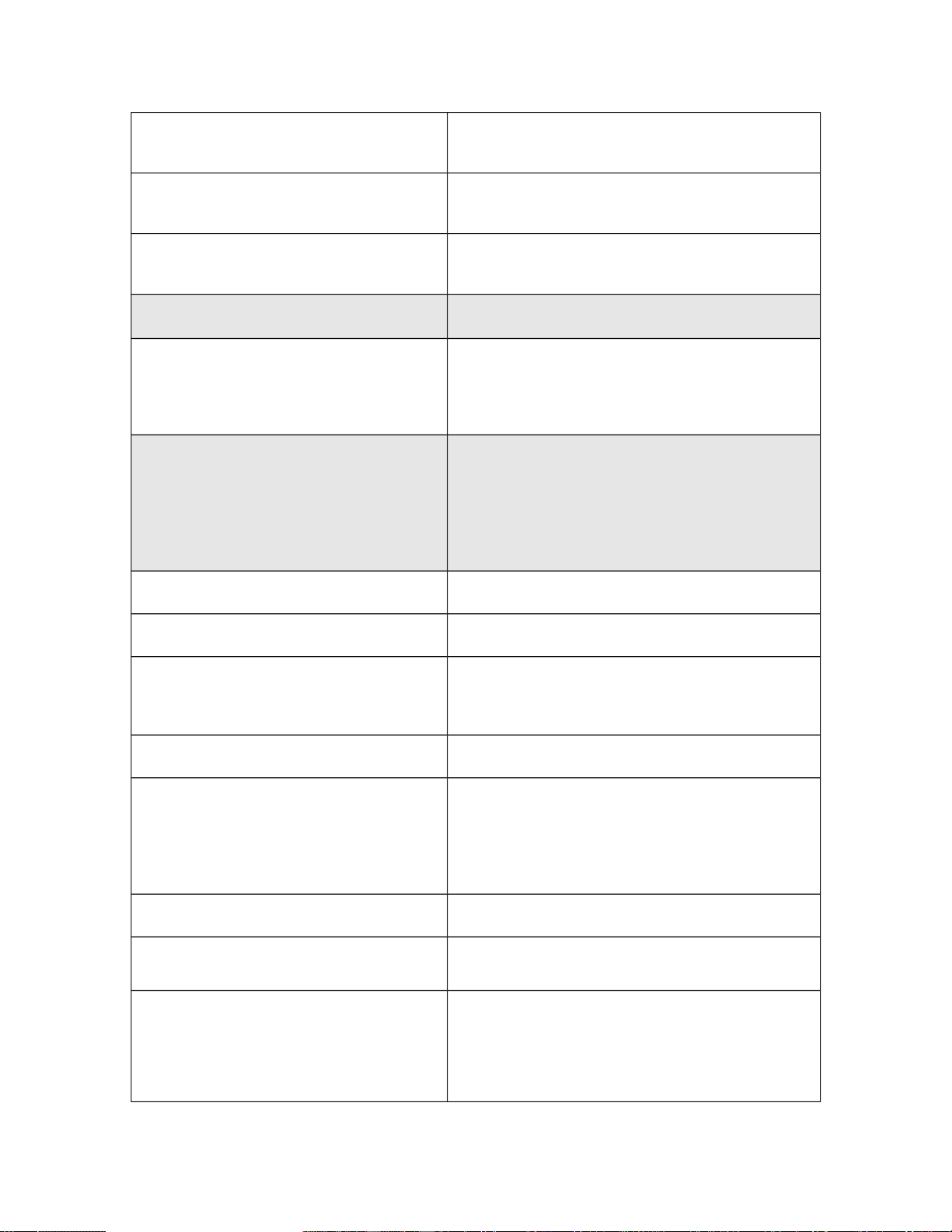
for Flight Simulator. Do not edit this parameter.
Version=2.00 is the only value that is recognized
by Flight Simulator.
Display Name=X
An internal naming process that does not affect
anything displayed in Flight Simulator but may help
you keep track of effects files as you work on them.
Radius=200
The maximal size of the effect. You must give an
effect a radius for it to show up as scenery.
Measured in meters.
[Properties]
The [Property] section defines the view modes
in which the effect will be displayed.
Cockpit=1
VirtualCockpit=1
Spot=1
Tower=1
Map=1
The view modes in which the effect appears. If you
use the list on the left, the effect shows up in all
views. If you don’t want the effect to show up in a
view, omit the parameter that corresponds to that
view or change its value to 0.
[Emitter.0]
The [Emitter.0] section defines the start of the
emitter portion of an effect. An emitter creates a
flow of particles, like water from a spigot, that is
displayed in the effect. You can include sections for
several emitters, each with a unique value (for
example, [Emitter.0], [Emitter.1], and
[Emitter.2]).
Lifetime=0.00, 0.00
The length of time that an emitter emits particles.
Measured in seconds.
Delay=0.00, 0.00
The length of delay before the emitter begins
emitting particles. Measured in seconds.
Bounce=0.00
The reaction of an emitter when it collides with the
ground. The higher the number, the larger the
bounce. If the parameter is set to 0, no reaction
occurs.
Rate=0.00, 0.00
The rate at which particles are emitted. Measured
in particles per second.
X Emitter Velocity=0.00, 0.00
Y Emitter Velocity=0.00, 0.00
Z Emitter Velocity=0.00, 0.00
The [X Emitter Velocity], [Y Emitter
Velocity], and [Z Emitter Velocity]
parameters define the velocity of the launched
emitter in the X, Y, and Z directions, respectively.
(The Y direction corresponds to vertical.) The larger
the number, the greater the velocity of the emitter.
Drag=0.00, 0.00
Drag defines the affect of wind and gravity on the
emitter. Negative numbers impart more drag.
X Particle Velocity=-0.00, 0.00
Y Particle Velocity=0.00, 0.00
Z Particle Velocity=-0.00, 0.00
The velocity at which particles travel in the X, Y,
and Z directions, respectively.
X Rotation=0.00, 0.00
Y Rotation=0.00, 0.00
Z Rotation=0.00, 0.00
The rate at which an effect rotates in the X, Y, or Z
plane. To create sprites that rotate around a center,
combine these Rotation parameters with the
Particle Offset parameters. The greater the offset
and the greater the rotation, the more dramatic the
effect. For example, some of the spectacular
fireworks effects in Flight Simulator 2004 were
done using these two parameters.
X Offset=0.00, 0.00
Y Offset=0.00, 0.00
Z Offset=0.00, 0.00
The distance that the emitter is offset from its point
of origin in the X, Y, and Z directions.
Pitch=0.00, 0.00
The angle at which the emitter is tilted. A tilted
emitter emits particles at an angle, a feature that is
especially helpful when working with static sprites.
Measured in degrees.
Bank=0.00, 0.00
Heading=0.00, 0.00
The [Bank] and [Heading] parameters are
similar to the [Pitch] parameter. For more
information about these parameters, see How to
Place Effects in Flight Simulator.
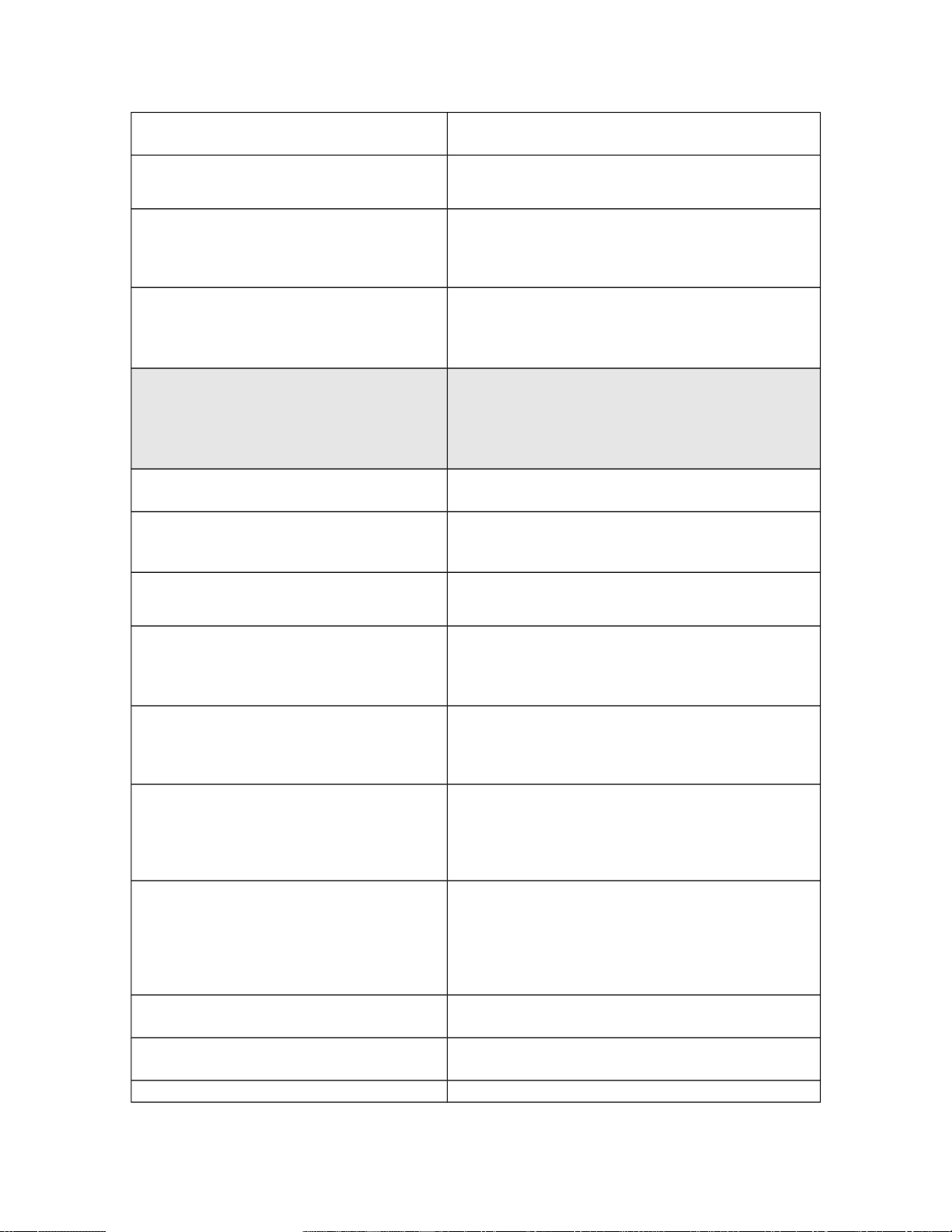
[Particle.0]
The [Particle.0] section defines the start of the
first particle and the particle’s behavior after it has
been emitted. You can include sections for more
than one particle (for example, [Particle.0],
[Particle.1], and [Particle.2]).
Lifetime=0.00, 0.00
The length of time that the particle exists.
Measured in seconds.
Type=19
The type of particle. Type=19 is a sprite and is
currently the only type that is recognized. Do not
edit.
X Scale=0.00, 0.00
Y Scale=0.00, 0.00
Z Scale=0.00, 0.00
The starting size of the particle in the X, Y, and Z
directions. Measured in meters.
X Scale Rate=0.00, 0.00
Y Scale Rate=0.00, 0.00
Z Scale Rate=0.00, 0.00
The rate at which a particle grows from zero to its
scale goal (see the [ParticleAttributes]
section) in the X, Y, and Z directions. The larger the
number, the faster the scaling.
Drag=0.00, 0.00
Drag defines the effect of wind and gravity on the
particles. Negative numbers impart more drag. For
positive numbers, don’t use a value greater than
1.00.
Color Rate=0.00, 0.00
The moment during its lifetime that a particle
switches from its start color to its end color. This
number is expressed as a percentage. For
example, .5 equals 50 percent of a particle’s
lifetime.
X Offset=0.00, 0.00
Y Offset=0.00, 0.00
Z Offset=0.00, 0.00
The distance that the emitted particles are offset
from the emitter in the X, Y, and Z directions. These
parameters can be combined with the Emitter
Rotation parameters to create swirling particle
effects. They can also be used to spread particles
out over an area.
Fade In=0.00, 0.00
The moment during its lifetime that a particle fades
in. Expressed as a percentage of total lifetime.
Fade Out=0.00, 0.00
The moment during its lifetime that a particle fades
out. Expressed as a percentage of total lifetime.
Rotation=-0.00, 0.00
The rotation of a particle. It is best to use a
negative number first and then a positive number to
get the most variation in the amount of rotation.
Shade=1
An on/off toggle that determines whether the
particle is darkened at night. It is used for night
shading.
Static=1
An on/off toggle that, when turned on, makes the
sprite attach itself to the emitter and shuts off the
emitter after the first sprite. This parameter was
used extensively in creating the lights for the
planes. Use this parameter when you need one
sprite that must stay in a fixed location relative to
the emitter (for example, signs or anything that
needs to “stick” to the plane).
Note Particle Offset does not work with Static
sprites.
Face=1, 1, 1
The direction that the particles face. Pitch, bank,
and heading are the constraints for the particles’
facing movement. These are on/off switches
because the particles either move in the
corresponding direction, or they do not.
To have the particles face you, use 1,1,1. If one of
the values is 0, then the particles will be
constrained in the corresponding axis. To have the
particles remain perpendicular to the ground but
still turn and face you, use 0,0,1.
[ParticleAttributes.0]
The [ParticleAttributes] section defines the
special attributes of a particle, such as color and
texture.
Blend Mode=1
Blend mode specifies which blending mode, alpha
or additive, is used to display the texture. For alpha
blending, use 1; for additive blending, use 2. For
more information about blending, see the Texture
Types section earlier in this document.
Texture=texturename.bmp
The name of the texture to reference in your
textures directory.
Bounce=0.00
The reaction of a particle when it collides with the
ground. The larger the number, the greater the
bounce. If the [Bounce] parameter is set to 0, no
reaction occurs.
Color Start=000, 000, 000, 000
The initial color of a particle. The first three
numbers define the red, green, and blue (RGB)
values and the fourth number specifies the amount
of alpha transparency (R, G, B, [00-255]).
Color End=000, 000, 000, 000
The final color of a particle. The first three numbers
specify the red, green, and blue (RGB) values, and
the fourth number specifies the amount of alpha
transparency (R, G, B, [00-255]).
Jitter Distance=0.00
The distance that the particles jitter. If you don't
want the particles to jitter, set the parameter to 0.
Jitter Time=0.00
The length of the delay before particles start to
jitter. Measured in seconds.

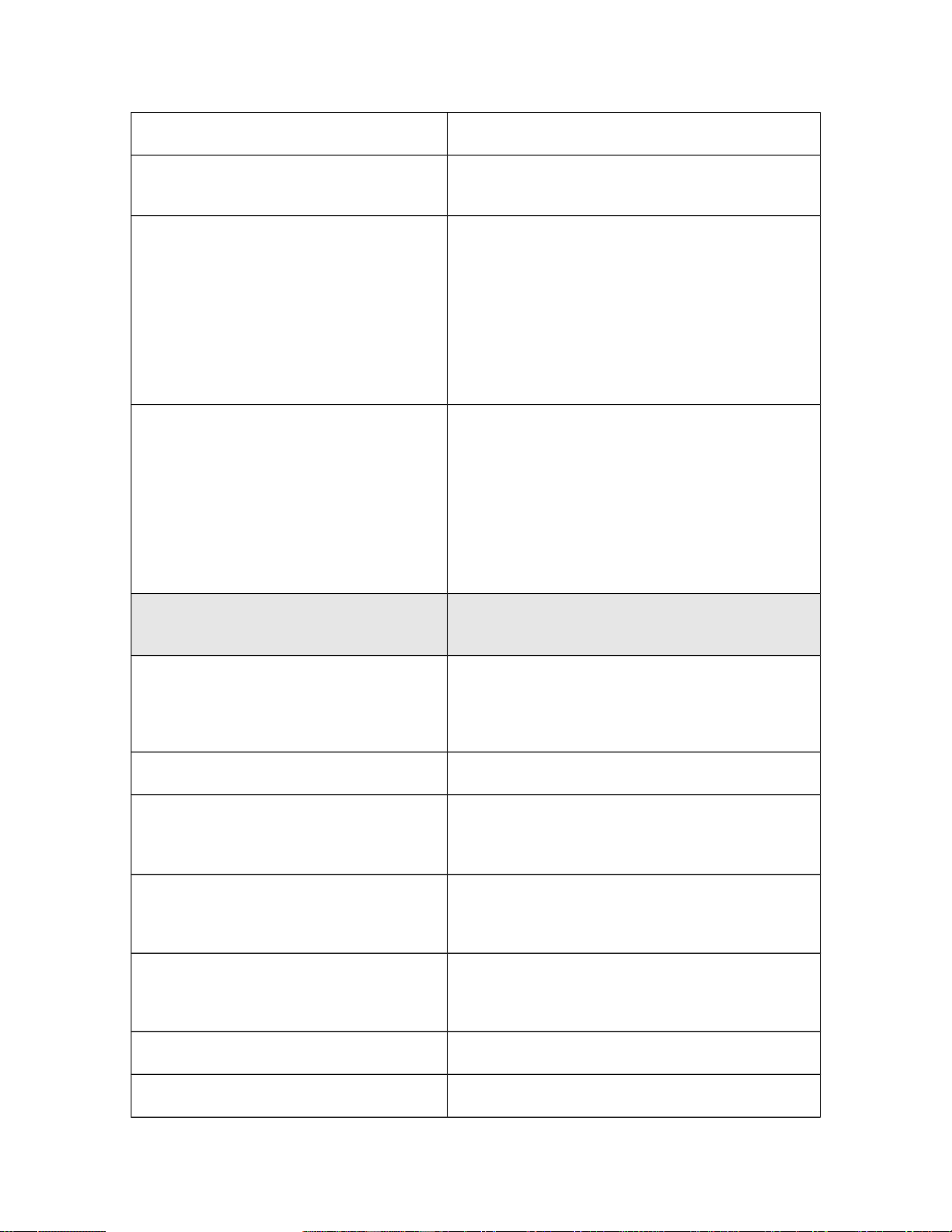
The following table describes the parameters that are used to animate textures on a sprite.
These parameters belong in the [ParticleAttributes] section of the effects file.
Effects file property Description
FPS=0.00
The frames per second at which the animation plays.
TextureSize=256
The size of the texture (in pixels) that is used for animation.
Textures must be square and their size must be a power of two,
for example, 256, 512, or 1024.
CellSize=64
The size of each frame of animation (in this case, 64 pixels by
64 pixels).
CellStart=0
The location of the first frame of animation on your texture. The
code parses your texture from lower left to upper right
(horizontally) skipping by CellSize. The value of 0 defines the
absolute lower left cell of the texture.
CellEnd=7
The location of the last frame of animation on your texture. For
example, if you specify TextureSize=256 and CellSize=64, the
texture is broken into 16 cells. In this case, a CellEnd value of 7
defines the cell that is halfway up the texture and all the way to
the right. A CellEnd value of 15 defines the cell that is in the
upper right.
You could make a four-frame animation by setting
TextureSize=256 and CellSize=128.
Note You can use only half a texture for an animation.
TempK=000.00
The temperature of the particles, which defines how fast they
rise or sink. To approximate room temperature, where particles
neither rise nor sink, set TempK to 107 degrees. To make the
particles rise, specify a temperature greater than 107; to make
the particles sink, specify a temperature less than 107.
TempRate=-0.00
The rate at which the particles cool or heat up. A negative value
represents temperatures that are cooling. The faster particles
cool, the sooner they fall back to the ground. A positive value
represents temperatures that are rising. The faster particles
heat up, the sooner they accelerate into the sky.
The following table describes parameters that are used for nonanimated textures on a
sprite. These parameters belong in the [ParticleAttributes] section of the effects file.
Property Description
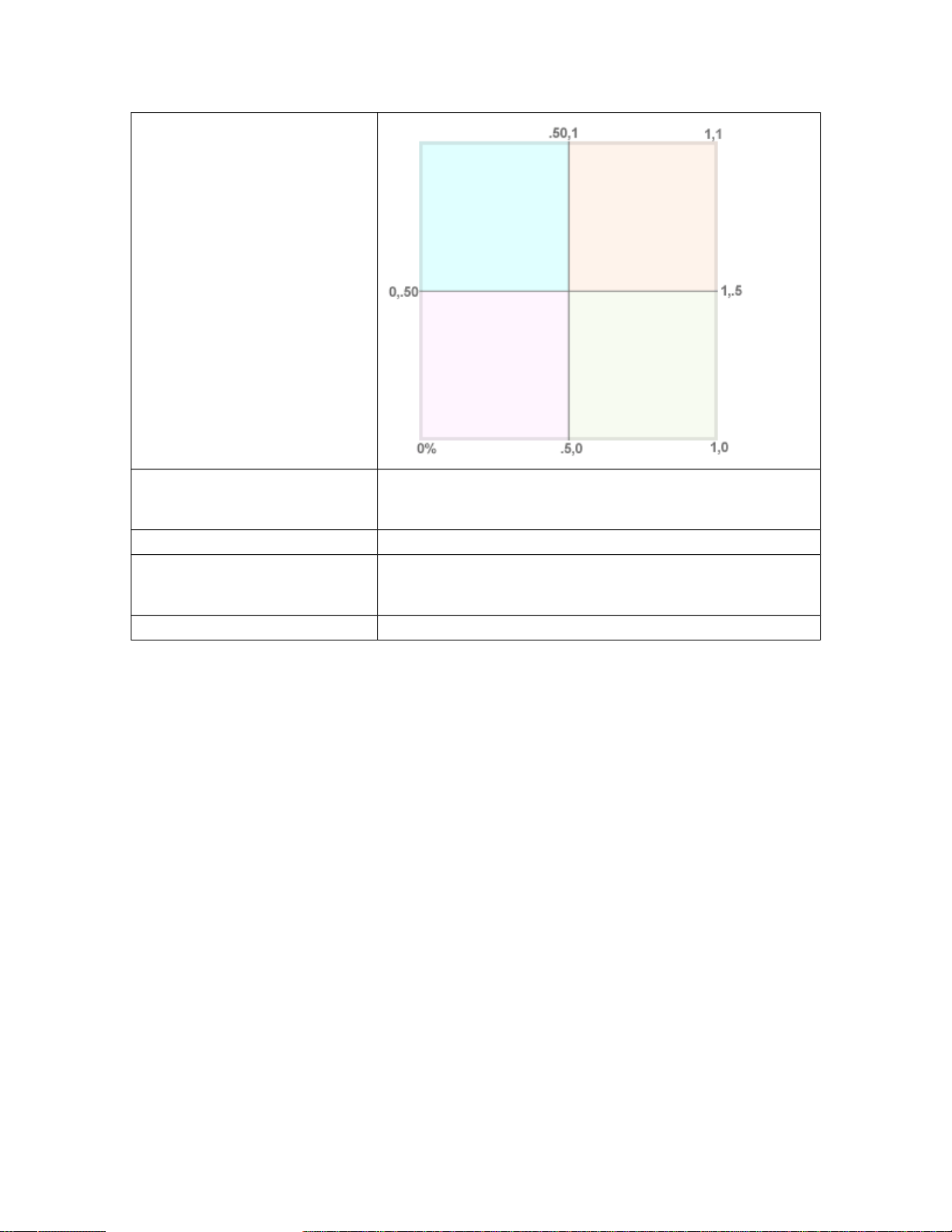
uv1=0.00, 0.50
The location of the lower-left corner of the texture on the
texture page (X, Y) expressed as percentages. The lower-left
corner of this texture starts at the left side of the page and 50
percent up its side.
uv2=0.50, 1.00
The location of the upper-right corner of the texture lies on the
texture page (X, Y) expressed as percentages. The upper-
right corner of this texture is 50 percent to the right and at the
very top of the page. See the diagram below.
X Scale Goal=0.00
Y Scale Goal=0.00
Z Scale Goal=0.00
The maximum size in the X, Y, and Z directions that a particle
scales to based on its scale rates in the X, Y, and Z
directions, respectively.
Extrude Length=0.00
The length of each portion of an extruded effect.
Extrude Pitch Max=0.00
The pitch angle at which point the extrusion creates a new
section. The smaller the number, the smoother the curves of
your extrusions.
Extrude Heading Max=0.00
Similar to the Extrude Pitch Max parameter.
The Controller
The Controller is a powerful new feature of Flight Simulator 2004 that lets you create
sequences of various effects that can be triggered from one place. Essentially, a controller
sets up a series of effects (or other controllers), and then it either repeatedly cycles
through the effects or randomly selects and triggers some of them. Because controllers
are effects themselves, you can spawn controllers from within controllers (just like any
other effect). You can use this feature to create a great randomization effect or huge
sequences of events that last over long time periods. Play around with it; you’ll find it’s
extremely powerful. The only limitation is how many sprites you can render onscreen
before killing the frame rate.
Effects File Properties
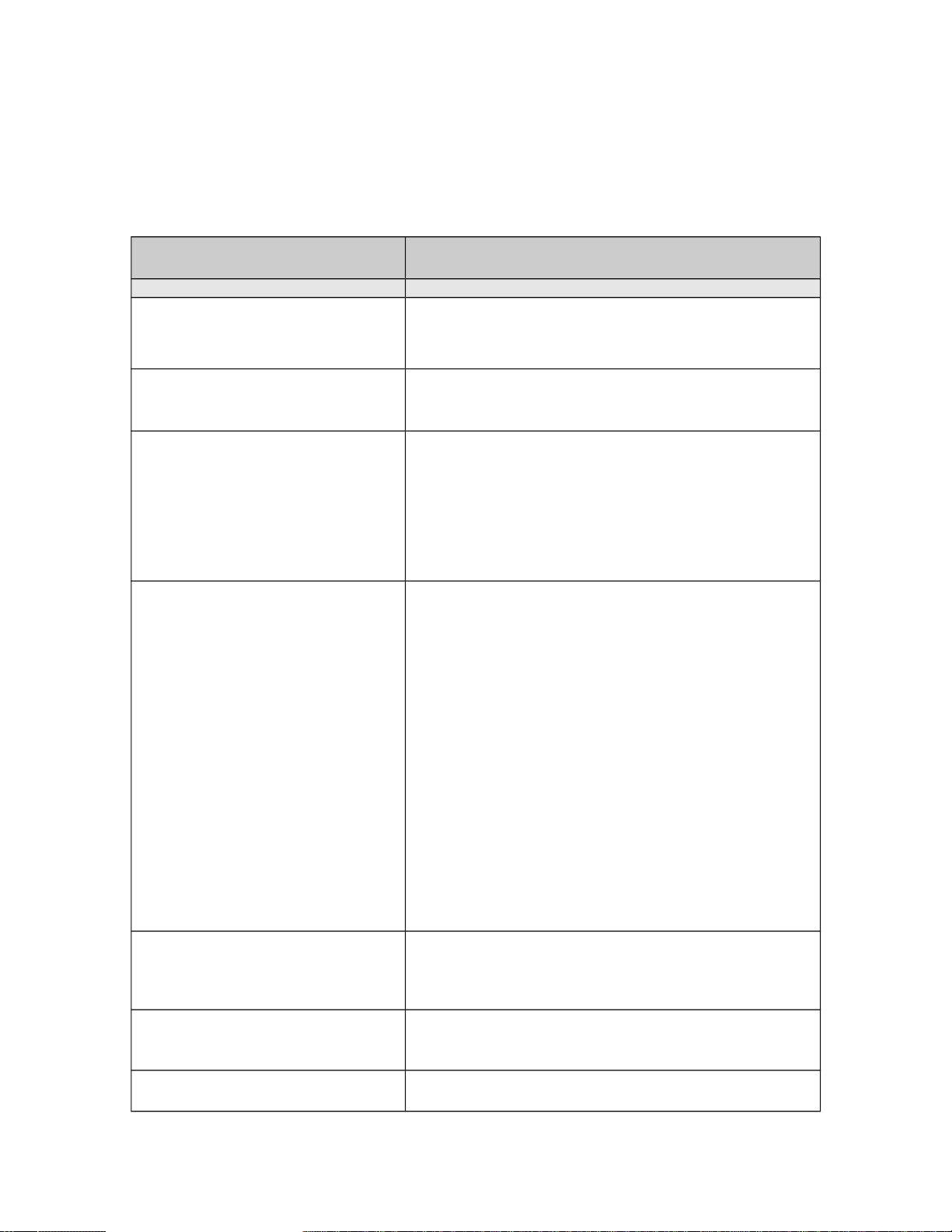
The following table lists the properties of the effects file used by the controller.
Effects file section or property Description
[Library Effect]
Lifetime=5
Version=1.00
Radius=200
Priority=0
The parameters in the [Library Effect] section are
the same as for a regular effects file.
[controller.0]
The controller number. You can spawn multiple
controllers: [controller.1], [controller.2], and
so on.
Lifetime=0.00, 0.00
The length of time that the controller exists and emits
effects. A [Lifetime] parameter value of 0.00 creates a
controller that has an infinite lifetime. If a controller has an
infinite lifetime, the effects engine continues to step
through the list of effects until the scenery engine shuts
off the controller. A short lifetime can mean that the
controller steps through the list of effects only once or
twice.
Type=0
The [Type] parameter determines how the controller
steps through the list of effects.
There are four different types:
Type=0 is the Standard controller. The controller steps
through each effect in the list sequentially.
Type=1 is the Random controller. This type works
together with the [Random count] parameter described
below. The controller takes the random count value that
is generated and uses it to determine how many effects in
the list to play. Each time through the list of effects, it
selects a new random batch.
Type=2 is the Line controller. This type was used to
create the waves (using vector data as lines). The line
controller uses the X, Y, and Z Offset described below.
Type=3 is the Distance controller. This option works with
the [Distance] parameter, which sets the distance at
which this effect becomes visible or audible.
Delay=0.00, 0.00
The time delay that occurs after the controller steps
through all of the effects. (The effects are listed in the
table below.) After the delay, the control steps through
the effects again.
X Offset=0.00, 0.00
Y Offset=0.00, 0.00
Z Offset=0.00, 0.00
Used with the Line controller. The sprites are generated
this offset distance from the line in the X, Y, or Z
direction.
Frequency=0.00, 0.00
The [Frequency] parameter determines how many
sprites appear along each section of line. If your lines
(vector data) are of fairly even length, you can very
accurately fill in along the line.
Random Count=0, 0
The [Random Count] parameter picks a random value
between the min/max values (in whole numbers) and
then randomly chooses that number of effects to step
through. (The effects are listed in the table below.) Use
this parameter with the Random controller.
Distance=0
The [Distance] parameter tells the scenery engine
how close you have to be before this effect is either
visible or audible. You can use this parameter to create
location specific sound effects. Use this parameter with
the Distance controller.
Effects
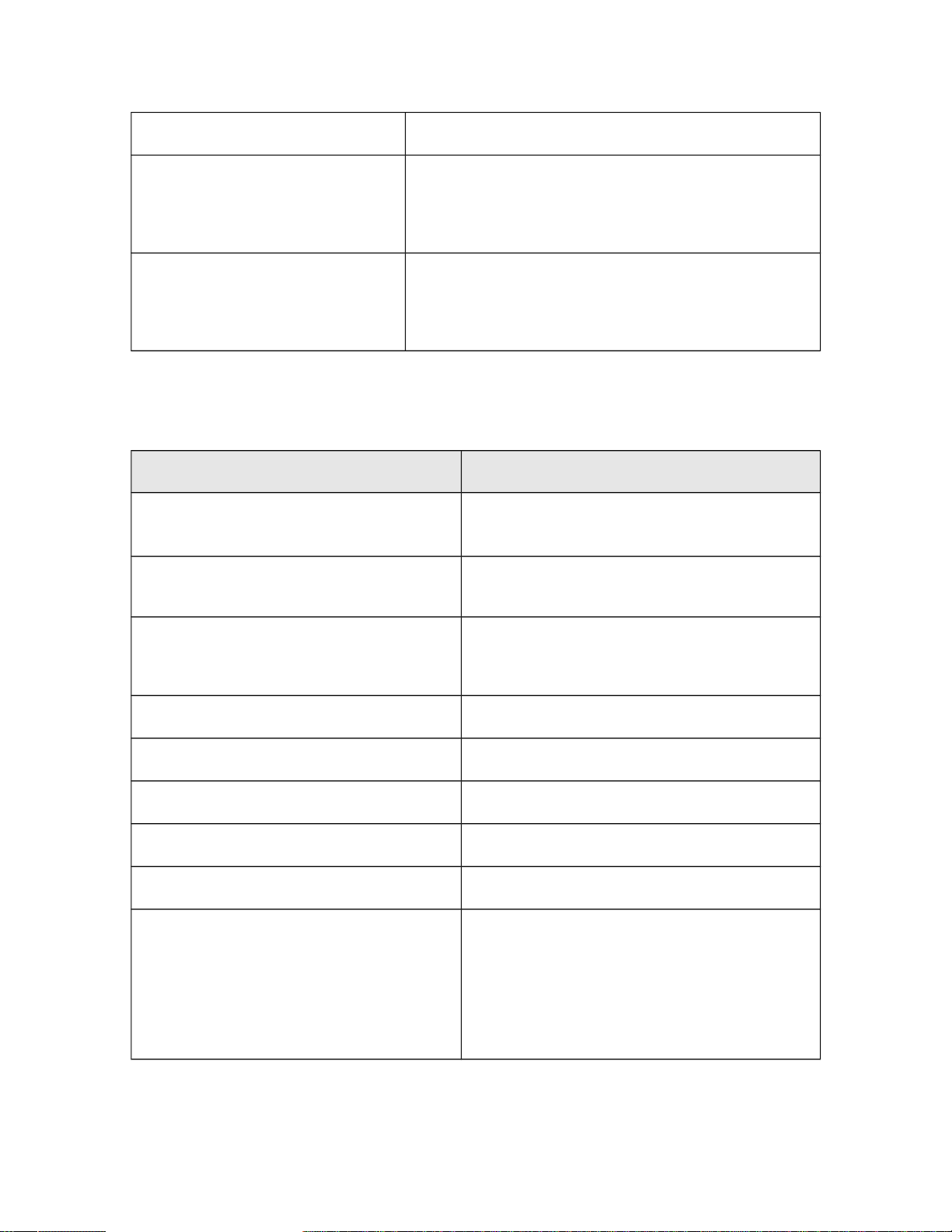
The following table describes the effects that a controller triggers.
Effects file property Description
effect.0=fx_launch, -10.00, 0.00,
-10.00, 10.00, 0.00, 10.00, 0.00,
1.00
The first effect in the list. The format is:
effect.#=effect name, X min, Y min, Z min, X
max, Y max, Z max, delay min, delay max
effect.#=effect name
The effect number and what effect (located in the
effects folder) is to be played. You can also
trigger another controller from here.
X min
The minimum offset value of the effect in the X
direction. These are used to randomize (or
specify exactly) the location of the effect when it
is played.
Y min
The minimum offset value of the effect in the Y
direction.
Z min
The minimum offset value of the effect in the Z
direction.
X max
The maximum offset value of the effect in the X
direction.
Y max
The maximum offset value of the effect in the Y
direction.
Z max
The maximum offset value of the effect in the Z
direction.
Delay min
Delay max
The minimum and maximum delays between
when the effect is called (when the controller
steps through it) and when it actually gets played.
The delays are helpful because the controller
steps through the effects list quickly (almost
instantaneously), so if you want the effects to
proceed in a slower sequence, use delays to
augment trigger times.