Back to FS2004 SDK Overview
Microsoft
Flight Simulator 2004
Software Development Kit
© 2003 Microsoft Corporation. All rights reserved.
How to Place Effects in Flight Simulator
2004
December 2003

Contents
How to Place Effects in Flight Simulator 2004.............................................................................1
December 2003...............................................................................................................................1
Contents..........................................................................................................................................2
Introduction....................................................................................................................................3
Placing an Effect............................................................................................................................3
Creating the BGL............................................................................................................................6
Moving the BGL File into Flight Simulator..................................................................................8

Introduction
Like all scenery placement in the Flight Simulator world, effects placement is now handled via
an XML file and BGLComp. BGLComp is a tool that will parse an XML stream and extract
relevant data such as Latitude and Longitude and create a placement file (BGL file) that will
place an object or effect in the Flight Simulator world. In order to successfully use this SDK,
you must download and understand the BGLComp SDK.
For this SDK, we will place a small forest fire near Seattle. Before you can place the effect,
make sure it is copied to the correct directory in Flight Simulator. Copy the included
fx_ForestFire.fx file from the Special_Effects_samples folder to your local Flight Simulator
effects folder (…\Flight Simulator 9\effects).
Note: In Flight Simulator 2004 some special effects such as smoke and haze will be rendered
behind clouds regardless of their actual relative location. This is a known issue.
Placing an Effect
The Effects_placement folder contains one XML file required for this tutorial: ForestFire.XML.
PLEASE NOTE: Placing an effect requires BGLComp.exe and BGLComp.xsd. These are
located in the BGLComp SDK. If you have not already downloaded and read the BGLComp
SDK, please do so now. Copy BGLComp.exe and BGLComp.xsd into the Effects_placement
folder next to the ForestFire.XML.
The BGLComp.exe application allows you to place an effect in the Flight Simulator 2004 world.
BGLComp requires an XML file in order to place an effect. Open the included ForestFire.XML
file with Notepad or another text editor. Its content should look like this:
<?xml version="1.0" encoding="ISO-8859-1"?>
<FSData version="9.0" xmlns:xsi='http://www.w3.org/2001/XMLSchema-instance'
xsi:noNamespaceSchemaLocation="bglcomp.xsd">
<SceneryObject lat="47.405" lon="-122.136" alt="0" pitch="0" bank="0"
heading="0" altitudeIsAgl="TRUE" imageComplexity="NORMAL">
<Effect effectName="fx_ForestFire" />
</SceneryObject>
</FSData>
The only XML parameters that we will be dealing with are those located within the
SceneryObject tag and those within the Effect tag. Here is what each of the parameters means:
In the SceneryObject section:
• lat= The latitude where you want to place the effect. This can be in decimal degrees (as
it is above) or degrees minutes seconds (N47 24.32).
• lon= The longitude where you want to place the effect. This can be in decimal degrees
(as it is above) or degrees minutes seconds (W122 8.16).
• alt= The altitude at which you want the effect to spawn (in meters).
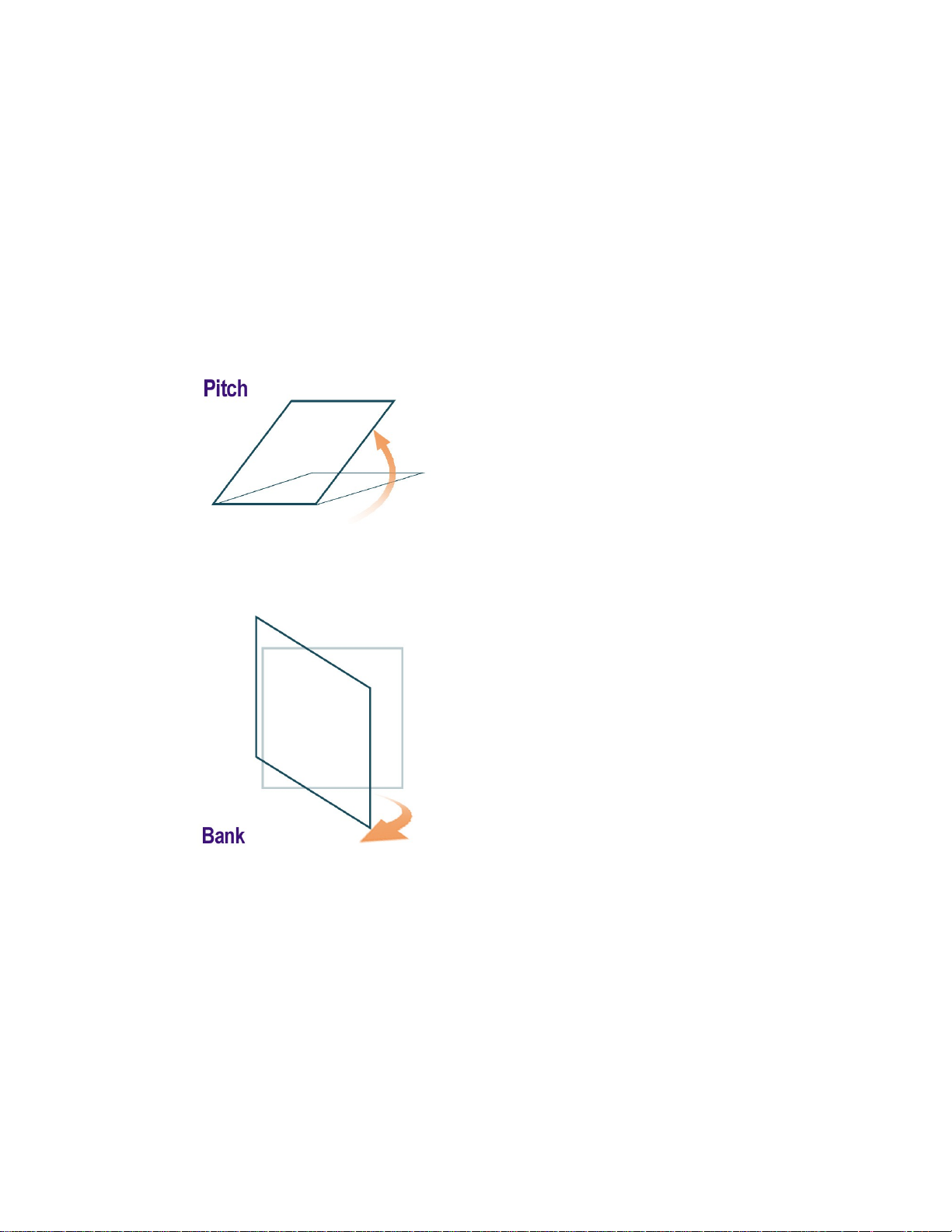
• pitch= The pitch of the effect (in degrees).
• bank= The bank of the effect (in degrees).
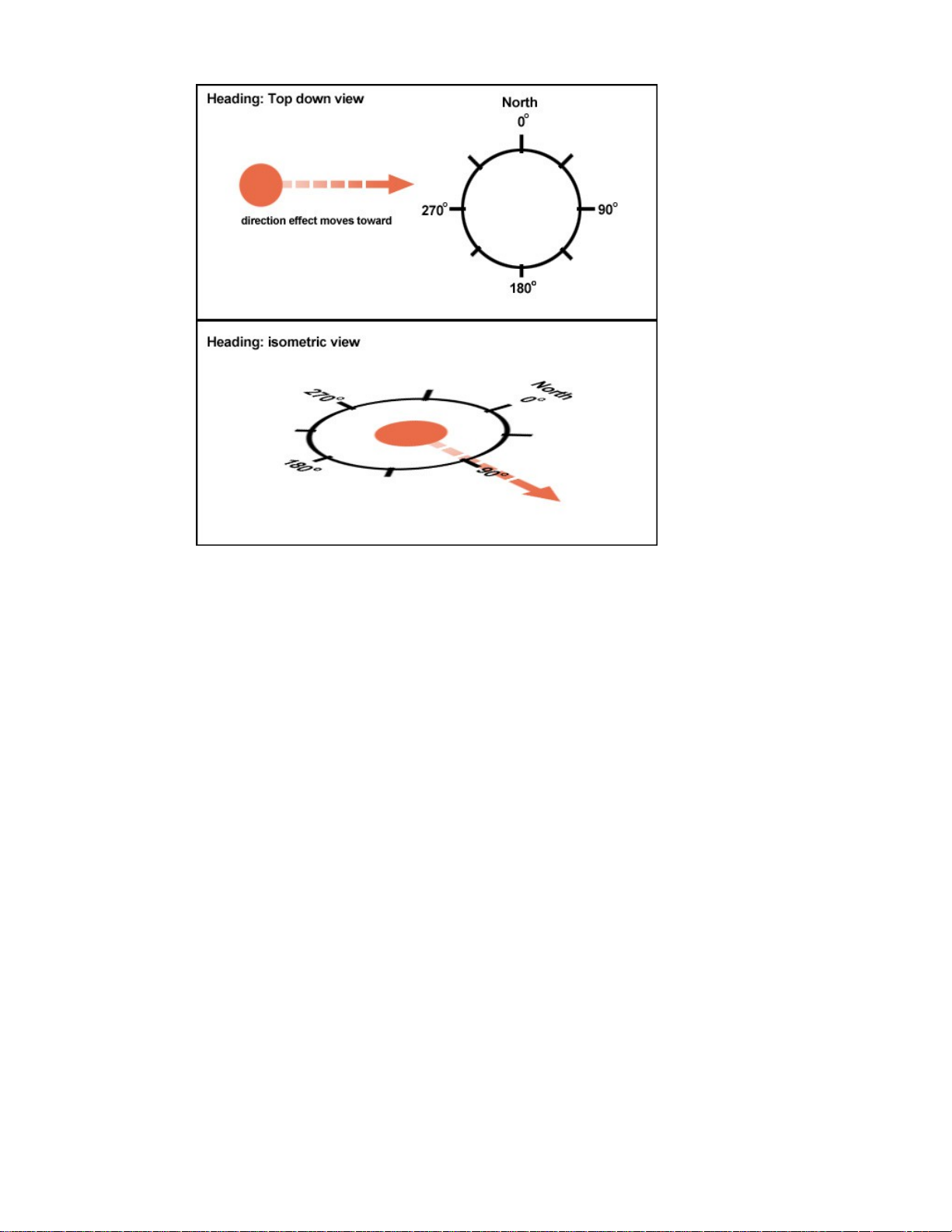
• heading= The heading of the effect (in degrees).
Notes
• The value of the Pitch field is expressed in degrees, from 0-360. Use this field with
effects that have a directional alignment along the x-axis.
• The value of the Bank field is expressed in degrees, from 0-360. Use this field with
effects that have a directional alignment along the z-axis.
• The value of the Heading field is expressed in degrees, from 0-360, with 0 degrees
being true north. Use this field with effects that have a directional alignment along the
y-axis.
altitudeIsAgl = Whether the altitude is represented in AGL or MSL. “true” is AGL. “false” is
MSL. If you want the object to snap to the ground, make “Alt=0” and “Altitude is AGL=true”.
imageComplexity= The minimum scenery complexity in the display settings for this object to
show up. They are: “Very Sparse”, “Sparse”, “Normal”, “Dense”, “Very Dense” and
“Extremely Dense”.
In the Effect section:
effectName= The name of the effect to be placed at this location. (This is the full effect name
minus the .fx suffix).
Note: An additional tag can be added after the EffectName= to create special parameters for an
effect. This should look like this:
<Effect effectName="fx_ForestFire"
effectParams="MOY=01,01;DOM=01,01;HOD=00,00;MOH=00,20;"/>
effectParams= The parameters of the effect. See the included “Effect Parameters.txt” file for
information about this. In this instance, the effect will appear at midnight on January 1
st
every
year and exist for 20 minutes.
PLEASE NOTE: The XML file is case sensitive. If you are editing the file in notepad, be sure to
follow the structure of the XML in the sample exactly. The XML case is documented
thoroughly in the BGLComp SDK.

You can add many different effects to one XML file. Just create multiple SceneryObject tags. It
should look like this:
<?xml version="1.0" encoding="ISO-8859-1"?>
<FSData version="9.0" xmlns:xsi='http://www.w3.org/2001/XMLSchema-instance'
xsi:noNamespaceSchemaLocation="bglcomp.xsd">
<SceneryObject lat="47.405" lon="-122.136" alt="0" pitch="0" bank="0"
heading="0" altitudeIsAgl="TRUE" imageComplexity="NORMAL">
<Effect effectName="fx_ForestFire" />
</SceneryObject>
<SceneryObject lat="47.505" lon="-122.236" alt="0" pitch="0" bank="0"
heading="0" altitudeIsAgl="TRUE" imageComplexity="NORMAL">
<Effect effectName="fx_ForestFire" />
</SceneryObject>
</FSData>
This will spawn the Forest Fire effect in two different locations.
Creating the BGL
After you have created the .XML file, you must compile the file into a format that Flight
Simulator can use. To do this, you will run ForestFire.XML through the BGLComp.exe
application, which is a BGL compiler, to create a new file, ForestFire.bgl.
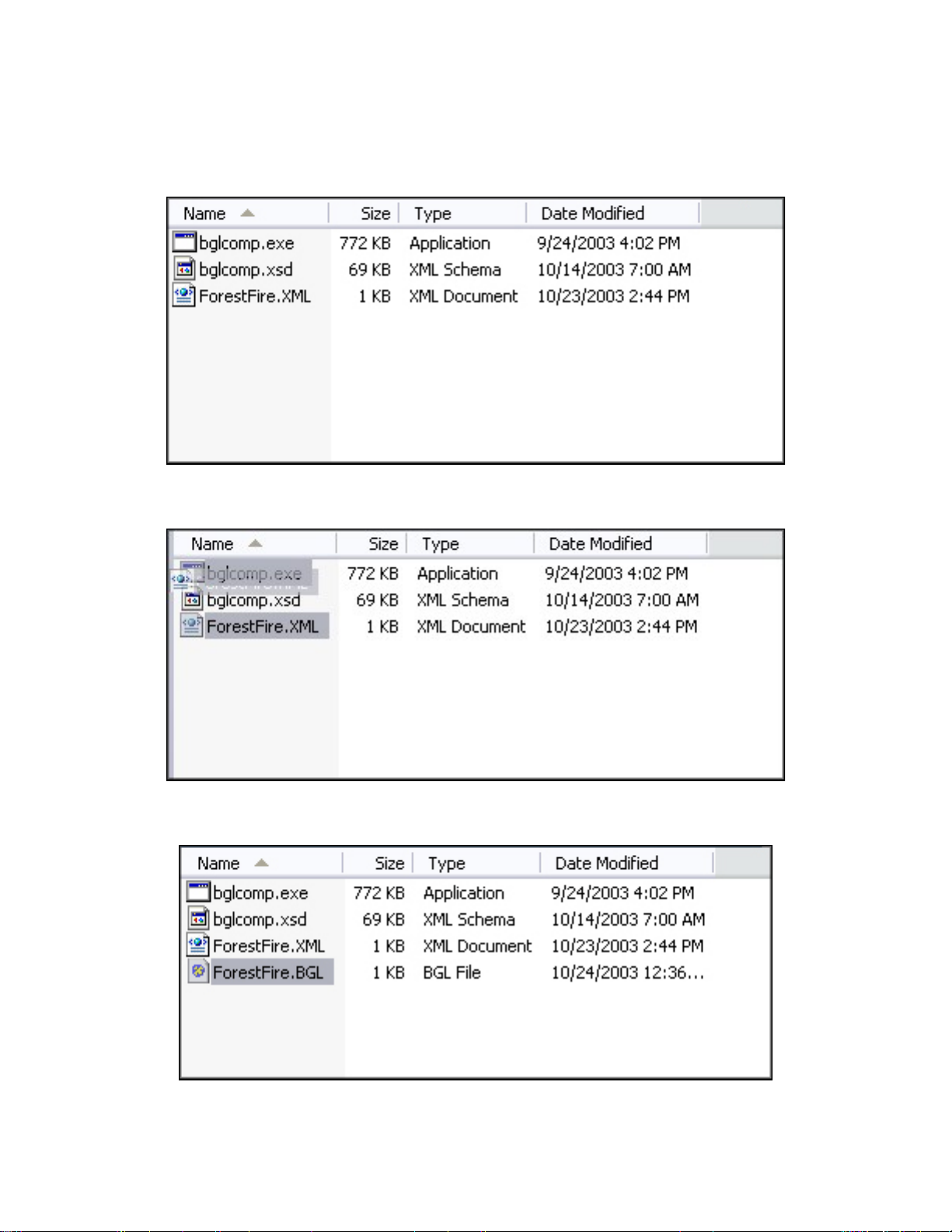
To compile the BGL
1. Navigate to the Effects_placement folder on your C:\ drive.
2. Select the ForestFire.XML file and drag it onto the bglcomp.exe.
3. bglcomp.exe will compile the .XML file into a new .BGL file called ForestFire.BGL.
If you are having troubles getting your XML to successfully create a BGL file, you might
want to do it in the MS-DOS Command window in order to see the errors generated. Do

this by opening a MS-DOS Command prompt window and navigating to the folder in
which you have placed the ForestFire.XML and the BGLComp.exe. Then simply type:
“bglcomp ForestFire.XML” at the command prompt. The command-line BGLComp
application will warn you if any of the tags in the XML file are invalid.
Moving the BGL File into Flight Simulator
Before you can see the effect in Flight Simulator, you must move the compiled ForestFire.BGL
file to the proper folder.
To move the BGL File into Flight Simulator
1. Navigate to the folder C:\fssdk\Special_effects_SDK\Effects_placement.
2. Copy ForestFire.BGL.
3. Paste ForestFire.BGL into the scenery area add-on folder named C:\Program
Files\Microsoft Games\Flight Simulator 9\Addon Scenery\scenery.
4. Make sure the effect is in the correct folder.
5. Remember to c opy the included fx_ForestFire.fx file from the Special_Effects_samples
folder to your local Flight Simulator effects folder (C:\Program Files\Microsoft
Games\Flight Simulator 9\effects).
Your path may look different depending on where you installed Flight Simulator
The placement file is now installed. To see the result, fly near N47*24.32’ W122*8.16’
(on the World menu, select Map View).