Back to FS2004 SDK Overview

Microsoft
Flight Simulator 2004:
A Century of Flight
Software Development Kit
Copyright © 2004 Microsoft Corporation. All rights reserved.
Air Traffic Information for Panel
Gauges
November 2003

Contents
Air Traffic Information for Panel Gauges...................................................................................................1
November 2003................................................................................................................................................1
Contents...........................................................................................................................................................2
Introduction.....................................................................................................................................................3
Required Files.................................................................................................................................................3
Overview..........................................................................................................................................................3
Example...........................................................................................................................................................4
Reference.........................................................................................................................................................6
Appendix........................................................................................................................................................12

Introduction
Traffic information systems such as traffic collision and avoidance systems (TCAS) and
mode S transponders display information and alerts about to nearby air traffic that may
pose a collision hazard. This document describes how to query for air traffic information
from within a panel gauge to allow the simulation of TCAS, mode S transponders, or
other traffic information systems in Flight Simulator.
This document assumes familiarity with how to write a gauge in C++ using the
techniques described in the Flight Simulator Panel SDK.
Required Files
This SDK includes two files that must be used in addition to the files included with the
Panel SDK:
1. TrafficInfo.dll. This DLL should be installed to Flight Simulator’s modules
subdirectory (e.g., C:\Program Files\Microsoft Games\Flight Simulator
9\Modules).
2. ITrafficInfo.h. This C++ header file is required to compile gauges that query for
air traffic information and defines the interface through which the queries are
performed.
Overview
Several steps are required when writing gauge code to query for air traffic information.
The steps are summarized below but will be described in more detail in the example
section of this document.
1. Include gauges.h and ITrafficInfo.h.
2. Query the panel system for the traffic information interface (ITrafficInfo). All
further queries will be made using this interface.
3. Query for the identifiers of the aircraft variables required, such as position,
altitude, and airspeed.
4. Query for the identifiers of the units of measure required for use with the aircraft
variables, such as degrees, feet, and knots.
5. Query for a list of aircraft near the user or some arbitrary point in space.
6. Query each aircraft for the required variables.
7. Display the results.

Perform steps 2-4 only once during gauge initialization. Repeat steps 5-7 as required to
update the gauge display. In general, do not repeat steps 5-7 more than one or two times
per second or the performance of Flight Simulator may degrade.
Example
This example finds up to 100 of the nearest aircraft to the user whose engine(s) are
running. If a multiplayer session is active, it finds the nearest 100 aircraft regardless of
the engine state. (The example assumes that you already have the C++ code for a
working gauge and can insert the example code into your gauge code in the appropriate
locations.)
1. Include gauges.h and ITrafficInfo.h.
#include "gauges.h"
#include "ITrafficInfo.h"
2. Query the panel system for the traffic information interface (ITrafficInfo). All
further queries will be made using this interface.
// get the panel callback interface
IPanelCCallback* pPanelCallback =
panel_get_registered_c_callback(TRAFFIC_INFO_INTERFACE_NAME);
if (pPanelCallback == NULL)
{
// Error: Unable to find registered callback
// Add your own error handler here
}
// get the TCAS info interface
ITrafficInfo* pTrafficInfo = static_cast<ITrafficInfo*>(pPanelCallback-
>QueryInterface(TRAFFIC_INFO_INTERFACE_NAME));
if (pTrafficInfo == NULL)
{
// Error: Unable to query interface ITrafficInfo
// Add your own error handler here
}
3. Query for the identifiers of the aircraft variables required, such as position,
altitude and airspeed. The full list of available aircraft variables can be found in
the appendix.
// lookup some aircraft variable identifiers
ENUM idVarLatitude = pTrafficInfo->QueryAircraftVarEnum("PLANE LATITUDE");
ENUM idVarLongitude = pTrafficInfo->QueryAircraftVarEnum("PLANE LONGITUDE");
ENUM idVarTrueAltitude = pTrafficInfo->QueryAircraftVarEnum("PLANE ALTITUDE");
ENUM idVarIndicatedAltitude = pTrafficInfo->QueryAircraftVarEnum("INDICATED
ALTITUDE");
ENUM idVarTrueHeading = pTrafficInfo->QueryAircraftVarEnum("PLANE HEADING DEGREES
TRUE");
ENUM idVarGroundSpeed = pTrafficInfo->QueryAircraftVarEnum("GROUND VELOCITY");
ENUM idVarVerticalSpeed = pTrafficInfo->QueryAircraftVarEnum("VELOCITY WORLD Y");
ENUM idVarTailNumber = pTrafficInfo->QueryAircraftVarEnum("ATC ID");
ENUM idVarCombustion = pTrafficInfo->QueryAircraftVarEnum("ENG COMBUSTION");
4. Query for the identifiers of the units of measure required for use with the aircraft
variables, such as degrees, feet and knots. The full list of available units of
measure can be found in Units.doc in the Panel SDK.

// lookup some unit ids
ENUM idUnitsFeet = pTrafficInfo->QueryUnitEnum("FEET");
ENUM idUnitsBool = pTrafficInfo->QueryUnitEnum("BOOL");
ENUM idUnitsDegrees = pTrafficInfo->QueryUnitEnum("DEGREES");
ENUM idUnitsKnots = pTrafficInfo->QueryUnitEnum("KNOTS");
ENUM idUnitsFPM = pTrafficInfo->QueryUnitEnum("FEET PER MINUTE");
5. Query for a list of the 100 aircraft nearest to the user within 10 nautical miles.
// query for the 100 nearest aircraft within 10 nautical miles of the user
const FLOAT64 C_QUERY_RADIUS_METERS = 10.0 * 1852.0; // in meters
const int C_MAX_NUM_AIRCRAFT = 100;
UINT32 aAircraftIds[C_MAX_NUM_AIRCRAFT];
UINT32 nAircraft = pTrafficInfo->QueryAircraftNearUser(C_QUERY_RADIUS_METERS,
C_MAX_NUM_AIRCRAFT, aAircraftIds);
6. Query each aircraft for the required variables. The query above will always
include the user aircraft. To skip the user aircraft, query for the value of the "IS
USER SIM" variable and ignore any aircraft with a non-zero value in the loop
below.
// query properties of each aircraft
for (UINT32 i = 0; i < nAircraft; i++)
{
UINT32 uAircraftId = aAircraftIds[i];
// get latitude in degrees
FLOAT64 dLatDeg = 0;
if (!pTrafficInfo->AircraftVarGetFloat(uAircraftId, idVarLatitude,
idUnitsDegrees, &dLatDeg))
continue;
// get longitude in degrees
FLOAT64 dLonDeg = 0;
if (!pTrafficInfo->AircraftVarGetFloat(uAircraftId, idVarLongitude,
idUnitsDegrees, &dLonDeg))
continue;
// get true heading in degrees
FLOAT64 dHdgDeg = 0;
if (!pTrafficInfo->AircraftVarGetFloat(uAircraftId, idVarTrueHeading,
idUnitsDegrees, &dHdgDeg))
continue;
// handle multiplayer aircraft differently from non-multiplayer aircraft
FLOAT64 dAltFeet = 0;
FLOAT64 dGroundSpeedKnots = 0;
FLOAT64 dVerticalSpeedFPM = 0;
STRINGZ szTailNumber[16] = "";
PCSTRINGZ pszTailNumber = szTailNumber;
if (!pTrafficInfo->IsMultiplayerActive())
{
// non-multiplayer
// get engine combustion state
FLOAT64 dCombustion = 0;
if (!pTrafficInfo->AircraftVarGetFloat(uAircraftId, idVarCombustion,
idUnitsBool, &dCombustion, 1))
continue;
// skip aircraft whose engines aren't running
if (dCombustion == 0)
continue;
// get indicated altitude
if (!pTrafficInfo->AircraftVarGetFloat(uAircraftId, idVarIndicatedAltitude,
idUnitsFeet, &dAltFeet))
continue;

// get ground speed
if (!pTrafficInfo->AircraftVarGetFloat(uAircraftId, idVarGroundSpeed,
idUnitsKnots, &dGroundSpeedKnots))
continue;
// get vertical speed
if (!pTrafficInfo->AircraftVarGetFloat(uAircraftId, idVarVerticalSpeed,
idUnitsFPM, &dVerticalSpeedFPM))
continue;
// get tail number
if (!pTrafficInfo->AircraftVarGetString(uAircraftId, idVarTailNumber,
szTailNumber, LENGTHOF(szTailNumber)))
continue;
}
else
{
// special handling for multiplayer
// get true altitude since indicated isn't available
if (!pTrafficInfo->AircraftVarGetFloat(uAircraftId, idVarTrueAltitude,
idUnitsFeet, &dAltFeet))
continue;
// ground speed not available for multiplayer aircraft
// vertical speed not available for multiplayer aircraft
// get player name since tail number isn't available
pszTailNumber = pTrafficInfo->GetPlayerName(uAircraftId);
}
7. Add your code here to display the aircraft data.
// dLatDeg
// dLonDeg
// dAltFeet
// dHdgDeg
// dGroundSpeedKnots
// dVerticalSpeedFPM
// pszTailNumber
}
Reference
This section documents the members of the ITrafficInfo interface.
ITrafficInfo::AircraftGetDatabaseInfo
The AircraftGetDatabaseInfo function gets the name of the traffic database file from
which an aircraft was instantiated. It also returns the instance key that uniquely identifies
the aircraft within the database file.
Syntax
BOOL ITrafficInfo::AircraftVarGetFloat(
UINT32 uAircraftId,
PSTRINGZ pszFileName,
UINT32 uFileNameMax,

UINT32* puInstanceKey
) const;
Parameters
uAircraftId
[in] The identifier of the aircraft to query. Aircraft identifiers are obtained by
calls to either ITrafficInfo::QueryAircraftNearPoint or
ITrafficInfo::QueryAircraftNearUser.
pszFileName
[out] Pointer to a string buffer to receive the name of the traffic database file.
uFileNameMax
[in] Length of the buffer pointed to by pszFileName.
puInstanceKey
[out] Pointer to a variable to receive the instance key.
Return Value
If successful, this function returns TRUE. This function returns FALSE if the
aircraft identifier is invalid.
ITrafficInfo::AircraftVarGetFloat
The AircraftVarGetFloat function gets the value of an aircraft floating point variable.
Syntax
BOOL ITrafficInfo::AircraftVarGetFloat(
UINT32 uAircraftId,
ENUM simvar,
ENUM units,
FLOAT64* pdValue,
SINT32 index = 0
) const;
Parameters
uAircraftId
[in] The identifier of the aircraft to query. Aircraft identifiers are obtained by
calls to either ITrafficInfo::QueryAircraftNearPoint or
ITrafficInfo::QueryAircraftNearUser.
simvar
[in] The identifier of the aircraft variable to read. Variable identifiers are
obtained by calls to ITrafficInfo::QueryAircraftVarEnum.
units

[in] The identifier of the units of measure desired for the value of the
requested aircraft variable. Units of measure identifiers are obtained by calls
to ITrafficInfo::QueryUnitEnum.
pdValue
[out] Address of a floating point variable to receive the value of the requested
aircraft variable.
index
[in, optional] One-based array index for array variables.
Return Value
If successful, this function returns TRUE. This function returns FALSE if the
aircraft, variable, or unit identifiers are invalid or unavailable.
ITrafficInfo::AircraftVarGetString
The AircraftVarGetString function gets the value of an aircraft string (text) variable.
Syntax
BOOL ITrafficInfo::AircraftVarGetString(
UINT32 uAircraftId,
ENUM simvar
pszBuffer,
uBufferLength,
index = 0
) const;
Parameters
uAircraftId
[in] The identifier of the aircraft to query. Aircraft identifiers are obtained by
calls to either ITrafficInfo::QueryAircraftNearPoint or
ITrafficInfo::QueryAircraftNearUser.
simvar
[in] The identifier of the aircraft variable to read. Variable identifiers are
obtained by calls to ITrafficInfo::QueryAircraftVarEnum.
pszBuffer
[out] Address of a string buffer to receive the value of the request aircraft
variable.
uBufferLength
[in] Maximum length of the buffer pointed to by pszBuffer.
index
[in, optional] One-based array index for array variables.

Return Value
If successful, this function returns TRUE. This function returns FALSE if the
aircraft or variable identifiers are invalid or unavailable.
ITrafficInfo::IsMultiplayerActive
Use the IsMultiplayerActive function to determine whether a multiplayer session is
active. During a multiplayer session, only a subset of the normal aircraft variables are
available for queries. See the appendix for a list of which aircraft variables are available
during a multiplayer session.
Syntax
BOOL ITrafficInfo::IsMultiplayerActive() const;
Return Value
Returns TRUE if a multiplayer session is active and FALSE otherwise.
ITrafficInfo::GetPlayerName
The GetPlayerName function queries the multiplayer name assigned to an aircraft during
a multiplayer session.
Syntax
PCSTRINGZ ITrafficInfo::GetPlayerName(
UINT32 uAircraftId
) const;
Parameters
uAircraftId
[in] The identifier of the aircraft to query. Aircraft identifiers are obtained by
calls to either ITrafficInfo::QueryAircraftNearPoint or
ITrafficInfo::QueryAircraftNearUser.
Return Value
During multiplayer sessions, returns a constant string pointer to an aircraft’s
multiplayer name. Returns a constant string pointer to an empty string outside of
a multiplayer session.
ITrafficInfo::QueryAircraftNearPoint
The QueryAircraftNearPoint function creates a list of any aircraft, including the user
aircraft, that fall within a given query region. The query region is defined by a center
point and a radius. The list created by this function contains the identifiers of any
aircraft, up to some caller-specified maximum number, that fall within the query region.
The list is sorted so that the nearest aircraft appear first. This query is somewhat CPU
intensive, so calls to this function should be limited to no more than one or two per
second.

Syntax
UINT32 ITrafficInfo::QueryAircraftNearPoint(
FLOAT64 dLatitudeDegrees,
FLOAT64 dLongitudeDegrees,
FLOAT64 dAltitudeMeters,
FLOAT64 dRadiusMeters,
UINT32 uMaxAircraftIds,
UINT32* puAircraftIds
) const;
Parameters
dLatitudeDegrees
[in] Latitude of the query center point in degrees.
dLongitudeDegrees
[in] Longitude of the query center point in degrees.
dAltitudeMeters
[in] Altitude of the query center point in meters.
dRadiusMeters
[in] Radius of the query region in meters.
uMaxAircraftIds
[in] The maximum number of aircraft desired by the query, which should be
less than or equal to the number of elements in the puAircraftIds array.
puAircraftIds
[out] Address of an array to receive the list of identifiers of any aircraft within
the query region, sorted in nearest-first order.
Return Value
Returns the number of aircraft found within the query region, up to a maximum of
uMaxAircraftIds.
ITrafficInfo::QueryAircraftNearUser
The QueryAircraftNearUser function creates a list of any aircraft, including the user
aircraft, that fall within a given distance of the user aircraft. The list created by this
function contains the identifiers of any aircraft, up to some caller-specified maximum
number, that fall within the query region. The list is sorted so that the nearest aircraft
appear first. This query is somewhat CPU intensive, so calls to this function should be
limited to no more than one or two per second.
Syntax
UINT32 ITrafficInfo::QueryAircraftNearUser(
FLOAT64 dRadiusMeters,

UINT32 uMaxAircraftIds,
UINT32* puAircraftIds
) const;
Parameters
dRadiusMeters
[in] Radius of the query region in meters.
uMaxAircraftIds
[in] The maximum number of aircraft desired by the query, which should be
less than or equal to the number of elements in the puAircraftIds array.
puAircraftIds
[out] Address of an array to receive the list of identifiers of any aircraft within
the query region, sorted in nearest-first order.
Return Value
Returns the number of aircraft found within the query region, up to a maximum of
uMaxAircraftIds.
ITrafficInfo::QueryAircraftVarEnum
The QueryAircraftVarEnum function converts the string (text) name of an aircraft
variable to a numerical identifier for use with the ITrafficInfo::AircraftVarGetFloat and
ITrafficInfo::AircraftVarGetString functions. Once queried, an aircraft variable identifier
is valid until Flight Simulator exits, so variables need only be queried once during gauge
initialization.
Syntax
ENUM ITrafficInfo::QueryAircraftVarEnum(
PCSTRINGZ pszAircraftVar
) const;
Parameters
pszAircraftVar
The name of the aircraft variable to query. The list of available variables is in
the appendix.
Return Value
The numerical identifier corresponding to the requested aircraft variable name. If
the variable name is not recognized, this function returns zero.
ITrafficInfo::QueryUnitEnum
The QueryUnitEnum function converts the string (text) name of a unit of measure such as
meters or feet to a numerical identifier for use with the ITrafficInfo::AircraftVarGetFloat
function. Once queried, a unit identifier is valid until Flight Simulator exits, so units
need only be queried once during gauge initialization.
Syntax
ENUM ITrafficInfo::QueryUnitEnum(
PCSTRINGZ pszUnit
) const;
Parameters
pszUnit
The name of the unit of measure to query. The list of available units of
measure can be found in Units.doc in the Panel SDK.
Return Value
The numerical identifier corresponding to the requested unit of measure. If the
unit name is not recognized, this function returns -1.
Appendix
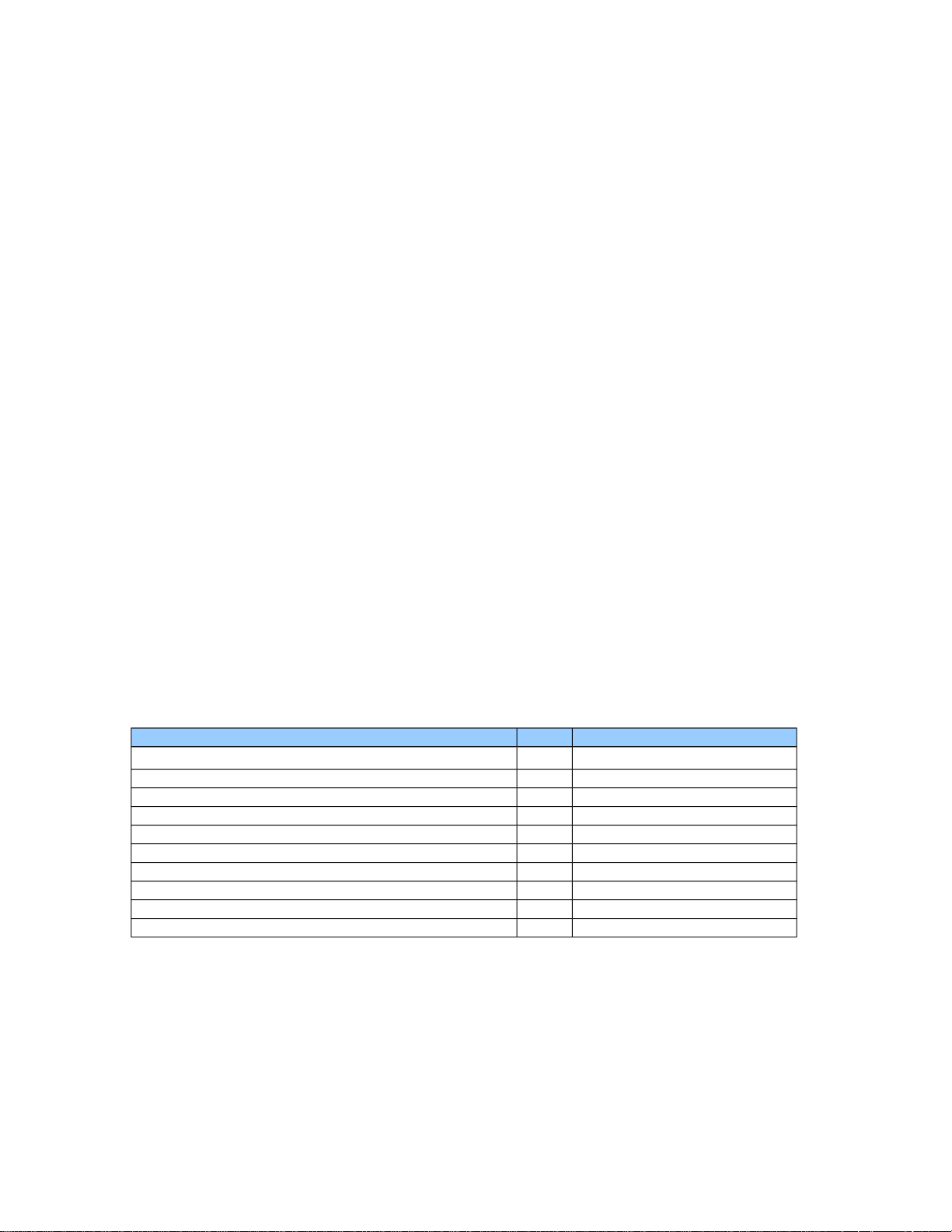
There are a number of aircraft variables that may be queried via the ITrafficInfo
interface. Most of them are numeric variables but there are also a few string (text)
variables. The user aircraft and any aircraft controlled by an artificial intelligence (AI)
pilot support all of the variables in the tables below. However, multiplayer (MP) aircraft
support only a limited subset of the normal aircraft variables as noted in the MP column
in the tables below.
Position Variables
Variable Name MP Comments
PLANE PITCH DEGREES
PLANE BANK DEGREES
PLANE HEADING DEGREES MAGNETIC
PLANE HEADING DEGREES TRUE
PLANE LATITUDE
PLANE LONGITUDE
PLANE ALTITUDE
PRESSURE ALTITUDE
INDICATED ALTITUDE
PLANE ALT ABOVE GROUND
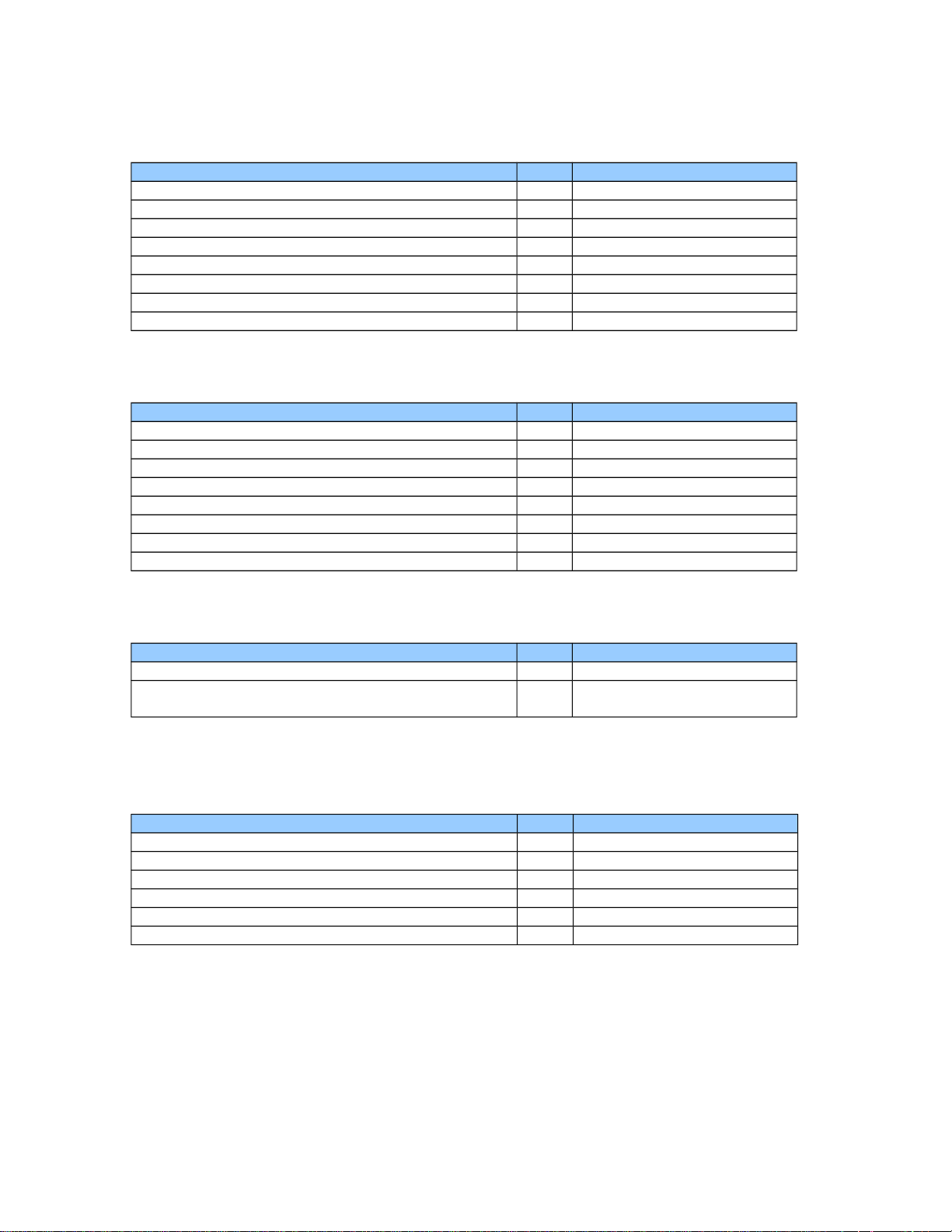
Speed Variables
Variable Name MP Comments
AIRSPEED INDICATED
AIRSPEED MACH
AIRSPEED TRUE
GROUND VELOCITY
TOTAL WORLD VELOCITY
VELOCITY WORLD X
VELOCITY WORLD Y
VELOCITY WORLD Z
Control Variables
Variable Name MP Comments
AILERON AVERAGE DEFLECTION
ELEVATOR DEFLECTION
RUDDER DEFLECTION
SPOILERS LEFT POSITION
SPOILERS RIGHT POSITION
FLAPS HANDLE PERCENT
GEAR HANDLE POSITION
GENERAL ENG THROTTLE LEVER POSITION
Miscellaneous Variables
Variable Name MP Comments
MAGVAR
VISUAL MODEL RADIUS
Aircraft radius used by
TrafficDatabaseBuilder
String Variables
Variable Name MP Comments
ATC AIRLINE
ATC FLIGHT NUMBER
ATC ID
Aircraft tail number
ATC MODEL
ATC TYPE
TITLE