
























Questions about my account
It is absolutely necessary to log on to your account to enjoy all our services and Jumbo speed. In order to do this, you’ll find a module at the top of your screen under the main menu on every page of the website. You can also login with your favorite social media such as Facebook.
Login with your username (or email address) and password that you have yourself chosen when you became a member.
Before login :

After a successful login :

Login with your username (or email address) and password that you have yourself chosen when you became a member.
Before login :
After a successful login :
on
samedi août 08
The first thing to do is to log in to your account using the connexion module to the top. Click on « Edit my account ».

Now, you just have to enter your new password twice, in the fields shown below. Then, click on « Submit » to save the modifications.
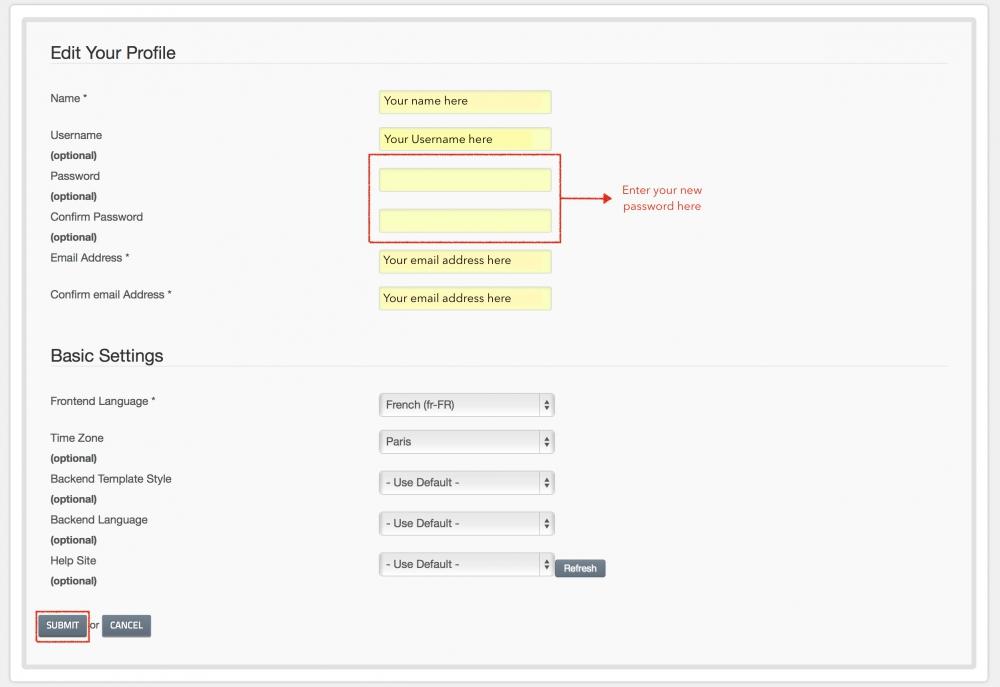
Now, you just have to enter your new password twice, in the fields shown below. Then, click on « Submit » to save the modifications.
on
dimanche août 09
If you have forgotten you password and/or your username, there are tools you can use to retrieve these informations :
I’ve forgotten my password
I’ve forgotten my username
If you still can’t access your account, contact us so that we can make the necessary modifications : Contact us.
I’ve forgotten my password
I’ve forgotten my username
If you still can’t access your account, contact us so that we can make the necessary modifications : Contact us.
on
dimanche août 09
- First, check that the statut « Jumbo OK » is placed in the top right side of the website like below :
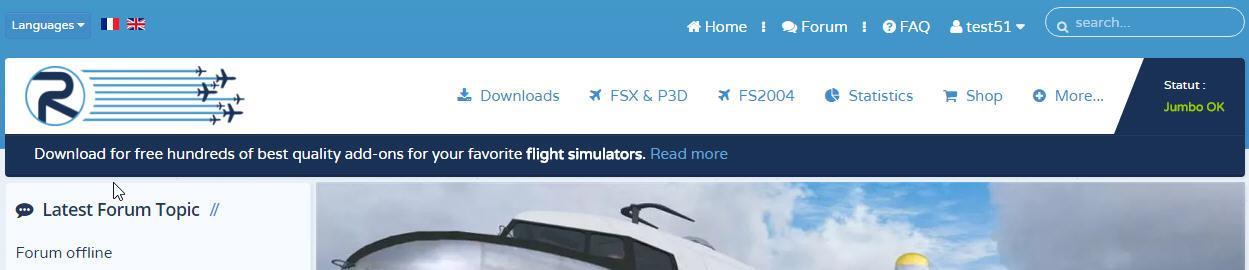
If you see « - Statut : No Jumbo », that means your Jumbo subscription isn’t activated. Try to reconnect to your account, using the « Log out » button. It should activate your Jumbo subscription.
- If you see statut « Jumbo OK », but your download speed isn’t higher than 220ko/s, then check that your bandwidth isn’t slowed by other programs trying to download in the same time.
- After activation of your Jumbo please make sure to restart your downloads already in progress, Jumbo URLs will change.
- You should also check that your Internet connexion allows you to do high-speed downloads. It can be necessary to do a test with another computer and another Internet connexion to check that the problem does not come from your computer.
- In order to boost you download speed to the maximum, we advise you to download and install FlashGet, which is a free program allowing you to multiply your download speed up to 10 times. You can find it here : http://www.flashget.com
If you see « - Statut : No Jumbo », that means your Jumbo subscription isn’t activated. Try to reconnect to your account, using the « Log out » button. It should activate your Jumbo subscription.
- If you see statut « Jumbo OK », but your download speed isn’t higher than 220ko/s, then check that your bandwidth isn’t slowed by other programs trying to download in the same time.
- After activation of your Jumbo please make sure to restart your downloads already in progress, Jumbo URLs will change.
- You should also check that your Internet connexion allows you to do high-speed downloads. It can be necessary to do a test with another computer and another Internet connexion to check that the problem does not come from your computer.
- In order to boost you download speed to the maximum, we advise you to download and install FlashGet, which is a free program allowing you to multiply your download speed up to 10 times. You can find it here : http://www.flashget.com
on
dimanche août 09
We bring a lot of changes and improvements, this is why it can sometimes happen that login function isn't working anymore. This is due to some changes on our server which isn't yet reflected on your side.
To resolve this, simply remove the cookies linked with your session on Rikoooo. You can do this automatically by following this link: https://www.rikoooo.com/fr/forum/user/delete_cookies You will be asked in French if you want to remove the cookies, click "Oui". You are done. Now you can try to login. Then click on this link https://www.rikoooo.com/board to get the website back to English.
If you still get an error message (more than twice) trying to login after the above solution, then you have probably forgotten your login information.
There are tools you can use to get back access to your account:
I’ve forgotten my password
I’ve forgotten my username
If you still can’t access your account, contact us so that we can make the necessary modifications: Contact us.
To resolve this, simply remove the cookies linked with your session on Rikoooo. You can do this automatically by following this link: https://www.rikoooo.com/fr/forum/user/delete_cookies You will be asked in French if you want to remove the cookies, click "Oui". You are done. Now you can try to login. Then click on this link https://www.rikoooo.com/board to get the website back to English.
If you still get an error message (more than twice) trying to login after the above solution, then you have probably forgotten your login information.
There are tools you can use to get back access to your account:
I’ve forgotten my password
I’ve forgotten my username
If you still can’t access your account, contact us so that we can make the necessary modifications: Contact us.
on
jeudi juin 25