





Questions about MSFS 2020
The problem occurs due to the length of the path to the "Community" folder. If this path is too long, the Rikoooo installer will not be able to succeed because some mods contain files with extremely long names. To solve this problem, you will need to shorten the path to the "Community" folder.
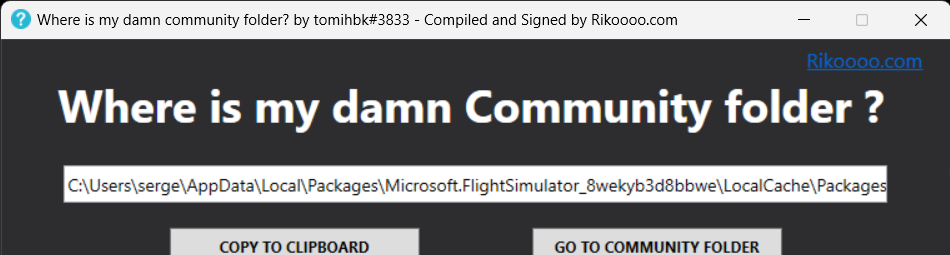
To determine if you are affected by this issue, you can download this small program that will show you the path to your "Community" folder: https://www.rikoooo.com/downloads/viewdownload/147/995/. If the displayed result is similar to this one, then you are also affected:
Step 1: Open Windows File Explorer.
Step 2: Go to the installation folder for Microsoft Flight Simulator. "C:\Users\Your username\AppData\Local\Packages\Microsoft.FlightSimulator_8wekyb3d8bbwe\LocalCache\Package".
Step 3: In this folder, you should see a folder called "Community" and a folder called "Official". Right-click on them and select "Cut".
Step 4: Now go to the location where you want to move the "Community" and "Official" folders. Create a new folder at the desired location to move the content. For example, in "C:\MSFS_Contents\" (you can also choose a location on another drive).
Step 5: Right-click on this location and select "Paste" to paste the "Community" and "Official" folders.
Step 6: Start MSFS, you will then be prompted to specify the location of the new folder. At this point, please specify the new location you just created using the following path: "C:\MSFS_Contents\"
That's it! From now on, the content of your "Community" and "Official" folders will be accessible from their new locations, and MSFS will also be able to find the mods and sceneries added in these folders.
To determine if you are affected by this issue, you can download this small program that will show you the path to your "Community" folder: https://www.rikoooo.com/downloads/viewdownload/147/995/. If the displayed result is similar to this one, then you are also affected:
Here are the steps to move the "Community" and "Official" folders to a shorter path for Microsoft Flight Simulator:
Step 1: Open Windows File Explorer.
Step 2: Go to the installation folder for Microsoft Flight Simulator. "C:\Users\Your username\AppData\Local\Packages\Microsoft.FlightSimulator_8wekyb3d8bbwe\LocalCache\Package".
Step 3: In this folder, you should see a folder called "Community" and a folder called "Official". Right-click on them and select "Cut".
Step 4: Now go to the location where you want to move the "Community" and "Official" folders. Create a new folder at the desired location to move the content. For example, in "C:\MSFS_Contents\" (you can also choose a location on another drive).
Step 5: Right-click on this location and select "Paste" to paste the "Community" and "Official" folders.
Step 6: Start MSFS, you will then be prompted to specify the location of the new folder. At this point, please specify the new location you just created using the following path: "C:\MSFS_Contents\"
That's it! From now on, the content of your "Community" and "Official" folders will be accessible from their new locations, and MSFS will also be able to find the mods and sceneries added in these folders.
on
samedi avril 22