
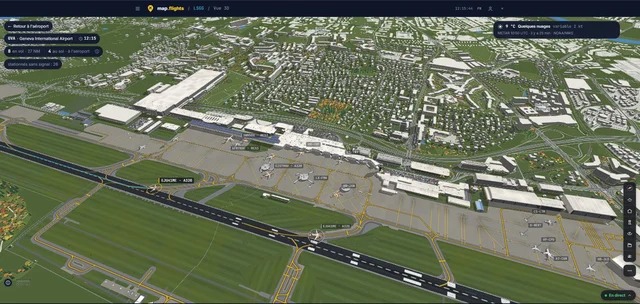
Rikoooo verwelkomt map.flights als partner. Met deze gratis, reclamevrije dienst kun je het werkelijke luchtverkeer volgen en luchthavens in drie dimensies verkennen, rechtstreeks in je browser. De luchthaven van Genève (GVA/LSGG) in map.flights. Schermafbeelding gemaakt op 8 november 2026. Bron…
Meer lezen
Rikoooo
Nieuws
Updates van Rikoooo en het laatste nieuws over vluchtsimulatie.
Bij Rikoooo
Updates van het team over de catalogus, Hub en de site.

Het nieuwe Rikoooo: een vernieuwde website voor piloten en makers
De volgende website van Rikoooo brengt een nieuwe presentatie van add-ons, aangepaste navigatie en speciale hulpmiddelen voor auteurs samen. Naast de wijzigingen aan de interface werken we aan de stappen tussen het vinden van een vliegtuig of scenery, het lezen van de bijbehorende informatie en de…
Meer lezen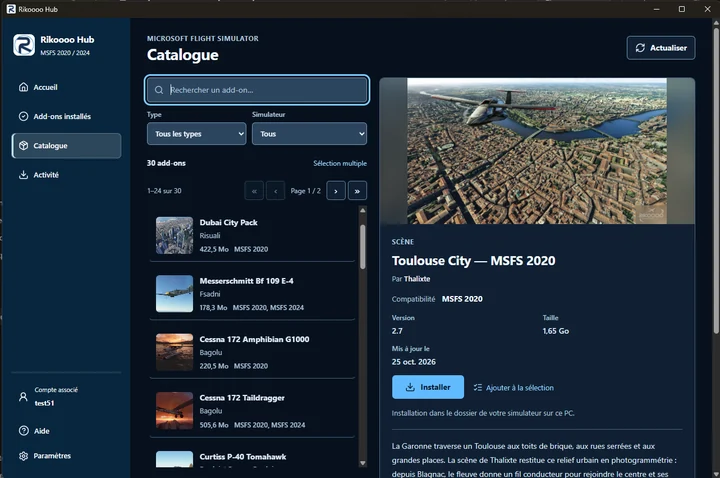
Rikoooo Hub: van de catalogus naar installatie in MSFS 2020 en 2024
Rikoooo Hub is de Windows-applicatie die we samen met de nieuwe website voorbereiden. Hiermee kun je de MSFS-catalogus doorzoeken en add-ons installeren die via de Hub worden aangeboden. De applicatie verzorgt het downloaden, uitpakken van archieven en plaatsen van bestanden.
Meer lezen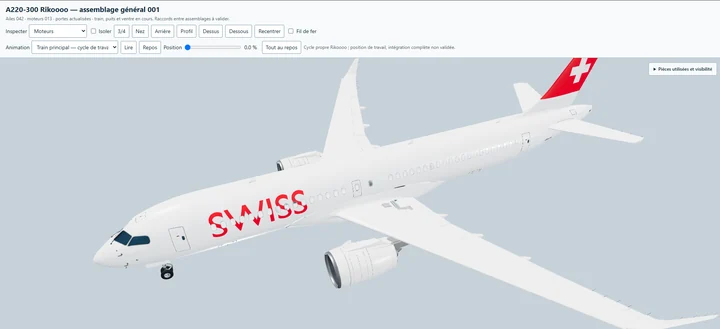
Een Airbus A220-300 van Rikoooo, freeware voor MSFS 2020 en MSFS 2024
We ontwikkelen onze eigen Airbus A220-300, met een 3D-model, virtuele cockpit, texturen en geluiden die door Rikoooo zijn gemaakt. Het vliegtuig zal gratis beschikbaar zijn en compatibel zijn met zowel Microsoft Flight Simulator 2020 als Microsoft Flight Simulator 2024.
Meer lezenVluchtsimulatie
Uitgaven, updates en nieuws van gespecialiseerde publicaties over vluchtsimulatie.
Nieuwsberichten: 1–12 van 93
-
iniBuilds Releases Ilulissat Airport for MSFS 2024
iniBuilds has recently released their rendition of Ilulissat Airport (BGJN) for Microsoft Flight Simulator 2024, serving Ilulissat and the entire Disko Bay Region with a yearly average of 83,930 passengers. The airport was built as part of a government effort to establish a network of STOL (Short T…
Artikel lezen
Inhoud uit de RSS-feed van Threshold; het artikel kan ingekort zijn.
Lezen bij ThresholdiniBuilds has recently released their rendition of Ilulissat Airport (BGJN) for Microsoft Flight Simulator 2024, serving Ilulissat and the entire Disko Bay Region with a yearly average of 83,930 passengers.
The airport was built as part of a government effort to establish a network of STOL (Short Take-Off and Landing) airports in Greenland to improve connectivity, with partial funding from the European Union. It was opened in 1984, and fixed-wing flights to the capital started shortly after inauguration.

Ilulissat became one of two of Air Greenland’s northern bases in the Country, with both helicopter traffic and fixed-wing aircraft operations, and destinations became more diversified as new airports opened in Greenland.

After decades of discussion about a potential expansion, work finally began in 2024, bringing a runway extension to accommodate flights from mainland Europe and the Americas. It’s set to open in October 2026.

It’s currently served by Air Greenland and Icelandair, but new operators may emerge once the new runway is officially inaugurated.
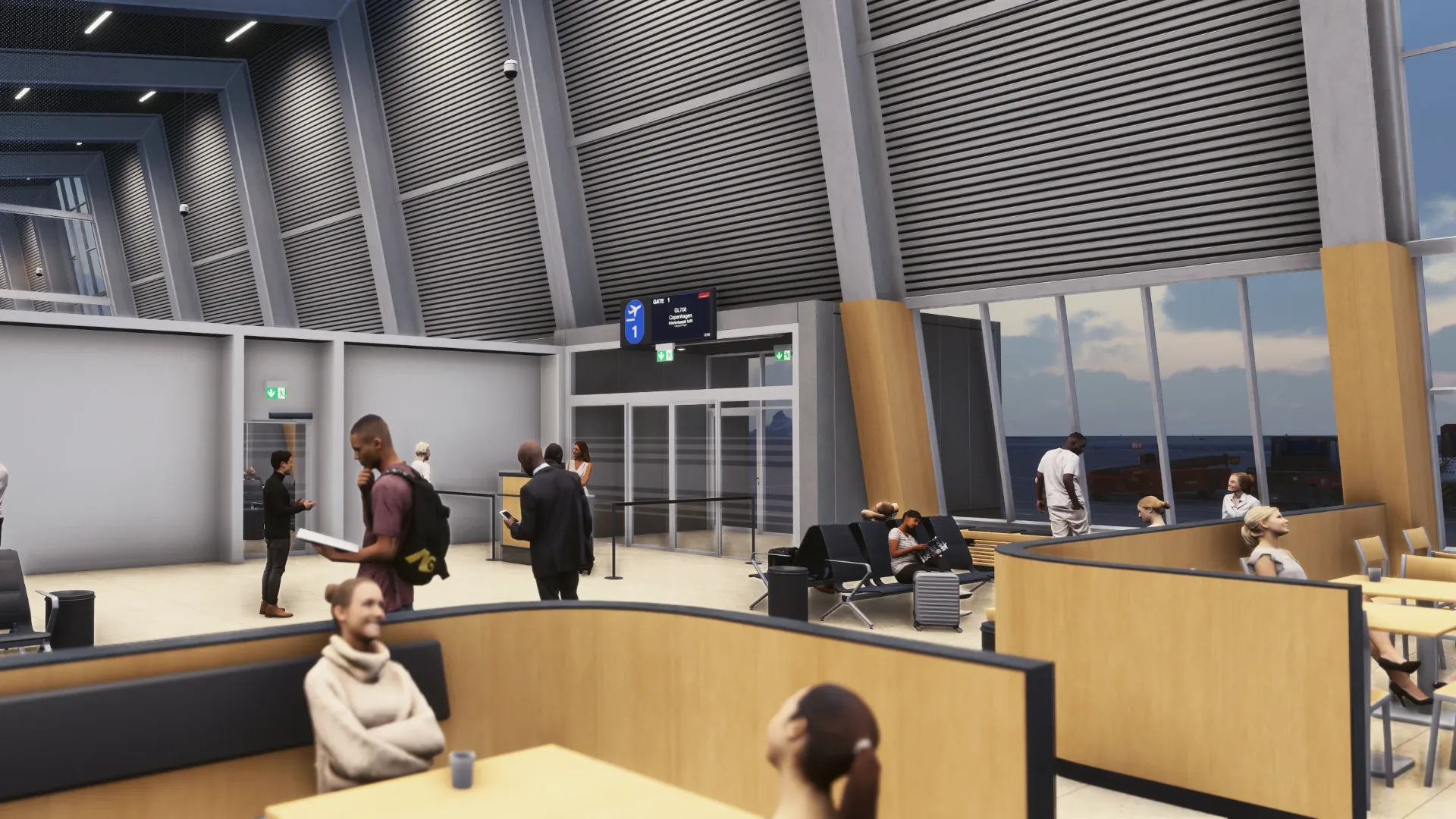
The scenery features an accurate rendition of the airport, with handmade ground textures, high-quality aerial imagery, a real-world runway slope profile, an accurate terrain profile derived from LiDAR data, and more.

It’s available on the iniBuilds Store for roughly $13.39, requiring at least 2.95 GB of free hard disk space to install.
If you enjoy our content and want to support Threshold, consider joining us on Patreon!

-
iniBuilds Releases Ilulissat for MSFS 2024
Greenland's stunning and latest international airport comes to MSFS.
Artikel lezen
Inhoud uit de RSS-feed van FSElite; het artikel kan ingekort zijn.
Greenland's stunning and latest international airport comes to MSFS.Lezen bij FSElite
-
Lunar AeroLabs Previews LAGF800 Avionics
Lunar AeroLabs previews the avionics of its upcoming long range business jet for Microsoft Flight Simulator 2024.
Artikel lezen
Inhoud uit de RSS-feed van FSElite; het artikel kan ingekort zijn.
Lunar AeroLabs previews the avionics of its upcoming long range business jet for Microsoft Flight Simulator 2024.Lezen bij FSElite
-
Wombii spent a year teaching the MSFS 2024 Cessna 152 to float, and it’s now on the Marketplace
Floatplanes in Microsoft Flight Simulator 2024 aren’t hard to find. According to Norwegian developer Kjetil Garpestad, the hard part is finding one that feels like a floatplane once it’s on the water. He took a real floatplane discovery flight in 2025 and went looking for the same feeling in the si…
Artikel lezen
Inhoud uit de RSS-feed van MSFS Addons; het artikel kan ingekort zijn.
Lezen bij MSFS AddonsFloatplanes in Microsoft Flight Simulator 2024 aren’t hard to find. According to Norwegian developer Kjetil Garpestad, the hard part is finding one that feels like a floatplane once it’s on the water. He took a real floatplane discovery flight in 2025 and went looking for the same feeling in the sim. He says he couldn’t find it, so he built it himself. A year later, the result has landed on an unlikely airframe: the humble default Cessna 152.
The 152 Ducky Edition 2.0, nicknamed the “Floaty Ducky” update, went live on the MSFS 2024 Marketplace on November 9. Garpestad told us by email that the Marketplace team released it faster than he expected, which is why it arrived without the usual heads-up. Existing owners get it as a free update, and new buyers pay $9.49.
From Lofoten airports to rubber ducks
If the name Wombii (or WombiiActual) rings a bell, it’s probably from Norway. Garpestad built Leknes Airport for World Update 15. In late 2024 came his first payware scenery, Svolvær Airport (ENSH), with touches like a runway sweeper you can trigger through the NAV2 radio. He also has a long-running soft spot for ducks. His freeware ranges from a floating rubber duck to a pack that replaces AI ships with, well, ducks.

The 152 Ducky Edition first appeared in March 2026 as an enhancement package for the default C152. It brought duck-themed liveries, a spring-mounted rubber duck on the glareshield and a long list of fixes. The package builds on top of Asobo’s aircraft, so the default Cessna 152 needs to be active in your library.
The big addition is a new straight-float variant, with custom-modeled floats and no amphibious gear. FSReborn’s TL3000 Sirius Amphibian can still drop its wheels for a runway. On the Floaty Ducky, the water is your airport.
Garpestad says he fine-tuned the float contact points over many months, and he adjusted the flight model for the weight of the large floats. He also wrote a custom system that estimates the water surface and places splash and wake effects for each float separately, plus custom effects for the prop vortex. And there’s a cool touch for anyone who has ever stranded a floatplane on a sim beach: you can now push the aircraft back into the water.
The rest of the 152 got attention too
The wheeled variant hasn’t been left behind. Version 2.0 rolls up the improvements Garpestad has shipped since launch, starting with a recoded electrical system where the circuit breakers behave close to what the POH describes. Pop the flap breaker and the starter won’t engage. The alternator also needs around 900 rpm to charge the battery properly.
He says propeller tuning brings cruise performance significantly closer to the POH, and he has fixed the engine’s tendency to fail from stress. The ADF now simulates its BFO, ADF and TEST modes and picks up NDBs on half-kilohertz frequencies. Other additions include:
- A mounted EFB with a custom app for the manual and settings
- A dark cockpit panel and gauge post lights
- Optional state saving for covers and chocks (the developer recommends turning it off in Career Mode)
Then there are the ducks. Five spring-mounted Ducky models now ride the glareshield. Garpestad says their physics-based movement helps you see the forces acting on the airplane, so they’re not only there for fun. There are also 26 liveries across six duck-inspired themes, duck-shaped cargo, and something the feature list simply calls a “secret magic compass autopilot.”

A small price for a different kind of floatplane
At $9.49, the Floaty Ducky costs well below the other float-equipped GA aircraft we’ve covered recently:
- Carenado’s CT206 costs $22.99, with floats and skis included.
- FSReborn’s TL3000 floats variant sells for $24.99.
- SimWorks Studios repackaged its Kodiak 100 with floats from €19.99.
Those are full aircraft, while the Ducky Edition builds on a plane MSFS 2024 owners already have. Still, it’s an inexpensive way in for anyone who trained in a 152, or who wants to practice water landings in something small and slow.
You can try it before buying with the free Marketplace trial. Garpestad says he asked for the trial to be reset with this update, so even people who tried the original should be able to use it again. The package is listed under Customization > Other as “Wombii 152 Ducky edition,” for PC and Xbox.


-
Black Square’s TBM 850 Gets New Update
Version 1.5 of the TBM 850 brings full state saving and many improvements to the popular turboprop…
Artikel lezen
Inhoud uit de RSS-feed van FSElite; het artikel kan ingekort zijn.
Version 1.5 of the TBM 850 brings full state saving and many improvements to the popular turboprop…Lezen bij FSElite
-
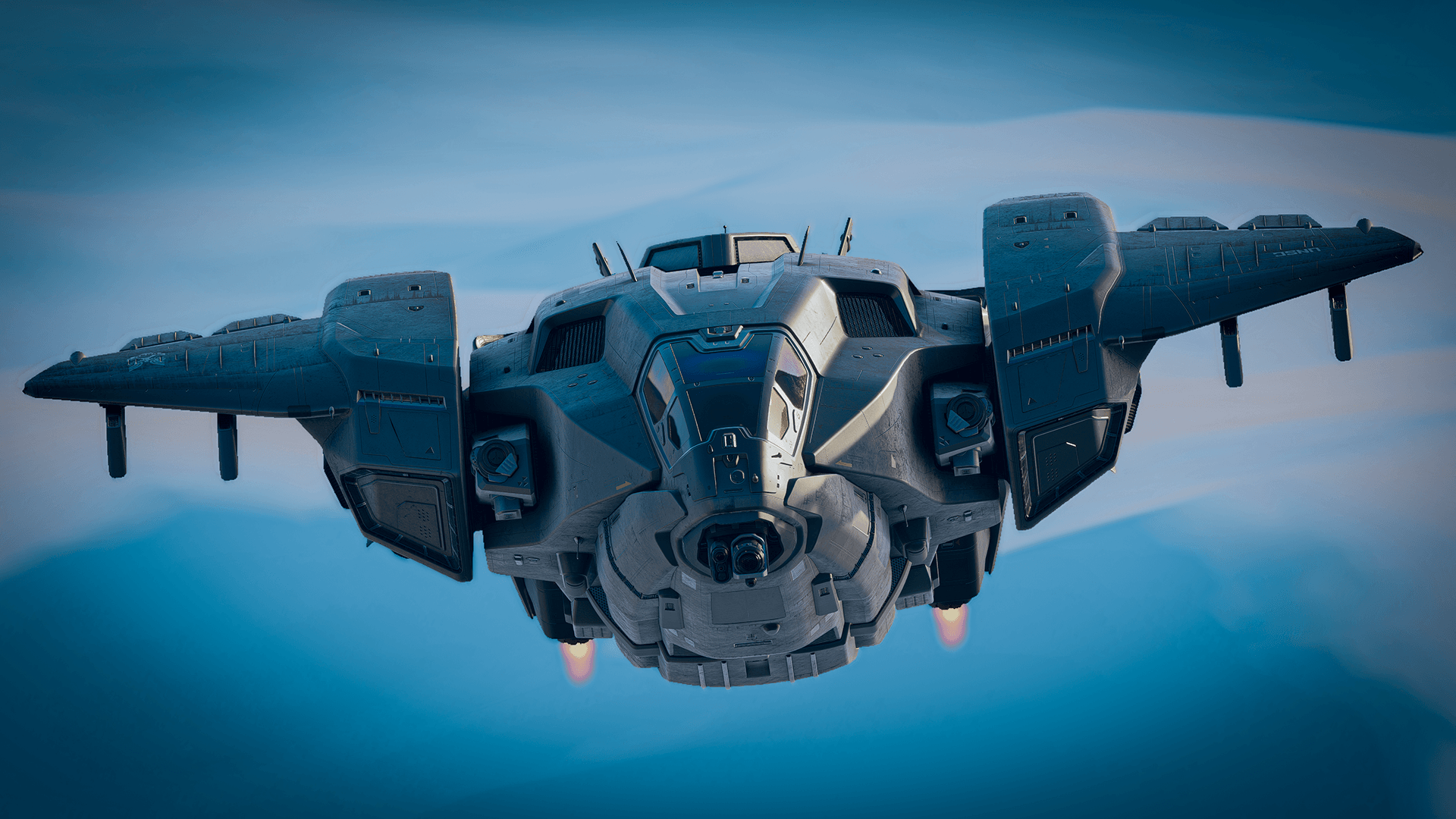
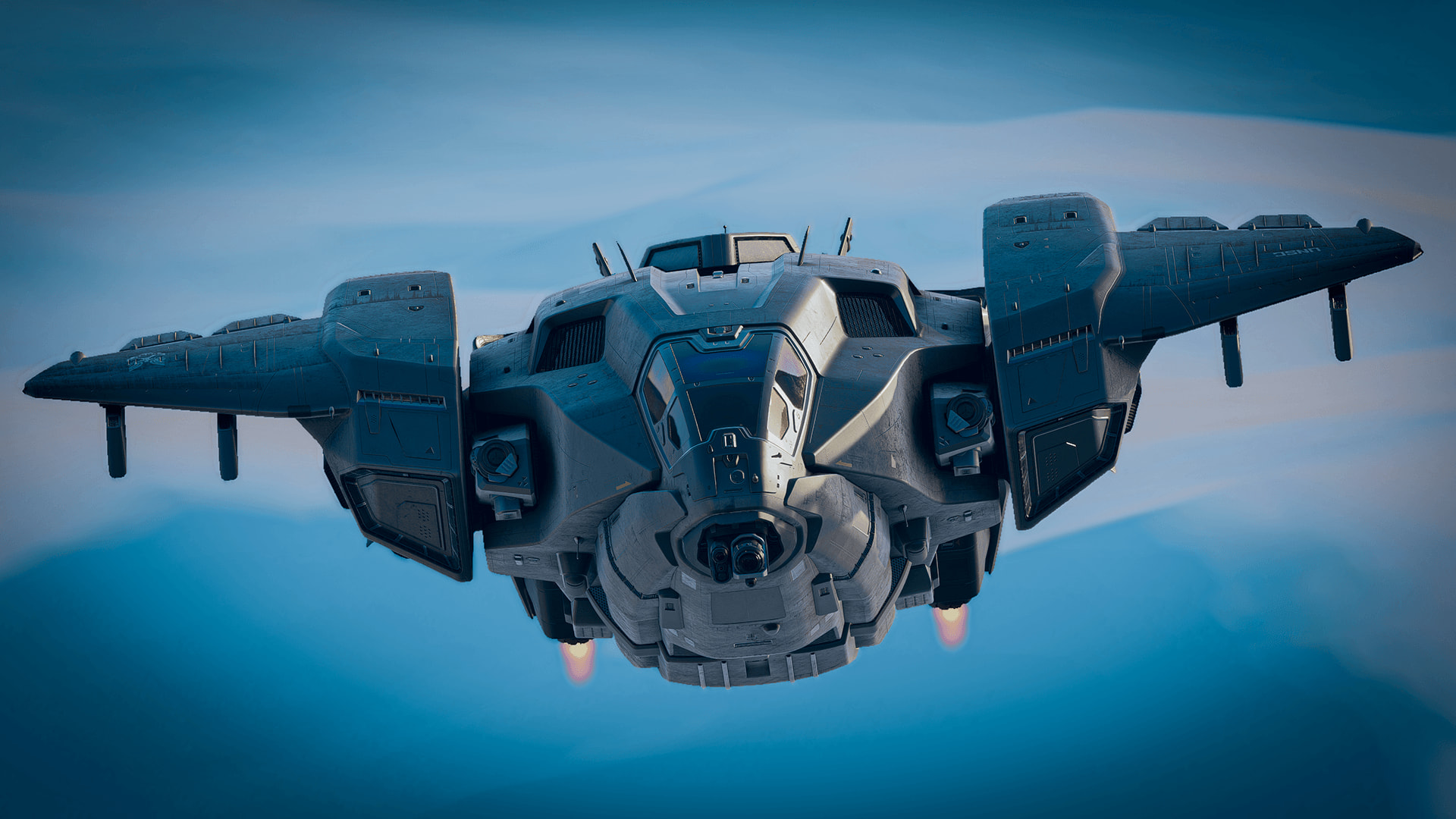
Halo’s Pelican dropship returns for MSFS 2024, but this time it’s only free for a week
Four and a half years after it became the first fictional aircraft in Microsoft Flight Simulator, Halo’s Pelican dropship is back, and this time it’s flying in Microsoft Flight Simulator 2024. There’s a catch, though. In 2022 the Pelican was a free gift with no expiry date. This time, the free wind…
Artikel lezen
Inhoud uit de RSS-feed van MSFS Addons; het artikel kan ingekort zijn.
Lezen bij MSFS AddonsFour and a half years after it became the first fictional aircraft in Microsoft Flight Simulator, Halo’s Pelican dropship is back, and this time it’s flying in Microsoft Flight Simulator 2024. There’s a catch, though. In 2022 the Pelican was a free gift with no expiry date. This time, the free window lasts one week.
Microsoft announced today that the D77-TC Pelican is available on all platforms to mark the 25th anniversary of Halo, the series that launched alongside the original Xbox in November 2001. You can claim it at no cost from November 10 until November 17. From November 18, anyone who missed it will need to buy it in the in-sim Marketplace for $9.99.
So if you have even a passing curiosity about flying Master Chief’s ride over your own house, this is the week to grab it.
A familiar face from 2022
When we covered the Pelican’s original release for MSFS 2020, it showed up as a surprise during the June 2022 Xbox and Bethesda Showcase, the same event where Microsoft announced the 40th Anniversary Edition. It was made in partnership with 343 Industries, now Halo Studios, and based on the Pelican from Halo Infinite. At the time we noted that some hardcore simmers would probably dismiss it as a toy for the Xbox crowd. That debate never fully went away. But plenty of people downloaded it anyway and had a lot of fun hovering around the planet in a 26th-century troop carrier, which was always the point.
The feature list for the MSFS 2024 version closely mirrors the original. Microsoft says the Pelican has a unique flight model that can switch between drone-type and jet-type propulsion, custom avionics inspired by the Halo games, and a complete interior model including the cargo bay. It comes with 12 liveries, one fewer than the 13 listed for the 2020 version.
A little Halo lore
Microsoft’s announcement also goes heavy on the in-universe backstory, which Halo fans will enjoy. According to the lore, the D77 Pelican is built by Misriah Armory and serves as the backbone of the UNSC’s transport squadrons, ferrying troops and cargo from orbit to a planet’s surface and back. It normally flies with a crew of three (pilot, copilot and crew chief), carries up to 14 fully equipped infantry, and can sling a vehicle from an external clamp. Four fusion thrusters provide the push, and each wing has three hardpoints for sensors, cargo pods or weapons.
From free gift to $9.99
Microsoft’s crossovers have had mixed fortunes in the move to MSFS 2024. The free Top Gun: Maverick expansion never made it across, and in August it left the MSFS 2020 Marketplace for good after the license agreement with the film studio ran its course. Halo is Microsoft’s own franchise, so the Pelican doesn’t face that kind of licensing deadline.

On the other end of the scale, last December’s Stranger Things expansion gave every MSFS 2024 owner a free Taog’s Hangar UH-1H Huey, with no time limit. The Pelican follows a different model, closer to what Microsoft did in May, when the Fokker F.VII was free for a week to celebrate World Update 21: Australia. Short free window, then paid.
At $9.99, the Pelican will sit at the low end of Marketplace pricing once the week is over. Still, free is free, and claiming it now costs you nothing but a couple of minutes.
How to claim it
Open the Marketplace in Microsoft Flight Simulator 2024 on PC, Xbox or PS5, search for the Pelican, and claim it before the end of November 17. Microsoft hasn’t specified a cut-off time, so we’d suggest not leaving it to the last evening.


-
Microsoft Flight Simulator 2024 Celebrates Halo’s 25th Anniversary with the Release of the Halo Pelican
Microsoft Flight Simulator – 10 Nov 26 Microsoft Flight Simulator 2024 Celebrates Halo’s 25th Anniversary with the... Fly the iconic Halo vehicle today in MSFS 2024 – free for a limited time! To commemorate the 25th Anniversary of Halo, the Microsoft Flight Simulator 2024 team invites simmers to ex…
Artikel lezen
Inhoud uit de RSS-feed van Microsoft Flight Simulator; het artikel kan ingekort zijn.
Lezen bij Microsoft Flight Simulator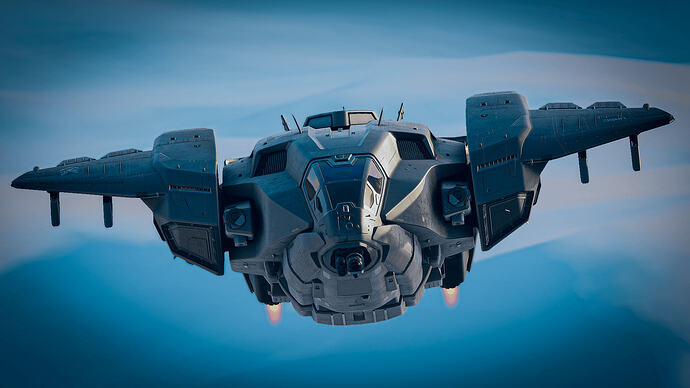 Microsoft Flight Simulator – 10 Nov 26
Microsoft Flight Simulator 2024 Celebrates Halo’s 25th Anniversary with the...
Fly the iconic Halo vehicle today in MSFS 2024 – free for a limited time! To commemorate the 25th Anniversary of Halo, the Microsoft Flight Simulator 2024 team invites simmers to experience the D77-TC…
1 post - 1 participant
-
Apple Park’s famous ring building comes to MSFS with Dfflyer Direct’s new San Jose pack
Few buildings on Earth are as easy to recognize from the air as Apple Park. That giant glass ring in Cupertino has become a kind of aerial postcard for Silicon Valley, and for anyone flying around the South Bay in Microsoft Flight Simulator, it’s exactly the sort of landmark you’d want to look down…
Artikel lezen
Inhoud uit de RSS-feed van MSFS Addons; het artikel kan ingekort zijn.
Lezen bij MSFS AddonsFew buildings on Earth are as easy to recognize from the air as Apple Park. That giant glass ring in Cupertino has become a kind of aerial postcard for Silicon Valley, and for anyone flying around the South Bay in Microsoft Flight Simulator, it’s exactly the sort of landmark you’d want to look down on. Now it has some proper attention, courtesy of Dfflyer Direct’s newest city pack.
San Jose, California went on sale on Contrail on November 9, priced at $9.10. And while the name on the box is San Jose, the pack reaches a little further than city limits, which is a slightly unusual scope for a Dfflyer release.
Dfflyer has been very active this year. We covered the Montreal pack back in March, which the studio called its biggest release to date, followed by Frankfurt’s “Mainhattan” skyline in June and the Cincinnati City & Bridges pack in September. In between, there have been Orlando, Cleveland and more, so Dfflyer Direct has quietly built one of the larger catalogs of affordable city enhancements for both simulators.
San Jose follows the same formula. The developer says the pack includes more than 75 handcrafted buildings, detailed landmarks, enhanced textures and night lighting across the downtown skyline.
Downtown San Jose and Almaden Boulevard
On the San Jose side, Dfflyer Direct lists several named landmarks: San Jose City Hall, the Adobe headquarters, Tower 55 and The 88 residential tower. Buildings along Almaden Boulevard also get dedicated detail, and the developer mentions enhanced night lighting and signage throughout, along with PBR textures.
From the screenshots, the night views look like a good showcase for the pack, with the downtown towers lit against the wider sprawl of the valley. As usual with this kind of product, the developer also says the models are performance-optimized for smooth frame rates.
Apple Park gets its own treatment
The Cupertino portion is where this release stands out. The Apple Park campus is modeled in full, including the ring building, the Steve Jobs Theater, the parking structures and surrounding campus buildings. The landscaped courtyard inside the ring also gets custom terrain, paths and vegetation, which should help the campus look like a park rather than a flat patch of photogrammetry.
For VFR flyers, that makes for a nice little sightseeing loop. The campus sits a short distance west of downtown San Jose, so taking in both in one low-and-slow flight should be easy.
Pairing it with the Bay Area airports
San Jose International sits right next to downtown, and that airport has been in the sim since the early days, with Orbx releasing its KSJC back in 2020. If you’re planning a longer Bay Area session, Flightbeam’s KSFO is a natural starting point up the peninsula, and the run down to San Jose makes for a nice scenic hop.
San Jose, California by Dfflyer Direct is available now on Contrail. At $9.10, the pack sits right in line with Dfflyer’s recent releases. Cincinnati also came in under $10, while Montreal launched at $12.99.
MSFS Addons is reader-supported. When you buy through links on this page, we may earn an affiliate commission at no additional cost to you. Thank you!


-
iniBuilds New Orleans International Airport (KMSY) review – Smooth like a fine jazz tune
Continuing its non-stop quest to build the finest and most detailed airports around the world, iniBuilds sends us back to the United States of America, after taking us from the sheer scale of Chicago O’Hare to the thin air of Addis Ababa Bole. This time, we’re heading toward the “Big Easy”, where t…
Artikel lezen
Inhoud uit de RSS-feed van MSFS Addons; het artikel kan ingekort zijn.
Lezen bij MSFS AddonsContinuing its non-stop quest to build the finest and most detailed airports around the world, iniBuilds sends us back to the United States of America, after taking us from the sheer scale of Chicago O’Hare to the thin air of Addis Ababa Bole. This time, we’re heading toward the “Big Easy”, where the planes don’t just land—they slide in with a side of delicious beignets, and to the sound of soft trumpets. The world capital of jazz is now available for you to visit, thanks to the iniBuilds Louis Armstrong New Orleans International Airport (KMSY) for Microsoft Flight Simulator 2024.
Also known as “Satchmo”, the incredibly talented Louis Armstrong revolutionized jazz music by turning collective ensemble playing into a showcase for brilliant, individual trumpet solos, while also pioneering scat singing. He’s the best-known star ever to walk New Orleans’ streets, even if another, more modern native musician, Lil Wayne, may be far more recognizable to today’s audiences. The new MSFS 2024 airport by iniBuilds is aptly named after Armstrong, just like the real one (sorry, Lil Wayne), and it is also trying to bring a sort of “revolution” to the city of New Orleans itself.
You see, this airport isn’t only set within the city’s metro area, serving millions of passengers in the southern US, it was also literally reclaimed from the local swamps in a true marvel of human ingenuity, turning a previously challenging area into a useful transportation hub. And this “revolution” continues to this day, because the airport itself is still being modernized, with redevelopment work underway across its grounds.
A historic achievement, still ongoing
To better understand this digital rendition, we have to look back at the chaotic timeline of the real-world KMSY. Built in the 1940s after a brief role as military training grounds, the airport’s origin story is quite turbulent. Because of the already mentioned surrounding swamps, it promptly got flooded by 2 feet of water during the 1947 Fort Lauderdale Hurricane, teaching early aviators a valuable lesson about building airports literally at sea level near a lake.
Perhaps because of the inherent dangers caused by water, because most planes hate water (sorry, seaplanes, it’s true), for decades the old 1959 terminal served as a glorious, smoke-stained time capsule of mid-century aviation. The architecture and structural design were practically untouched, with a few touches of modernity added where possible. It went through several expansions over the years, until a $1.3 billion project to build an entirely new terminal, along with multiple modern facilities, was finally announced in 2013. The new North Terminal opened its doors in November 2019.
Like most things in politics, however, a new terminal didn’t make the old one disappear. Most administrations would choose to rebuild the facilities section by section, but this is the United States, remember that. The new terminal was designed and built from scratch on the northern side of the airfield, completely replacing the old facilities. But once the new terminal and facilities were completed, what happened to the old buildings? They’re still there, actually.
The modern take with the old one still attached
As a true contrast to the late-1950s design of the old southern terminal, the brand-new, modern Cesar Pelli-designed terminal, in all its glassy, sun-reflecting glory, now dominates the airport’s landscape. And you can really compare them, since iniBuilds modeled them both. The new northern terminal is thoroughly detailed, while the southern one, now called the “South Terminal”, is only there as a brick-and-mortar memory. None of its gates and aprons are functional, and there are no interiors.
At first, out of ignorance, of course, I thought there was a problem. Given it’s such a large facility, I thought that maybe the project was incomplete or even that the GSX profile was broken. But no, this is actually true to life. The South Terminal is still there and the buildings are simply abandoned. The airport plans to demolish large parts of it, but for now they’re still standing. So, when you land, just don’t look south and definitely don’t try to park at that ghost terminal from the Nixon administration. Everyone will look awkwardly at you.
So, looking at the north terminal, where all your money is, of course, you can expect the ridiculous amount of detail iniBuilds is known for. That goes for the outside of this modern terminal area, with numerous gates serving well-known airlines like Delta and Southwest, all the access roads and even the ramps for regional and private aviation, but also for the incredibly vast interiors. Once more, this is a full-featured experience you can enjoy flying into or out of, but also explore with your avatar on foot.

The layout reflects the airport’s latest, post-2019 configuration. It includes the already mentioned passenger concourses A, B and C, but also the main cargo facilities on the southwestern side, the FBOs for your business jet fleet, as well as the parking areas used by operators such as Breeze Airways. It is always advisable to download and install the official FSDreamTeam GSX profile to get the proper gates, parking and ramp positions.
When it rains, it bogs
It doesn’t always rain in New Orleans, of course, otherwise Mardi Gras wouldn’t be that famous. But it isn’t always a pleasant experience either. During hurricane season (typically from August to September), it can become one of those hardcore destinations that turn into a bit of a nightmare. However, in other times of the year, the weather is mostly mild. So why did I include this little quip as a subtitle? Well, simply because there are some bogs in this scenery, some quite visible.
It’s not as noticeable as in iniBuilds’ Chicago O’Hare but, once again, the elevation mesh used in the New Orleans Airport doesn’t really blend well with the local scenery. Some areas have different elevations, especially around the various levees, bridges and drains around the airport, that just needed some better polishing. This is also evident with some of the auto-gen scenery used in the surrounding areas. I know it’s not really iniBuilds’ responsibility to work on the surrounding New Orleans scenery, but a little tweaking on some objects would be appreciated for the sake of visual blending. It would only require a bit more polishing.
What really is iniBuilds’ responsibility is the actual modeling and texturing. I get that the South Terminal needs to be there, even if unused. However, I’m pretty sure a lot of people would advocate for a little less detail in these older terminals, especially those with lower-end PCs who would appreciate the frame rate increase. iniBuilds does let you tune the airport for your system through iniManager, though. It is a double-edged sword, however. Because, on the other hand, iniBuilds would never hear the end of it if they actually reduced the older terminal visual fidelity.
There are also some issues with the ground textures, and the buildings on the northern aprons look a bit too “sanitized”, somehow lacking some realistic grit. On the ground, there is some dirt, some tire marks and a bit of wear and tear. But it’s arguable whether it could be a bit more detailed, with a lot more grit and dirt on the buildings themselves too. The airport construction may be new(ish), from 2019, but it has certainly seen its fair share of oil spills and occasional structural dirt.
Then there are a couple of more visible issues, like two large, darker ground tiles near runway 11 that seem to have slipped past the team’s quality assurance. It looks like those two tiles just weren’t optimized correctly during the final compilation. It’s an easy fix, of course, but still worth pointing out.
I would also like to see some more life in this airport. We do get some walking 3D passengers in the terminals but what about ground vehicles on the access roads? What about rotating radar antennas? Given this isn’t as big an airport as KJFK or KORD, there would be some room to have a bit more animations to the airport, even if you could just turn it off. Of course, this isn’t “important” for the simulation itself but since we’re talking about immersion, I can’t help but note this.
Final Words
Flying into Louis Armstrong New Orleans International Airport in the sim feels less like a sterile routine approach to some major airport, invariably so busy you can’t really appreciate the view. Flying here is more like threading a needle past Lake Pontchartrain, tackling that humidity level that could very well fog up your windshield. And if you want an additional challenge, try to get to it during the hurricane season.
iniBuilds has successfully captured the architectural glow-up of Louis Armstrong International Airport, without losing the slightly “swampy” soul of southern Louisiana. It transforms a historically soggy plot of land into a crisp, modern regional hub that makes narrowbody and regional jet operations genuinely fun. It has its flaws like I pointed out, but I can certainly see myself flying here just to steer away from the major airports. And if you fancy something smaller, Propair Flight’s Lakefront Airport (KNEW) sits just across town.
Is it a masterpiece? It all depends on what you seek from an airport. It’s a very solid, modern rendition that breathes new life into the Gulf South. It beats default MSFS 2024 auto-gen by a mile, of course. And, without making comparisons, the competition for this airport is, let’s say, no competition at all, since the last dedicated payware KMSY we covered was LatinVFR’s version, back in December 2020 for MSFS 2020.
If you do fly often to Louisiana, this one is a must buy, of course. At roughly £17 (plus taxes), it’s an easy recommendation for anyone flying Breeze, Southwest, or business jets down into the Gulf. Much like a fine jazz tune, however, it can become pretty much an acquired taste, catering to only a select few connoisseurs.
Look at me! I’m speaking French and all…
Verdict: 8/10 (Recommended)
Pros
- Native MSFS 2024, featuring optimized Level of Detail (LOD) models
- Up-to-date layout reflects the current real-world configuration of the airport, including the new terminal and the abandoned older one
- Detailed terminal interiors if you feel like walking the passenger terminal
- Correct ground operations with an official GSX profile included
- Priced at £16.99 (excl. VAT), it is cheaper than some of iniBuilds’ “mega-hub” releases like Chicago O’Hare or London Gatwick
- The awesome approaches over New Orleans’ unique landscape
- Extra challenge added during the changing weather seasons
Cons
- Somewhat “bland” ground textures lacking some grit or wear and tear
- Some issues with mismatched ground tiles near runway 11
- Minor ground mesh problems, mainly around the airport’s drain areas
- Auto-gen scenery issues with photogrammetry enabled; not really iniBuilds’ problem, but it still looks bad
- No backward compatibility with MSFS 2020. A minor con, but still a problem for those seeking enhancements for the older sim


-
Carenado Previews Dornier DO228-200
A look at Carenado's upcoming Dornier.
Artikel lezen
Inhoud uit de RSS-feed van FSElite; het artikel kan ingekort zijn.
A look at Carenado's upcoming Dornier.Lezen bij FSElite
-
FlyingIron Simulations Spitfire V2 “Weeks Away”, More Details
FlyingIron Simulations' Spitfire V2 is getting closer to release as the team is sharing more details.
Artikel lezen
Inhoud uit de RSS-feed van FSElite; het artikel kan ingekort zijn.
FlyingIron Simulations' Spitfire V2 is getting closer to release as the team is sharing more details.Lezen bij FSElite
-
FlyingIron’s new Spitfire will remember how you treated it, flight after flight
Most add-on aircraft in Microsoft Flight Simulator forget everything the moment you shut down. You can run the engine past its limits for half an hour, park it, and the next morning it starts up as if it just left the factory. FlyingIron wants its next Spitfire to work very differently, and judging…
Artikel lezen
Inhoud uit de RSS-feed van MSFS Addons; het artikel kan ingekort zijn.
Lezen bij MSFS AddonsMost add-on aircraft in Microsoft Flight Simulator forget everything the moment you shut down. You can run the engine past its limits for half an hour, park it, and the next morning it starts up as if it just left the factory. FlyingIron wants its next Spitfire to work very differently, and judging by the first pre-release development post, the Australian studio is building one of the most ambitious persistence systems we’ve seen in a warbird for the sim.
When FlyingIron announced the Spitfire V2 rebuild for MSFS 2024 back in August, there was no release date or price, only the promise that more details would follow. Now the developer says release is “only weeks away,” and it has started a countdown series of posts on the new features. The first two cover the new Form 700 maintenance system and the full variant lineup, and there’s a lot to unpack in both.
A logbook that follows your airframe
The name comes from the real thing. Every RAF aircraft had a Form 700, the logbook and maintenance record kept by ground crews and signed by the pilot before each sortie. FlyingIron has built its own version into the Spitfire’s EFB, and the idea is simple: with wear switched on, the aircraft logs its engine hours and keeps track of how you fly it. Each component wears at its own rate, the EFB shows its health and remaining hours, and when a part reaches the end of its life, it fails.

Everything carries over between flights. Wear, damage, worn components, oil, coolant, battery charge and oxygen are all saved, and FlyingIron says even the dirt, grime and oil streaks stay on the airframe until you wash it. The studio puts it plainly on its blog: “This Spitfire remembers.”
There’s an extra twist for day one. FlyingIron says you won’t get a factory-fresh aircraft when you first install the Spitfire. Instead, every component already has some hours behind it, and no two installs draw the same airframe, so your Spitfire will have its own weak spots that a friend’s won’t. If that sounds like a lot of homework, all of this is optional. You can disable wear entirely, start with a fresh airframe, or use an accelerated wear mode if you don’t fly often but still want to see the effects.
For anyone who’s spent time in A2A’s Accu-Sim Comanche 250, the concept will feel familiar. A persistent aircraft that rewards careful handling has been one of the most praised parts of A2A’s approach for years, and it’s interesting to see FlyingIron bring a similar philosophy to a WWII fighter, where operating limits and engine management are a big part of the experience.
Failures with a mechanical story
What stands out in FlyingIron’s write-up is that the failures are tied to how the real components wore out. According to the developer, generator brushes wear until output flickers and the battery stops charging. Hydraulic pump gears and seals degrade until the undercarriage refuses to move, which is when the single-use emergency CO2 cartridge comes in. The engine-driven air compressor wears like a small piston engine of its own, and slow leaks can cost you brakes, flaps and radiator flaps. Pitot heat can quietly fail open, and you only find out when the airspeed indicator freezes.
Smaller items are part of it too. FlyingIron mentions a gunsight lamp that dies and leaves you without a reticle, valve radios that slowly lose output until COM1 goes silent, and a booster pump failure that hurts most at altitude. Random failures can be added on top if you want the unexpected.
The legendary Merlin engine itself gets the most attention. FlyingIron describes a gradual decline driven by worn piston rings and cylinder bores, with lower compression, higher oil and coolant temperatures, rising oil consumption and a blue-grey haze from the exhaust stacks as the engine ages. Worn exhaust valves and a tired supercharger complete the picture, and the developer says you’ll get misfires, backfires, power sags and surges, backed by custom visual effects, sounds and its own power modelling.

Abuse is tracked as well. Exceed the boost limits and detonation starts damaging the engine. Run the coolant or oil too hot for too long and that damage accumulates in the Form 700 until it’s repaired, with the possibility of a seized engine if you keep pushing. FlyingIron notes that a little over the limit for a long time can do as much harm as a lot over the limit briefly, which is how the real engine behaved.
The by-the-book details
Some of the most interesting bits are the procedural ones. Oil consumption rises at high power and on a worn engine, and running low can cause pressure flickers and, eventually, a seized prop governor. Coolant boils off when you run hot, and it stays low until you refill it on the ground. Spark plugs foul if you idle too long, so you’ll need a proper run-up before takeoff, and FlyingIron says opening up a cold Merlin before it’s warmed up will wear it just as surely as running it hot.
Then there’s oil dilution, which is a deep cut even by warbird standards. The RAF used it to keep oil from thickening overnight in freezing weather, with the pilot feeding fuel into the oil before the last shutdown of the day. FlyingIron has modelled the full procedure, with specific RPM and oil temperature ranges, and the result is saved in the Form 700 so it carries over to your next morning’s start. Skip it before a frost and the developer says the Merlin will crank sluggishly and refuse to fire.
The control surfaces wear too. FlyingIron says stretched cables create dead zones in the stick, worn hinge bearings let surfaces twitch, and rigging drifts over time, so a well-used Spitfire may need a bit of trim that a new one wouldn’t.
Everything ends up in a defect log on the Form 700 page, with per-component repair buttons, a full overhaul option and a “new airframe” button for a fresh start, placed behind a confirmation so you don’t wipe your history by accident.
Eight variants across three marks
In a second post, FlyingIron also detailed the variants included in the package. Our August article counted four variants and a floatplane, and the developer now describes it as eight variants across three marks:
- Mk.IXc with the C wing, cannon and .303 Brownings, plus the rounded rudder
- Mk.IXe with the E wing, .50 cal Brownings and broad-chord rudder
- Clipped-wing versions of both, each with its own flight model built using MSFS 2024’s modular aircraft system
- Mk.VIII with its own cockpit layout, wing leading-edge fuel tanks and a retractable tailwheel
- Mk.XVI (late-war, E wing, bubble canopy and gyro gunsight) in standard and clipped-wing forms
- Mk.IXc Floats, based on the 1944 MJ892 conversion

The Mk.VIII has a nice extra. It’s the only variant with a Standard Beam Approach receiver, the wartime blind approach aid that gives you dots, dashes or a steady tone depending on which side of the runway centerline you’re on. There’s no glideslope or needle, so the approach is flown entirely by ear. FlyingIron also notes the Mk.VIII has special meaning for the studio, since Australia ordered 410 of them and the first arrived in 1943 to defend Darwin.

The Mk.XVI is worth a mention given recent events. Flight Replicas released the first bubble canopy Spitfire in MSFS back in August, a Mk.XVI priced at $12.49, so FlyingIron’s version will arrive in a corner of the market that already has a budget option. The two seem to be aiming at quite different buyers, though, given the systems depth FlyingIron is describing.
Loadouts are configurable from the EFB, including 30, 45 or 90 gallon slipper tanks on the Mk.IX and Mk.XVI, a 500 lb centerline bomb and 250 lb wing bombs, or a beer barrel in place of a wing bomb for the historically inclined. Seat armor, radio and oxygen can be fitted or removed, tanks are fueled individually, and FlyingIron says everything is reflected in weight and balance, with custom drag models for the loadout choices. The developer also teases that the guns and bombs are fully functional, with more details promised in a future post.

Five years on from the original
FlyingIron’s Spitfire has been part of the MSFS hangar almost from the start. The original Mk.IXc launched in March 2021 for $35 and quickly became the go-to Spitfire in the sim. The studio first showed early work on a remake in June 2025, and since then it has also kept refining its German fighters, including the Fw 190A-8.
What we still don’t know is the price, the exact release date, or whether owners of the original Spitfire will get any kind of upgrade path. FlyingIron hasn’t addressed those yet. Given the pace of these posts, though, it shouldn’t be long before we find out.

Bronnen van deze nieuwsberichten
Nieuwsberichten uit RSS-feeds van uitgevers, die regelmatig worden vernieuwd. Volledige artikelen blijven op de websites van de betreffende uitgevers staan.