
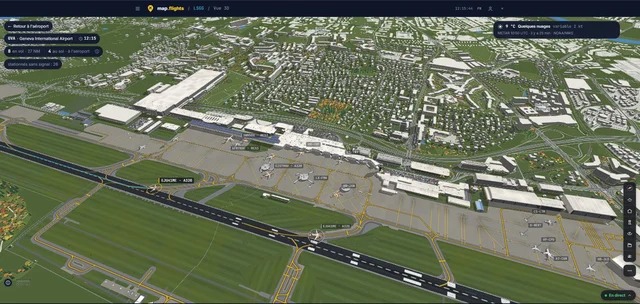
Rikoooo välkomnar map.flights som partner. Tjänsten är gratis och reklamfri och låter dig följa verklig flygtrafik och utforska flygplatser i tre dimensioner, direkt i webbläsaren. Genèves flygplats (GVA/LSGG) i map.flights. Skärmbild tagen den 8 november 2026. Källa: map.flights. Källor och…
Läs mer
Rikoooo
Nyheter
Uppdateringar från Rikoooo och de senaste nyhetsrubrikerna om flygsimulering.
Hos Rikoooo
Uppdateringar om katalogen, Hub och webbplatsen från teamet.

Nya Rikoooo: en omarbetad webbplats för piloter och skapare
Nästa webbplats för Rikoooo kommer att förena en ny presentation av tillägg med omarbetad navigering och särskilda verktyg för upphovspersoner. Vid sidan av gränssnittsförändringarna arbetar vi med stegen från att hitta ett flygplan eller ett sceneri till att läsa om det och installera det.
Läs mer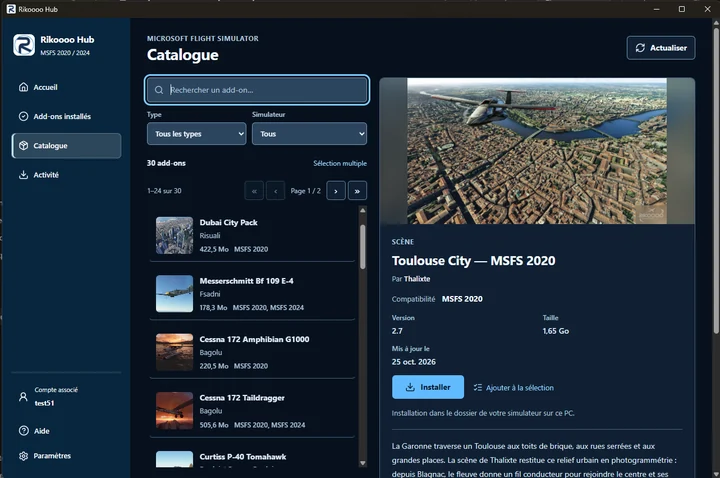
Rikoooo Hub: från katalogen till installation i MSFS 2020 och 2024
Rikoooo Hub är Windows-programmet som vi förbereder parallellt med den nya webbplatsen. Det kommer att låta dig bläddra i katalogen för MSFS och installera tillägg som erbjuds via Hub, med hantering av nedladdning, uppackning av arkiv och placering av filer.
Läs mer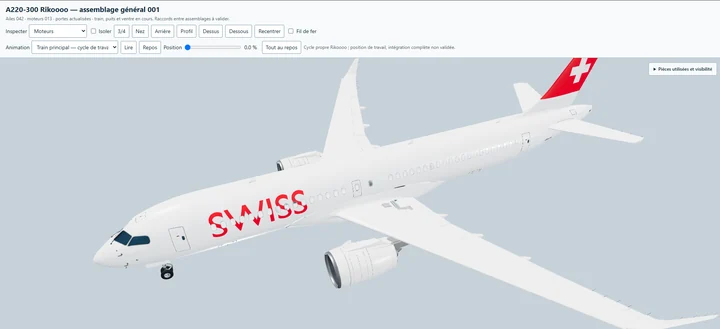
En Airbus A220-300 från Rikoooo, gratis för MSFS 2020 och MSFS 2024
Vi utvecklar vår egen Airbus A220-300, med en 3D-modell, virtuell cockpit, texturer och ljud skapade av Rikoooo. Flygplanet kommer att vara gratis och kompatibelt med både Microsoft Flight Simulator 2020 och Microsoft Flight Simulator 2024.
Läs merFlygsimulering
Utgåvor, uppdateringar och nyheter från publikationer specialiserade på flygsimulering.
Nyhetsrubriker: 1–10 av 10
-
Greenland’s second busiest airport is out as iniBuilds releases Ilulissat for MSFS 2024
Whenever we think of Greenland, it’s hard not to think about the capital, Nuuk, and its small but very important airport as an international entry point. But there is another important destination, Ilulissat Airport (BGJN), on the western coast of the country, right on the famous Disko Bay, a littl…
Läs artikeln
Innehåll från RSS-flödet från MSFS Addons. Artikeln kan vara förkortad.
Läs hos MSFS AddonsWhenever we think of Greenland, it’s hard not to think about the capital, Nuuk, and its small but very important airport as an international entry point. But there is another important destination, Ilulissat Airport (BGJN), on the western coast of the country, right on the famous Disko Bay, a little over 500 miles north of Nuuk. iniBuilds just released its rendition of Greenland’s second busiest airport for Microsoft Flight Simulator 2024, promising more ice than your aircraft’s de-icing system can probably handle.
The new scenery was developed in cooperation with the real airport and created by Jakub Lukaszewski in association with iniBuilds, the same credit behind the developer’s Svalbard (ENSB) airport. It features hand-made ground textures, as well as the most recent CGL aerial imagery captured using drones. The 2026 layout was recreated, including the sloped runway, the taxiways and the ground elevation, for which the team used high-resolution LiDAR scan data. The passenger terminal is also modeled in detail, including its interior and several custom objects.
Around the airport, expect icebergs in the water, custom city autogen recreating Ilulissat and its surroundings, custom-modeled landmarks such as the Icefjord Centre and Zion Church, and even some hidden Easter eggs.
Out of curiosity, the release of this MSFS2024 scenery also coincides with the real Ilulissat International Airport refurbishment, after the construction of a brand new 2,200-meter runway able to receive international jets that was made operational last month. So you can expect to fly “heavier” aircraft, aside the occasional Dash-8 regional propliner.
Curiously, the release of this MSFS 2024 scenery also coincides with the opening of the real Ilulissat International Airport, whose brand-new 2,200-meter runway, able to receive international jets, became operational on October 29. So you can expect to fly “heavier” aircraft, besides the occasional Dash 8 regional propliner, and Miltech’s upcoming Dash 8 is already being previewed in Air Greenland colors.
Scenery Features
- Developed in close cooperation with the real Ilulissat Airport
- Authentic Arctic environment capturing the unique atmosphere of Greenland
- Handcrafted ground textures with crisp, bespoke texture sets throughout the airport
- High-quality custom CGL aerial imagery captured using drones
- Real-world runway slope profile
- Airport terrain accurately recreated using high-resolution LiDAR scan data
- High-quality building interiors
- High-quality SimObject behaviours
- Custom-made icebergs recreating Greenland’s iconic icy landscape
- Fully custom night lighting, including approach, runway and taxiway lights
- Custom taxiway signs
- High-quality, optimised textures
- Custom city autogen recreating Ilulissat and its surroundings
- Numerous custom-modelled landmarks, including the Icefjord Centre, Zion Church, Ilulissat Harbour and hotels
- Immersive Arctic winter conditions with authentic snow coverage
- Numerous Easter eggs to discover – keep your eyes peeled!
- All models optimised for performance with Level of Detail (LOD)
- GSX profile included, by RW Profiles’ Elton Hjalmarsson
As usual, iniBuilds Ilulissat Airport is now available on the iniBuilds Store and through the iniManager platform. It costs £9.99 excluding VAT, which works out to roughly $13.39 or €11.96, since the store charges in GBP.
MSFS Addons is reader-supported. When you buy through links on this page, we may earn an affiliate commission at no additional cost to you. Thank you!


-
Wombii spent a year teaching the MSFS 2024 Cessna 152 to float, and it’s now on the Marketplace
Floatplanes in Microsoft Flight Simulator 2024 aren’t hard to find. According to Norwegian developer Kjetil Garpestad, the hard part is finding one that feels like a floatplane once it’s on the water. He took a real floatplane discovery flight in 2025 and went looking for the same feeling in the si…
Läs artikeln
Innehåll från RSS-flödet från MSFS Addons. Artikeln kan vara förkortad.
Läs hos MSFS AddonsFloatplanes in Microsoft Flight Simulator 2024 aren’t hard to find. According to Norwegian developer Kjetil Garpestad, the hard part is finding one that feels like a floatplane once it’s on the water. He took a real floatplane discovery flight in 2025 and went looking for the same feeling in the sim. He says he couldn’t find it, so he built it himself. A year later, the result has landed on an unlikely airframe: the humble default Cessna 152.
The 152 Ducky Edition 2.0, nicknamed the “Floaty Ducky” update, went live on the MSFS 2024 Marketplace on November 9. Garpestad told us by email that the Marketplace team released it faster than he expected, which is why it arrived without the usual heads-up. Existing owners get it as a free update, and new buyers pay $9.49.
From Lofoten airports to rubber ducks
If the name Wombii (or WombiiActual) rings a bell, it’s probably from Norway. Garpestad built Leknes Airport for World Update 15. In late 2024 came his first payware scenery, Svolvær Airport (ENSH), with touches like a runway sweeper you can trigger through the NAV2 radio. He also has a long-running soft spot for ducks. His freeware ranges from a floating rubber duck to a pack that replaces AI ships with, well, ducks.

The 152 Ducky Edition first appeared in March 2026 as an enhancement package for the default C152. It brought duck-themed liveries, a spring-mounted rubber duck on the glareshield and a long list of fixes. The package builds on top of Asobo’s aircraft, so the default Cessna 152 needs to be active in your library.
The big addition is a new straight-float variant, with custom-modeled floats and no amphibious gear. FSReborn’s TL3000 Sirius Amphibian can still drop its wheels for a runway. On the Floaty Ducky, the water is your airport.
Garpestad says he fine-tuned the float contact points over many months, and he adjusted the flight model for the weight of the large floats. He also wrote a custom system that estimates the water surface and places splash and wake effects for each float separately, plus custom effects for the prop vortex. And there’s a cool touch for anyone who has ever stranded a floatplane on a sim beach: you can now push the aircraft back into the water.
The rest of the 152 got attention too
The wheeled variant hasn’t been left behind. Version 2.0 rolls up the improvements Garpestad has shipped since launch, starting with a recoded electrical system where the circuit breakers behave close to what the POH describes. Pop the flap breaker and the starter won’t engage. The alternator also needs around 900 rpm to charge the battery properly.
He says propeller tuning brings cruise performance significantly closer to the POH, and he has fixed the engine’s tendency to fail from stress. The ADF now simulates its BFO, ADF and TEST modes and picks up NDBs on half-kilohertz frequencies. Other additions include:
- A mounted EFB with a custom app for the manual and settings
- A dark cockpit panel and gauge post lights
- Optional state saving for covers and chocks (the developer recommends turning it off in Career Mode)
Then there are the ducks. Five spring-mounted Ducky models now ride the glareshield. Garpestad says their physics-based movement helps you see the forces acting on the airplane, so they’re not only there for fun. There are also 26 liveries across six duck-inspired themes, duck-shaped cargo, and something the feature list simply calls a “secret magic compass autopilot.”

A small price for a different kind of floatplane
At $9.49, the Floaty Ducky costs well below the other float-equipped GA aircraft we’ve covered recently:
- Carenado’s CT206 costs $22.99, with floats and skis included.
- FSReborn’s TL3000 floats variant sells for $24.99.
- SimWorks Studios repackaged its Kodiak 100 with floats from €19.99.
Those are full aircraft, while the Ducky Edition builds on a plane MSFS 2024 owners already have. Still, it’s an inexpensive way in for anyone who trained in a 152, or who wants to practice water landings in something small and slow.
You can try it before buying with the free Marketplace trial. Garpestad says he asked for the trial to be reset with this update, so even people who tried the original should be able to use it again. The package is listed under Customization > Other as “Wombii 152 Ducky edition,” for PC and Xbox.


-
Halo’s Pelican dropship returns for MSFS 2024, but this time it’s only free for a week
Four and a half years after it became the first fictional aircraft in Microsoft Flight Simulator, Halo’s Pelican dropship is back, and this time it’s flying in Microsoft Flight Simulator 2024. There’s a catch, though. In 2022 the Pelican was a free gift with no expiry date. This time, the free wind…
Läs artikeln
Innehåll från RSS-flödet från MSFS Addons. Artikeln kan vara förkortad.
Läs hos MSFS AddonsFour and a half years after it became the first fictional aircraft in Microsoft Flight Simulator, Halo’s Pelican dropship is back, and this time it’s flying in Microsoft Flight Simulator 2024. There’s a catch, though. In 2022 the Pelican was a free gift with no expiry date. This time, the free window lasts one week.
Microsoft announced today that the D77-TC Pelican is available on all platforms to mark the 25th anniversary of Halo, the series that launched alongside the original Xbox in November 2001. You can claim it at no cost from November 10 until November 17. From November 18, anyone who missed it will need to buy it in the in-sim Marketplace for $9.99.
So if you have even a passing curiosity about flying Master Chief’s ride over your own house, this is the week to grab it.
A familiar face from 2022
When we covered the Pelican’s original release for MSFS 2020, it showed up as a surprise during the June 2022 Xbox and Bethesda Showcase, the same event where Microsoft announced the 40th Anniversary Edition. It was made in partnership with 343 Industries, now Halo Studios, and based on the Pelican from Halo Infinite. At the time we noted that some hardcore simmers would probably dismiss it as a toy for the Xbox crowd. That debate never fully went away. But plenty of people downloaded it anyway and had a lot of fun hovering around the planet in a 26th-century troop carrier, which was always the point.
The feature list for the MSFS 2024 version closely mirrors the original. Microsoft says the Pelican has a unique flight model that can switch between drone-type and jet-type propulsion, custom avionics inspired by the Halo games, and a complete interior model including the cargo bay. It comes with 12 liveries, one fewer than the 13 listed for the 2020 version.
A little Halo lore
Microsoft’s announcement also goes heavy on the in-universe backstory, which Halo fans will enjoy. According to the lore, the D77 Pelican is built by Misriah Armory and serves as the backbone of the UNSC’s transport squadrons, ferrying troops and cargo from orbit to a planet’s surface and back. It normally flies with a crew of three (pilot, copilot and crew chief), carries up to 14 fully equipped infantry, and can sling a vehicle from an external clamp. Four fusion thrusters provide the push, and each wing has three hardpoints for sensors, cargo pods or weapons.
From free gift to $9.99
Microsoft’s crossovers have had mixed fortunes in the move to MSFS 2024. The free Top Gun: Maverick expansion never made it across, and in August it left the MSFS 2020 Marketplace for good after the license agreement with the film studio ran its course. Halo is Microsoft’s own franchise, so the Pelican doesn’t face that kind of licensing deadline.

On the other end of the scale, last December’s Stranger Things expansion gave every MSFS 2024 owner a free Taog’s Hangar UH-1H Huey, with no time limit. The Pelican follows a different model, closer to what Microsoft did in May, when the Fokker F.VII was free for a week to celebrate World Update 21: Australia. Short free window, then paid.
At $9.99, the Pelican will sit at the low end of Marketplace pricing once the week is over. Still, free is free, and claiming it now costs you nothing but a couple of minutes.
How to claim it
Open the Marketplace in Microsoft Flight Simulator 2024 on PC, Xbox or PS5, search for the Pelican, and claim it before the end of November 17. Microsoft hasn’t specified a cut-off time, so we’d suggest not leaving it to the last evening.


-
Apple Park’s famous ring building comes to MSFS with Dfflyer Direct’s new San Jose pack
Few buildings on Earth are as easy to recognize from the air as Apple Park. That giant glass ring in Cupertino has become a kind of aerial postcard for Silicon Valley, and for anyone flying around the South Bay in Microsoft Flight Simulator, it’s exactly the sort of landmark you’d want to look down…
Läs artikeln
Innehåll från RSS-flödet från MSFS Addons. Artikeln kan vara förkortad.
Läs hos MSFS AddonsFew buildings on Earth are as easy to recognize from the air as Apple Park. That giant glass ring in Cupertino has become a kind of aerial postcard for Silicon Valley, and for anyone flying around the South Bay in Microsoft Flight Simulator, it’s exactly the sort of landmark you’d want to look down on. Now it has some proper attention, courtesy of Dfflyer Direct’s newest city pack.
San Jose, California went on sale on Contrail on November 9, priced at $9.10. And while the name on the box is San Jose, the pack reaches a little further than city limits, which is a slightly unusual scope for a Dfflyer release.
Dfflyer has been very active this year. We covered the Montreal pack back in March, which the studio called its biggest release to date, followed by Frankfurt’s “Mainhattan” skyline in June and the Cincinnati City & Bridges pack in September. In between, there have been Orlando, Cleveland and more, so Dfflyer Direct has quietly built one of the larger catalogs of affordable city enhancements for both simulators.
San Jose follows the same formula. The developer says the pack includes more than 75 handcrafted buildings, detailed landmarks, enhanced textures and night lighting across the downtown skyline.
Downtown San Jose and Almaden Boulevard
On the San Jose side, Dfflyer Direct lists several named landmarks: San Jose City Hall, the Adobe headquarters, Tower 55 and The 88 residential tower. Buildings along Almaden Boulevard also get dedicated detail, and the developer mentions enhanced night lighting and signage throughout, along with PBR textures.
From the screenshots, the night views look like a good showcase for the pack, with the downtown towers lit against the wider sprawl of the valley. As usual with this kind of product, the developer also says the models are performance-optimized for smooth frame rates.
Apple Park gets its own treatment
The Cupertino portion is where this release stands out. The Apple Park campus is modeled in full, including the ring building, the Steve Jobs Theater, the parking structures and surrounding campus buildings. The landscaped courtyard inside the ring also gets custom terrain, paths and vegetation, which should help the campus look like a park rather than a flat patch of photogrammetry.
For VFR flyers, that makes for a nice little sightseeing loop. The campus sits a short distance west of downtown San Jose, so taking in both in one low-and-slow flight should be easy.
Pairing it with the Bay Area airports
San Jose International sits right next to downtown, and that airport has been in the sim since the early days, with Orbx releasing its KSJC back in 2020. If you’re planning a longer Bay Area session, Flightbeam’s KSFO is a natural starting point up the peninsula, and the run down to San Jose makes for a nice scenic hop.
San Jose, California by Dfflyer Direct is available now on Contrail. At $9.10, the pack sits right in line with Dfflyer’s recent releases. Cincinnati also came in under $10, while Montreal launched at $12.99.
MSFS Addons is reader-supported. When you buy through links on this page, we may earn an affiliate commission at no additional cost to you. Thank you!


-
iniBuilds New Orleans International Airport (KMSY) review – Smooth like a fine jazz tune
Continuing its non-stop quest to build the finest and most detailed airports around the world, iniBuilds sends us back to the United States of America, after taking us from the sheer scale of Chicago O’Hare to the thin air of Addis Ababa Bole. This time, we’re heading toward the “Big Easy”, where t…
Läs artikeln
Innehåll från RSS-flödet från MSFS Addons. Artikeln kan vara förkortad.
Läs hos MSFS AddonsContinuing its non-stop quest to build the finest and most detailed airports around the world, iniBuilds sends us back to the United States of America, after taking us from the sheer scale of Chicago O’Hare to the thin air of Addis Ababa Bole. This time, we’re heading toward the “Big Easy”, where the planes don’t just land—they slide in with a side of delicious beignets, and to the sound of soft trumpets. The world capital of jazz is now available for you to visit, thanks to the iniBuilds Louis Armstrong New Orleans International Airport (KMSY) for Microsoft Flight Simulator 2024.
Also known as “Satchmo”, the incredibly talented Louis Armstrong revolutionized jazz music by turning collective ensemble playing into a showcase for brilliant, individual trumpet solos, while also pioneering scat singing. He’s the best-known star ever to walk New Orleans’ streets, even if another, more modern native musician, Lil Wayne, may be far more recognizable to today’s audiences. The new MSFS 2024 airport by iniBuilds is aptly named after Armstrong, just like the real one (sorry, Lil Wayne), and it is also trying to bring a sort of “revolution” to the city of New Orleans itself.
You see, this airport isn’t only set within the city’s metro area, serving millions of passengers in the southern US, it was also literally reclaimed from the local swamps in a true marvel of human ingenuity, turning a previously challenging area into a useful transportation hub. And this “revolution” continues to this day, because the airport itself is still being modernized, with redevelopment work underway across its grounds.
A historic achievement, still ongoing
To better understand this digital rendition, we have to look back at the chaotic timeline of the real-world KMSY. Built in the 1940s after a brief role as military training grounds, the airport’s origin story is quite turbulent. Because of the already mentioned surrounding swamps, it promptly got flooded by 2 feet of water during the 1947 Fort Lauderdale Hurricane, teaching early aviators a valuable lesson about building airports literally at sea level near a lake.
Perhaps because of the inherent dangers caused by water, because most planes hate water (sorry, seaplanes, it’s true), for decades the old 1959 terminal served as a glorious, smoke-stained time capsule of mid-century aviation. The architecture and structural design were practically untouched, with a few touches of modernity added where possible. It went through several expansions over the years, until a $1.3 billion project to build an entirely new terminal, along with multiple modern facilities, was finally announced in 2013. The new North Terminal opened its doors in November 2019.
Like most things in politics, however, a new terminal didn’t make the old one disappear. Most administrations would choose to rebuild the facilities section by section, but this is the United States, remember that. The new terminal was designed and built from scratch on the northern side of the airfield, completely replacing the old facilities. But once the new terminal and facilities were completed, what happened to the old buildings? They’re still there, actually.
The modern take with the old one still attached
As a true contrast to the late-1950s design of the old southern terminal, the brand-new, modern Cesar Pelli-designed terminal, in all its glassy, sun-reflecting glory, now dominates the airport’s landscape. And you can really compare them, since iniBuilds modeled them both. The new northern terminal is thoroughly detailed, while the southern one, now called the “South Terminal”, is only there as a brick-and-mortar memory. None of its gates and aprons are functional, and there are no interiors.
At first, out of ignorance, of course, I thought there was a problem. Given it’s such a large facility, I thought that maybe the project was incomplete or even that the GSX profile was broken. But no, this is actually true to life. The South Terminal is still there and the buildings are simply abandoned. The airport plans to demolish large parts of it, but for now they’re still standing. So, when you land, just don’t look south and definitely don’t try to park at that ghost terminal from the Nixon administration. Everyone will look awkwardly at you.
So, looking at the north terminal, where all your money is, of course, you can expect the ridiculous amount of detail iniBuilds is known for. That goes for the outside of this modern terminal area, with numerous gates serving well-known airlines like Delta and Southwest, all the access roads and even the ramps for regional and private aviation, but also for the incredibly vast interiors. Once more, this is a full-featured experience you can enjoy flying into or out of, but also explore with your avatar on foot.

The layout reflects the airport’s latest, post-2019 configuration. It includes the already mentioned passenger concourses A, B and C, but also the main cargo facilities on the southwestern side, the FBOs for your business jet fleet, as well as the parking areas used by operators such as Breeze Airways. It is always advisable to download and install the official FSDreamTeam GSX profile to get the proper gates, parking and ramp positions.
When it rains, it bogs
It doesn’t always rain in New Orleans, of course, otherwise Mardi Gras wouldn’t be that famous. But it isn’t always a pleasant experience either. During hurricane season (typically from August to September), it can become one of those hardcore destinations that turn into a bit of a nightmare. However, in other times of the year, the weather is mostly mild. So why did I include this little quip as a subtitle? Well, simply because there are some bogs in this scenery, some quite visible.
It’s not as noticeable as in iniBuilds’ Chicago O’Hare but, once again, the elevation mesh used in the New Orleans Airport doesn’t really blend well with the local scenery. Some areas have different elevations, especially around the various levees, bridges and drains around the airport, that just needed some better polishing. This is also evident with some of the auto-gen scenery used in the surrounding areas. I know it’s not really iniBuilds’ responsibility to work on the surrounding New Orleans scenery, but a little tweaking on some objects would be appreciated for the sake of visual blending. It would only require a bit more polishing.
What really is iniBuilds’ responsibility is the actual modeling and texturing. I get that the South Terminal needs to be there, even if unused. However, I’m pretty sure a lot of people would advocate for a little less detail in these older terminals, especially those with lower-end PCs who would appreciate the frame rate increase. iniBuilds does let you tune the airport for your system through iniManager, though. It is a double-edged sword, however. Because, on the other hand, iniBuilds would never hear the end of it if they actually reduced the older terminal visual fidelity.
There are also some issues with the ground textures, and the buildings on the northern aprons look a bit too “sanitized”, somehow lacking some realistic grit. On the ground, there is some dirt, some tire marks and a bit of wear and tear. But it’s arguable whether it could be a bit more detailed, with a lot more grit and dirt on the buildings themselves too. The airport construction may be new(ish), from 2019, but it has certainly seen its fair share of oil spills and occasional structural dirt.
Then there are a couple of more visible issues, like two large, darker ground tiles near runway 11 that seem to have slipped past the team’s quality assurance. It looks like those two tiles just weren’t optimized correctly during the final compilation. It’s an easy fix, of course, but still worth pointing out.
I would also like to see some more life in this airport. We do get some walking 3D passengers in the terminals but what about ground vehicles on the access roads? What about rotating radar antennas? Given this isn’t as big an airport as KJFK or KORD, there would be some room to have a bit more animations to the airport, even if you could just turn it off. Of course, this isn’t “important” for the simulation itself but since we’re talking about immersion, I can’t help but note this.
Final Words
Flying into Louis Armstrong New Orleans International Airport in the sim feels less like a sterile routine approach to some major airport, invariably so busy you can’t really appreciate the view. Flying here is more like threading a needle past Lake Pontchartrain, tackling that humidity level that could very well fog up your windshield. And if you want an additional challenge, try to get to it during the hurricane season.
iniBuilds has successfully captured the architectural glow-up of Louis Armstrong International Airport, without losing the slightly “swampy” soul of southern Louisiana. It transforms a historically soggy plot of land into a crisp, modern regional hub that makes narrowbody and regional jet operations genuinely fun. It has its flaws like I pointed out, but I can certainly see myself flying here just to steer away from the major airports. And if you fancy something smaller, Propair Flight’s Lakefront Airport (KNEW) sits just across town.
Is it a masterpiece? It all depends on what you seek from an airport. It’s a very solid, modern rendition that breathes new life into the Gulf South. It beats default MSFS 2024 auto-gen by a mile, of course. And, without making comparisons, the competition for this airport is, let’s say, no competition at all, since the last dedicated payware KMSY we covered was LatinVFR’s version, back in December 2020 for MSFS 2020.
If you do fly often to Louisiana, this one is a must buy, of course. At roughly £17 (plus taxes), it’s an easy recommendation for anyone flying Breeze, Southwest, or business jets down into the Gulf. Much like a fine jazz tune, however, it can become pretty much an acquired taste, catering to only a select few connoisseurs.
Look at me! I’m speaking French and all…
Verdict: 8/10 (Recommended)
Pros
- Native MSFS 2024, featuring optimized Level of Detail (LOD) models
- Up-to-date layout reflects the current real-world configuration of the airport, including the new terminal and the abandoned older one
- Detailed terminal interiors if you feel like walking the passenger terminal
- Correct ground operations with an official GSX profile included
- Priced at £16.99 (excl. VAT), it is cheaper than some of iniBuilds’ “mega-hub” releases like Chicago O’Hare or London Gatwick
- The awesome approaches over New Orleans’ unique landscape
- Extra challenge added during the changing weather seasons
Cons
- Somewhat “bland” ground textures lacking some grit or wear and tear
- Some issues with mismatched ground tiles near runway 11
- Minor ground mesh problems, mainly around the airport’s drain areas
- Auto-gen scenery issues with photogrammetry enabled; not really iniBuilds’ problem, but it still looks bad
- No backward compatibility with MSFS 2020. A minor con, but still a problem for those seeking enhancements for the older sim


-
FlyingIron’s new Spitfire will remember how you treated it, flight after flight
Most add-on aircraft in Microsoft Flight Simulator forget everything the moment you shut down. You can run the engine past its limits for half an hour, park it, and the next morning it starts up as if it just left the factory. FlyingIron wants its next Spitfire to work very differently, and judging…
Läs artikeln
Innehåll från RSS-flödet från MSFS Addons. Artikeln kan vara förkortad.
Läs hos MSFS AddonsMost add-on aircraft in Microsoft Flight Simulator forget everything the moment you shut down. You can run the engine past its limits for half an hour, park it, and the next morning it starts up as if it just left the factory. FlyingIron wants its next Spitfire to work very differently, and judging by the first pre-release development post, the Australian studio is building one of the most ambitious persistence systems we’ve seen in a warbird for the sim.
When FlyingIron announced the Spitfire V2 rebuild for MSFS 2024 back in August, there was no release date or price, only the promise that more details would follow. Now the developer says release is “only weeks away,” and it has started a countdown series of posts on the new features. The first two cover the new Form 700 maintenance system and the full variant lineup, and there’s a lot to unpack in both.
A logbook that follows your airframe
The name comes from the real thing. Every RAF aircraft had a Form 700, the logbook and maintenance record kept by ground crews and signed by the pilot before each sortie. FlyingIron has built its own version into the Spitfire’s EFB, and the idea is simple: with wear switched on, the aircraft logs its engine hours and keeps track of how you fly it. Each component wears at its own rate, the EFB shows its health and remaining hours, and when a part reaches the end of its life, it fails.

Everything carries over between flights. Wear, damage, worn components, oil, coolant, battery charge and oxygen are all saved, and FlyingIron says even the dirt, grime and oil streaks stay on the airframe until you wash it. The studio puts it plainly on its blog: “This Spitfire remembers.”
There’s an extra twist for day one. FlyingIron says you won’t get a factory-fresh aircraft when you first install the Spitfire. Instead, every component already has some hours behind it, and no two installs draw the same airframe, so your Spitfire will have its own weak spots that a friend’s won’t. If that sounds like a lot of homework, all of this is optional. You can disable wear entirely, start with a fresh airframe, or use an accelerated wear mode if you don’t fly often but still want to see the effects.
For anyone who’s spent time in A2A’s Accu-Sim Comanche 250, the concept will feel familiar. A persistent aircraft that rewards careful handling has been one of the most praised parts of A2A’s approach for years, and it’s interesting to see FlyingIron bring a similar philosophy to a WWII fighter, where operating limits and engine management are a big part of the experience.
Failures with a mechanical story
What stands out in FlyingIron’s write-up is that the failures are tied to how the real components wore out. According to the developer, generator brushes wear until output flickers and the battery stops charging. Hydraulic pump gears and seals degrade until the undercarriage refuses to move, which is when the single-use emergency CO2 cartridge comes in. The engine-driven air compressor wears like a small piston engine of its own, and slow leaks can cost you brakes, flaps and radiator flaps. Pitot heat can quietly fail open, and you only find out when the airspeed indicator freezes.
Smaller items are part of it too. FlyingIron mentions a gunsight lamp that dies and leaves you without a reticle, valve radios that slowly lose output until COM1 goes silent, and a booster pump failure that hurts most at altitude. Random failures can be added on top if you want the unexpected.
The legendary Merlin engine itself gets the most attention. FlyingIron describes a gradual decline driven by worn piston rings and cylinder bores, with lower compression, higher oil and coolant temperatures, rising oil consumption and a blue-grey haze from the exhaust stacks as the engine ages. Worn exhaust valves and a tired supercharger complete the picture, and the developer says you’ll get misfires, backfires, power sags and surges, backed by custom visual effects, sounds and its own power modelling.

Abuse is tracked as well. Exceed the boost limits and detonation starts damaging the engine. Run the coolant or oil too hot for too long and that damage accumulates in the Form 700 until it’s repaired, with the possibility of a seized engine if you keep pushing. FlyingIron notes that a little over the limit for a long time can do as much harm as a lot over the limit briefly, which is how the real engine behaved.
The by-the-book details
Some of the most interesting bits are the procedural ones. Oil consumption rises at high power and on a worn engine, and running low can cause pressure flickers and, eventually, a seized prop governor. Coolant boils off when you run hot, and it stays low until you refill it on the ground. Spark plugs foul if you idle too long, so you’ll need a proper run-up before takeoff, and FlyingIron says opening up a cold Merlin before it’s warmed up will wear it just as surely as running it hot.
Then there’s oil dilution, which is a deep cut even by warbird standards. The RAF used it to keep oil from thickening overnight in freezing weather, with the pilot feeding fuel into the oil before the last shutdown of the day. FlyingIron has modelled the full procedure, with specific RPM and oil temperature ranges, and the result is saved in the Form 700 so it carries over to your next morning’s start. Skip it before a frost and the developer says the Merlin will crank sluggishly and refuse to fire.
The control surfaces wear too. FlyingIron says stretched cables create dead zones in the stick, worn hinge bearings let surfaces twitch, and rigging drifts over time, so a well-used Spitfire may need a bit of trim that a new one wouldn’t.
Everything ends up in a defect log on the Form 700 page, with per-component repair buttons, a full overhaul option and a “new airframe” button for a fresh start, placed behind a confirmation so you don’t wipe your history by accident.
Eight variants across three marks
In a second post, FlyingIron also detailed the variants included in the package. Our August article counted four variants and a floatplane, and the developer now describes it as eight variants across three marks:
- Mk.IXc with the C wing, cannon and .303 Brownings, plus the rounded rudder
- Mk.IXe with the E wing, .50 cal Brownings and broad-chord rudder
- Clipped-wing versions of both, each with its own flight model built using MSFS 2024’s modular aircraft system
- Mk.VIII with its own cockpit layout, wing leading-edge fuel tanks and a retractable tailwheel
- Mk.XVI (late-war, E wing, bubble canopy and gyro gunsight) in standard and clipped-wing forms
- Mk.IXc Floats, based on the 1944 MJ892 conversion

The Mk.VIII has a nice extra. It’s the only variant with a Standard Beam Approach receiver, the wartime blind approach aid that gives you dots, dashes or a steady tone depending on which side of the runway centerline you’re on. There’s no glideslope or needle, so the approach is flown entirely by ear. FlyingIron also notes the Mk.VIII has special meaning for the studio, since Australia ordered 410 of them and the first arrived in 1943 to defend Darwin.

The Mk.XVI is worth a mention given recent events. Flight Replicas released the first bubble canopy Spitfire in MSFS back in August, a Mk.XVI priced at $12.49, so FlyingIron’s version will arrive in a corner of the market that already has a budget option. The two seem to be aiming at quite different buyers, though, given the systems depth FlyingIron is describing.
Loadouts are configurable from the EFB, including 30, 45 or 90 gallon slipper tanks on the Mk.IX and Mk.XVI, a 500 lb centerline bomb and 250 lb wing bombs, or a beer barrel in place of a wing bomb for the historically inclined. Seat armor, radio and oxygen can be fitted or removed, tanks are fueled individually, and FlyingIron says everything is reflected in weight and balance, with custom drag models for the loadout choices. The developer also teases that the guns and bombs are fully functional, with more details promised in a future post.

Five years on from the original
FlyingIron’s Spitfire has been part of the MSFS hangar almost from the start. The original Mk.IXc launched in March 2021 for $35 and quickly became the go-to Spitfire in the sim. The studio first showed early work on a remake in June 2025, and since then it has also kept refining its German fighters, including the Fw 190A-8.
What we still don’t know is the price, the exact release date, or whether owners of the original Spitfire will get any kind of upgrade path. FlyingIron hasn’t addressed those yet. Given the pace of these posts, though, it shouldn’t be long before we find out.

-
iniBuilds Global FBOs now available for MSFS 2024
On Saturday, iniBuilds announced its Global FBOs, the luxury business aviation terminal we first spotted in the Global Jet teaser. Two days later, you can already get it: the iniBuilds Global FBOs are out now for Microsoft Flight Simulator 2024, priced at £9.99 (plus tax). That price is one of the …
Läs artikeln
Innehåll från RSS-flödet från MSFS Addons. Artikeln kan vara förkortad.
Läs hos MSFS AddonsOn Saturday, iniBuilds announced its Global FBOs, the luxury business aviation terminal we first spotted in the Global Jet teaser. Two days later, you can already get it: the iniBuilds Global FBOs are out now for Microsoft Flight Simulator 2024, priced at £9.99 (plus tax).
That price is one of the most interesting details. A full iniBuilds airport like Chicago O’Hare sells for £19.99, so the FBO costs roughly half of one airport. And it’s a single purchase. You buy it once, and then you can install it at every supported iniBuilds airport you own, so the value grows with the size of your iniBuilds collection.
If you missed the announcement, the Global FBO adds a Fixed Base Operator building, the private side of an airport where business aviation passengers skip the main terminal, to selected iniBuilds airports. iniBuilds says each FBO comes with its own apron parking for business and general aviation aircraft, plus custom taxiway connections and ground markings tied into the airport layout.
Inside, the developer lists a restaurant, bar, games room, gym and lounge areas, with custom sounds and music in individual rooms. There’s also the basement Trophy Room, which displays mementos for the iniBuilds airports you own and grows as your collection does.
The ten launch locations haven’t changed since Saturday:
- Dubai International (OMDB)
- New York JFK (KJFK)
- Doha Hamad (OTHH)
- London Heathrow (EGLL)
- Innsbruck (LOWI)
- Ibiza (LEIB)
- Chicago O’Hare (KORD)
- Palm Springs (KPSP)
- Dallas Fort Worth (KDFW)
- Hong Kong (VHHH)
Update your airports first
There’s one thing worth knowing before you hit install. The FBO doesn’t include any airports, so you need to own a compatible iniBuilds scenery for each location. On top of that, iniBuilds says those airports must be updated or reinstalled to their latest versions in iniManager first. According to the developer, older versions aren’t compatible and may cause the FBO to install or display incorrectly.
After that, the process is simple. Once the Global FBO is downloaded, you select a supported airport in your iniManager library and choose “Install FBO”. iniManager adds the building, parking and taxiways for you, so there’s nothing to place by hand. If you’re missing an airport, you can also buy it from inside iniManager.
For now, the FBO is sold through the iniBuilds store and iniManager. iniBuilds hasn’t mentioned the in-sim Marketplace.
Luton, Stansted and Malta are next
The release post also gives a first look at the roadmap, and iniBuilds says expanding the network is the first priority. The next three FBO locations will be London Luton, London Stansted and Malta.
Two of them give you more London-area options alongside Heathrow, and Malta, which iniBuilds released for MSFS 2024 in August, adds a Mediterranean destination next to Ibiza. iniBuilds says more airports will follow, but hasn’t named them yet.
Your logo on the door
The second roadmap item may appeal to virtual airline and charter operators in particular. iniBuilds says it will add an option to customize the FBO branding, either by removing the iniBuilds logos entirely or by replacing them with your own. It will be a way to run your own private airline, charter company or virtual operation from the building. There’s no date for either addition yet, but iniBuilds says it will share more closer to release.
Waiting for the Global Jet
The obvious missing piece is the aircraft that started all this. iniBuilds again calls the FBO a perfect match for the upcoming Global Jet, its first business jet, announced at FSimUK in October, but there’s still no release date for the jet itself.
Until then, the FBO works with any business or GA aircraft you already have. It’s also a different approach from the FBO system that ships with the FSReborn Phenom 300E, which lets you place FBO buildings at any airport. iniBuilds offers fewer locations, but each one was built into the airport by the same team that made the scenery.
The iniBuilds Global FBO is available now from the iniBuilds store for £9.99 (excl. VAT). You can find the full release notes on the iniBuilds forum.
MSFS Addons is reader-supported. When you buy through links on this page, we may earn an affiliate commission at no additional cost to you. Thank you!


-
StrataSim’s StrataFx Review – Brush those skies like a pretty painting
For years, the previous generations of flight simulation were very limited in terms of environmental realism. Atmospheric effects were quite basic and dull. In search of something more realistic, developers created several programs throughout the years, with the sole intention of improving the sky …
Läs artikeln
Innehåll från RSS-flödet från MSFS Addons. Artikeln kan vara förkortad.
Läs hos MSFS AddonsFor years, the previous generations of flight simulation were very limited in terms of environmental realism. Atmospheric effects were quite basic and dull. In search of something more realistic, developers created several programs throughout the years, with the sole intention of improving the sky color and the cloud depth, and even adding better haze and many other effects, searching for that extra layer of atmospheric realism that the default engines failed to capture.
Since Microsoft Flight Simulator 2020 was introduced, however, a new level of realism became the goal. The previous “semi-realistic” visuals were no longer acceptable; “photo-real” was the new rule. Then, Microsoft Flight Simulator 2024 brought unprecedented levels of detail to the virtual skies, making it even more visually demanding. So, it seemed like those “atmospheric enhancement” programs were no longer needed… Or were they?
This was, of course, very debatable. For some time, the skies in MSFS looked fine for the most part. It was only when people started enhancing clouds and scenery that a new level of visual tweaking became popular. External tools like ReShade allowed users to literally “paint” the skies and all the other visuals with filters. But that wasn’t enough, of course. That was just a different “lens” used to change colors. Something more robust was needed.

The “need” for an environment tweak
In the latest MSFS 2024 generation, there aren’t many tools to achieve that level of control. The idea would be to alter the atmospheric parameters to change the sky color, the haze, the light dispersion and more, to make those skies look brighter, more colorful and, above all, more realistic. With that in mind, most of you have heard about REX Atmos Core, but some of you may not be quite sure what it does. In fact, its list of features can be a little hard to decipher at first.
Enter StrataSim’s new StrataFx for MSFS 2024, which arrived in Early Access last week. This is yet another atmospheric modifying tool that seeks to shatter the flat, vanilla visual presentation of the simulator. But there are major differences between these two products. This review, of course, does not intend to make a direct comparison, but one is still inevitable and we’ll get to that further down. Before that, however, let’s dive into what StrataSim Designs’ new creation actually does.
Currently in Early Access, this utility works as a real-time memory injector of the atmospheric depiction, bypassing the limitations of the simulator’s built-in weather features. It does so by directly altering how light, moisture, and particles interact in the virtual sky. The result is a highly sophisticated attempt to bridge the gap between digital simulation and genuine aviation physics.

A deep dive into the attributes of StrataFx reveals a tool built with modern simulation demands in mind. At its core, StrataFx controls Rayleigh scattering, particle density, and ozone distribution. By doing so, it removes the distracting visual anomalies found in the default simulator, such as the weird effect where distant terrain somehow “collides” with the horizon. Instead, it creates soft, believable horizons where haze naturally blends into the ground, all managed efficiently through an external application.
I can already hear your question in the ether: “Is this type of application actually relevant?” If you are already impressed with the current MSFS 2024 visual fidelity, the arguments for an “even better environment” are, of course, a hard sell. Some of these tweaks aren’t huge, and some will even look irrelevant to some extent. I guess this type of software is aimed at those seeking more dramatic visuals, especially in poor weather. Is this you? Then, keep reading.
Automated or manual, your choice!
The primary advantage of the software is its commitment to dynamic and fully automated visual transformations, completely eliminating the need for pilots to manually load visual filters or adjust environmental sliders for every flight, or even mid-flight. But if you do want some level of control, it will still provide the necessary sliders as an option, so you can make manual adjustments and call those skies your own. Let me explain.

I would argue that a good chunk of users of this program will probably just want an automated mode to tweak all this with one button push and move on to flying. These users just don’t want to be bothered with constantly adjusting sliders. Don’t worry if that’s your case. StrataFx has a few presets to choose from: activate one and then “forget” about it. This is one of the main highlights of StrataFx, as it can run completely automatically, just by pressing Apply on one of the dynamic presets.
However, for those willing to really go deep into the visual changes, the software provides an incredible array of options and adjustments you can tweak to your liking. You can add any preset, snapshot or dynamic, to your sandbox, then start adjusting all the parameters. Want to replicate that pretty orange dusk setting? Want to gray the skies to simulate that winter haze? Feeling “cyberpunk” enough to wish for greenish skies? Honoring a certain upcoming game and wish to depict that infamous pink Floridian sky? Your wish is StrataFx’s command.
But it’s not just the sky color that you control via the atmospheric settings and Rayleigh scattering, although that’s perhaps the most visible change you can make. You can also control the solar glow effect, the particle distribution and absorption that influence haze depiction, balance the RGB colors to control how light bounces off objects, and so much more. It’s actually time-consuming to try absolutely everything this program can do. So much so that you’ll want to save these settings.

Good news! You can save your own presets and actually apply them in different conditions. The software provides some baseline themes, including one called “realistic”. But you can create your own and even share them with other users. This creates a cool platform to share these creations easily, with the click of a button. And if you don’t like the results, all you need to do is disable the theme or just shut down StrataFx. The software will immediately restore the simulator’s default values.
Another very important note is performance. These atmospheric changes will, of course, affect your overall visual experience, but they could also have an impact on your graphical performance. The good news, however, is that the frame rate seems to be utterly unaffected by the new visual fidelity StrataFx provides. This is perhaps due to the fact that it runs from an external application and writes its values directly into MSFS 2024’s own visual engine. It’s not a secondary layer added to the simulation, so it shouldn’t bring performance issues.
Works best with its companion loaded

The true magic of the software unlocks when you introduce the StrataWx integration, which perfectly explains the developer’s broader ecosystem vision. When StrataFx runs alongside StrataSim’s proprietary StrataWx weather engine, which we reviewed back in August, the two programs establish a real-time data link that elevates the visual experience beyond a simple cosmetic filter. The visual engine continuously reads the live conditions generated by the weather injector, adjusting atmospheric parameters on the fly based on the local weather report.
For example, if the weather engine injects a dense, multi-layered storm front into your flight path, StrataFx immediately calculates the appropriate particle scattering height and light absorption, giving the air ahead a thick, ominous quality that warns you of impending turbulence. If the sky is clearing out, you’ll notice a faint blue color appearing on the horizon, along with some light and haze dispersion indicating an impending improvement. This is, of course, all very subtle during all flight phases.
The best part of this automated synergy is that you don’t really need to fiddle with any presets or sliders. No complicated configuration menus are needed while managing a stressful instrument approach, as the weather engine tells the visual engine exactly how miserable or how pleasant the sky should look. In practice, this means transitioning from clear skies into a heavy overcast layer feels like a natural meteorological progression rather than a sudden shift in screen contrast.

There is always a caveat…
Despite these impressive visual leaps, this is still an experimental product. Because StrataFx is explicitly marketed as an Early Access title, users will inevitably encounter unpolished features, occasional lighting snaps during rapid time transitions, and a few grayed-out adjustment sliders that await future development builds. It’s also quite possible that you’ll find a few glitches in the depiction as the team continues to work on it and sends out regular updates. If you want a finished product, you know you’ll need to wait.
However, if you do want to take a chance, you’ll be helping the team. While using this software at this stage, I have to point out that updates arrive very frequently, almost daily, via the StrataSim Manager. This is a good indicator that, much like StrataWx, which continues to be polished to this day, StrataFx will keep improving.
Then there’s the pricing model. I already explained how powerful StrataFx is when working alongside StrataWx. I would pretty much say it’s essential to have both. However, StrataFx does require a separate license, meaning simulation enthusiasts will have to open their wallets twice to unlock the ecosystem’s full potential. A license costs $19.99 (currently $18.99 with a 5% discount) on StrataSim’s own store. There’s no bundle with StrataWx at the time of writing, although StrataWx owners can get StrataFx for $16.99 once they sign in.
I won’t go off on a tangent about the price itself, but some argue it’s overpriced for what it does, others argue it should be embedded into StrataWx, while others dismiss its value by saying MSFS 2024’s environment already looks good enough. In my opinion, anything that aims to increase realism, especially if it’s not just a visual “gimmick” like ReShade filters, is worth the attention. Whether it’s worth the actual investment, however, is another matter.
The inevitable comparison
When evaluating the current market for MSFS 2024 atmospheric modifiers, that brief comparison with REX Atmos Core becomes essential, as both utilities approach atmospheric realism from somewhat different philosophies. The prices are fairly similar, with REX’s a bit lower (Atmos Core sells for $14.50 at stores like Aerosoft) but still in the same general range. So the actual differences come down to how they work and what they aim to do for you.
StrataFx positions itself as a dynamic, hands-off solution that relies on automated calculations to morph the sky relative to active weather layers. The biggest bonus is its integration with StrataWx, a true weather injector, which makes the depiction incredibly deep, with constant real-time adjustments. It provides a solid platform to create and share profiles, making these profiles easy to load or unload with the click of a button. Then, just leave it running in the background, doing its thing.
REX Atmos Core, by contrast, relies heavily on static presets and manual snapshots, requiring the pilot to actively choose a specific environmental profile or download community-shared configurations before taking off. REX has kept updating the software, as with its Technical Update 1.0, and has promised a weather injection system and a level of automation for Atmos Core for some time, but those haven’t arrived yet. For now, it relies on manual tweaking and adjustments.
The user interfaces of the two products further demonstrate their differing design directions and priorities. StrataFx uses a very modern, clean design that integrates smoothly into the unified StrataSim Manager, providing an accessible gateway for users who prefer a set-and-forget experience. REX Atmos Core features a functional but less intuitive interface, with oversized, highly sensitive sliders that have small sweet spots, making precise adjustments a game of patience.
However, maturity is where the scales tip back. REX Atmos Core is a largely finished, stable utility, backed by a team with a proven track record of delivering regular technical updates and broad compatibility. StrataFx remains a newer, experimental contender with much to prove, still in its Early Access phase. Even if you favor the newer product as something fresh and better looking, it’s not easy to just “jump in” blindly to a new project.
Ultimately, choosing between these two atmospheric tools comes down to your personal preferences regarding flight preparation and simulation philosophy. If you prefer a modern, automated system that reacts naturally to your changing flight route without constant user intervention, StrataFx represents the future-leaning choice for MSFS 2024. If you’re one of those who thrives on micromanaging sky physics, adjusting individual cloud illumination layers, or using community-voted visual profiles, REX Atmos Core remains a reliable utility for your hangar. If you still think neither seems worth your time… well, the choice is already made for you, isn’t it?
Final thoughts
StrataSim’s StrataFx for MSFS 2024 delivers a highly sophisticated leap forward in flight simulation visuals by improving on the “vanilla” atmospheric limitations of the default engine. Operating as a real-time memory injector, it’s able to generate atmospheric depth through dynamic and fully automated visual transformations. It calculates Rayleigh scattering and particle distribution on the fly, effectively fixing the default simulator’s horizons and seamlessly blending distant terrain with realistic haze, while completely preserving system performance through an external background manager.
However, potential buyers must carefully weigh these impressive visual milestones against the software’s current experimental phase. Because the utility is still navigating its early development builds, you will inevitably encounter unpolished items and some missing features. Furthermore, unlocking the software’s true potential requires pairing it with its sister weather engine, StrataWx, meaning it needs a separate license with additional costs.
Ultimately, the decision rests entirely on your personal simulation philosophy and willingness to go beyond the basics, while taking some chances to test cutting-edge, evolving code. It’s quite possible you are already acquainted with the veteran REX Atmos Core, and might be hesitant to change from it. Maybe the fact that StrataFx is actually capitalizing on the automation and weather engine integration that the older software lacks will make you change platforms.
In the end, the closing argument is pretty straightforward: if you want a modern, hands-off “set-and-forget” ecosystem that intelligently alters the sky’s quality based on live weather data, this is a “no-brainer”. StrataFx paired with StrataWx represents StrataSim Designs’ continuous search for visual realism in flight simulation’s atmospheric physics. All it needs now is your attention.
Verdict: 7/10 (It’s OK, but…)
Pros
- The smart integration with StrataWx (sold separately)
- The atmospheric depth it can work on is amazing, from Rayleigh scattering to particle density
- The cool-looking user interface, easy to navigate
- Automated settings make it truly “set-and-forget”
- Dynamic presets that keep adjusting parameters according to weather or flight phase
- No discernible performance impact
- Seamless installation via the StrataSim Manager
- The team’s commitment, with frequent updates since launch
Cons
- It takes some time to understand what every slider does
- Some may argue what it changes isn’t relevant for the simulation
- Being in Early Access means missing features and/or software bugs to be ironed out
- REX Atmos Core is already out there with a slightly lower price
- It requires a separate license to unlock its true potential with StrataWx
-
Bob Dispatcher’s MSFS add-on manager returns with a major round of updates
When Bob Dispatcher arrived in June, it was a paid tool entering a room full of free ones. Our first look at Bob Dispatcher found a rich feature list and a version number of 1.0.x. The question at the time was whether one window for add-on management, GSX checks and cache cleanup could justify a pr…
Läs artikeln
Innehåll från RSS-flödet från MSFS Addons. Artikeln kan vara förkortad.
Läs hos MSFS AddonsWhen Bob Dispatcher arrived in June, it was a paid tool entering a room full of free ones. Our first look at Bob Dispatcher found a rich feature list and a version number of 1.0.x. The question at the time was whether one window for add-on management, GSX checks and cache cleanup could justify a price tag next to free options that already exist.
Five months later, the developer has shipped 17 stable releases since that earlier build. Versions 1.5 (October 11) and 1.6 (November 2) are where most of that work comes together. And according to the developer, almost all of it started with simmers using Bob and sharing what they wanted next, through Discord, bug reports, a beta channel and an anonymous feedback page inside the app.
Built around user feedback
Several of the changes since launch come straight from requests by early users. People with large collections asked for more room, so Bob now handles libraries of any size, World Map included. Others asked for a smoother activation process, and the developer says activation is now set and forget. Version 1.6 goes a step further and detects when a PC’s clock is wrong, a common cause of activation hiccups.
The first-run setup also got a lot of attention. Bob now shows where every add-on currently is and where it would go, explains why anything stays in place, and only moves files once you confirm. If you change your mind later, a “Move Everything Back” option returns everything to the Community folder, and the uninstaller offers the same.

Other requests made it in too, including setting the sim path by hand, changing the type of many add-ons at once, and loading flight plans without SimBrief.
Flight preparation, rebuilt around the map
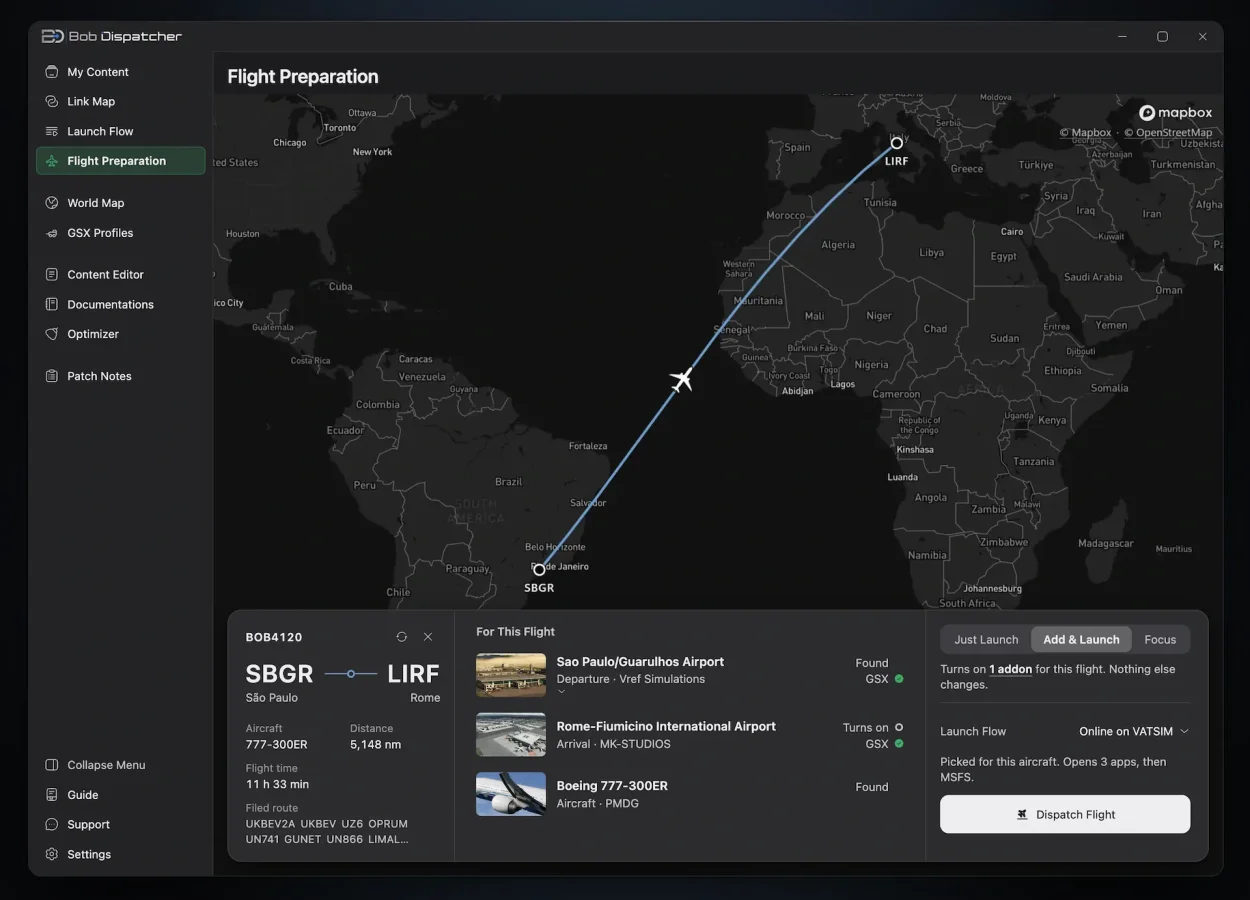
Flight preparation is still Bob’s main selling point, and version 1.4 rebuilt it from scratch. You can now search for airports by city, airport name, IATA or ICAO code, and the developer says small typos and missing accents still work. The aircraft field takes a model name like “737” or “king air.”
SimBrief is no longer required. Bob can open a .pln file from MSFS or a .lnmpln file from Little Navmap, which is a welcome addition for simmers who plan their flights elsewhere. A single card then lists every scenery and aircraft the flight needs. There are three modes: Just Launch, Add & Launch, which turns on what the flight needs, and Focus, which also turns off everything else. One Dispatch button then handles the add-ons, the companion apps and the sim itself.
Version 1.6 adds three useful changes:
- Alternate airport scenery. Bob now turns on scenery for your alternate airport too, taken from the SimBrief plan or the flight plan file.
- Three-character airport codes. Small airports with codes like S50 now work throughout the app, which helps US GA pilots.
- Sim selection. If you have both MSFS 2020 and 2024 installed, you can choose which one Bob starts.

Bob’s case for itself is the depth it now offers in route-aware activation, conditional links and GSX profile handling. A lot of that depth simply didn’t exist when we first looked at it.
The 1.6 notes end with a message from the developer. He writes that Bob’s growth has slowed, and that he will now work on other projects alongside Bob. Updates may come a little less often, but he says they will keep coming and that user feedback will continue to shape them. He’s counting on word of mouth from one simmer to another, which is how many small utilities usually find their audience.
Bob Dispatcher is available on SimMarket and the Flightsim.to Store, and it supports both MSFS 2024 and 2020. At the time of writing, SimMarket lists it at 50% off, €7.49 instead of €14.97. The full version history is on the Bob Dispatcher changelog.

-
Lunar AeroLabs pulls back the curtain on the LAGF800’s FMS, weeks after signing with Navigraph
Four weeks ago, Lunar AeroLabs was a name almost nobody in the community had heard. Since then, the studio behind the LAGF800 has kept up a steady weekly rhythm, and the last ten days or so continue to be busy. There was a Navigraph partnership, an official SimBrief profile, a long list of alpha ch…
Läs artikeln
Innehåll från RSS-flödet från MSFS Addons. Artikeln kan vara förkortad.
Läs hos MSFS AddonsFour weeks ago, Lunar AeroLabs was a name almost nobody in the community had heard. Since then, the studio behind the LAGF800 has kept up a steady weekly rhythm, and the last ten days or so continue to be busy. There was a Navigraph partnership, an official SimBrief profile, a long list of alpha changes, and today, a much closer look at the avionics that run the whole aircraft.
It’s an interesting momentum for a first-time developer whose release target is still close to a year away, and it comes during the same weeks that iniBuilds has been showing more of its own big-cabin jet, which makes the comparison hard to avoid.
If you’re just catching up, the LAGF800 is an ultra-long-range business jet for MSFS 2024 that looks a lot like Gulfstream’s G800. The developer says it’s an independent design, not licensed or endorsed by any manufacturer, and it runs on Working Title’s Epic 2 v2 avionics with a lot of custom pages and logic on top (we covered the reveal and the studio’s FAQ here). A week later, the studio opened the cockpit for the first time with a full power-up tour. The target hasn’t changed: Q3 2027, exclusively for MSFS 2024.
A closer look at the flight management system
Today’s update, posted on the developer’s Discord, is all about the displays. According to the studio, the FMS handles route sequencing, altitude and speed constraints and flight predictions, along with vertical planning data such as VNAV profiles, vertical speeds and flight path angles. Pilots will be able to switch between several data layouts for the active flight plan, depending on whether they want to see timings, winds and temperatures, fuel figures or coordinates.
Each waypoint also gets its own task menu. The developer lists direct-to, route amendments, holds, airway insertion and crossing constraints, and the screenshots show a few more options in there too, like vertical direct-to, intercept and RTA. A flight progress page brings together LNAV and VNAV data, air data and navigation accuracy figures.
The systems side gets attention as well. Lunar AeroLabs says the EICAS shows live engine indications, fuel quantities and hydraulic pressures, with selectable pages for flight controls, brakes, environmental systems, fuel and cameras. The brakes page, for example, displays pedal demand and brake temperatures.
Then there’s the arrival and landing interface on the touchscreen controller, which the developer says it’s particularly excited about. It brings together runway and landing performance information, VREF and approach speed calculations, landing configuration, autobrake selection, barometric minimums and altimeter settings, plus a step to confirm and dispatch the landing data.
The studio also goes out of its way to stress that none of this is static imagery or AI-generated graphics. It says the displays are software-driven, built with HTML, CSS and JavaScript, and work with real-time aircraft and flight management data. As always with in-development previews, the developer notes that everything shown remains subject to refinement.
Lunar AeroLabs is now also an official Navigraph partner. Alongside the news, the official LAGF800 SimBrief aircraft profile went live, which brings proper flight planning, fuel calculations and performance data for the jet.

What changed during alpha
The studio’s Sunday update on November 1 was the most detailed changelog we’ve had from Lunar AeroLabs so far, and a lot of it lines up with today’s screenshots.
On the touchscreen controller, the developer says it added MOD review with EXEC and Cancel MOD, secondary flight plans, saving and loading flight plans, direct-to, and support for airways, holds and crossing restrictions. The LNAV, VNAV, fuel and aircraft pages were expanded, and departure, approach and go-around speed schedules are now adjustable.
Handling and systems work included improved roll and pitch response, refined spoiler behavior, better climb and cruise scheduling, improved engine-out logic, a new in-flight relight capability, enhanced throttle calibration and improved reverse thrust. In the cabin, the galley, stairs and baggage areas were refined, and the studio added sounds for cabinets, drawers, appliances and water, reduced the battery-fan noise and integrated newly recorded audio. In its FAQ, the studio had said the sound package was recorded on a real ultra-long-range business jet, though the update doesn’t say more about the new recordings.
Alpha testing continues, and the current priorities are:
- Flight handling and flare characteristics
- Spoiler deployment and go-arounds
- Speed scheduling and throttle calibration
- Flight plan management
- HUD and EVS functionality
- VR usability
- Cabin interactions and night lighting

Ground vehicles and the full FBO experience
The other notable addition is on the ramp. The studio says its first set of ground vehicles is now implemented and fully working, and the ground power unit has been completed. One of today’s screenshots shows a ground services page in the SpeedPad EFB, where you pick two vehicles to bring passengers to the airstairs, with an optional red carpet arrival.
Lunar AeroLabs says its goal is a complete business aviation experience from engine start to shutdown. That’s an interesting parallel with iniBuilds, whose latest Global Jet teaser also put the cabin and FBO side front and center. It seems the ramp experience is becoming part of how these jets are being presented, not just the flight deck.
Still a long runway ahead
The usual caveats still apply. This is the studio’s first aircraft, it’s in alpha, and Q3 2027 is a long way off in MSFS terms. Lunar AeroLabs itself says there’s refining and testing ahead, and that it isn’t interested in rushing the aircraft out the door.
But if the pace of the last few weeks holds, there should be plenty more to look at before then.


Källor till nyhetsrubrikerna
Nyhetsrubriker från utgivarnas RSS-flöden, som uppdateras regelbundet. De fullständiga artiklarna finns på respektive webbplats.