
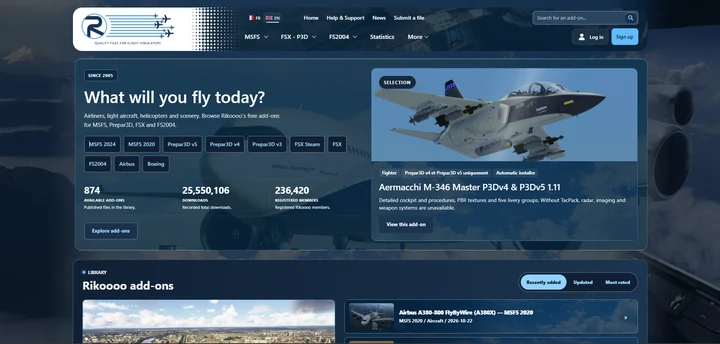
The next Rikoooo website will bring together a new presentation for add-ons, revised navigation and dedicated author tools. Alongside the interface changes, we’re working on the steps that connect finding an aircraft or scenery to reading its details and installing it.
Read more
Rikoooo
News
Updates from Rikoooo and the latest flight simulation headlines.
At Rikoooo
Catalogue, Hub and site updates from the team.
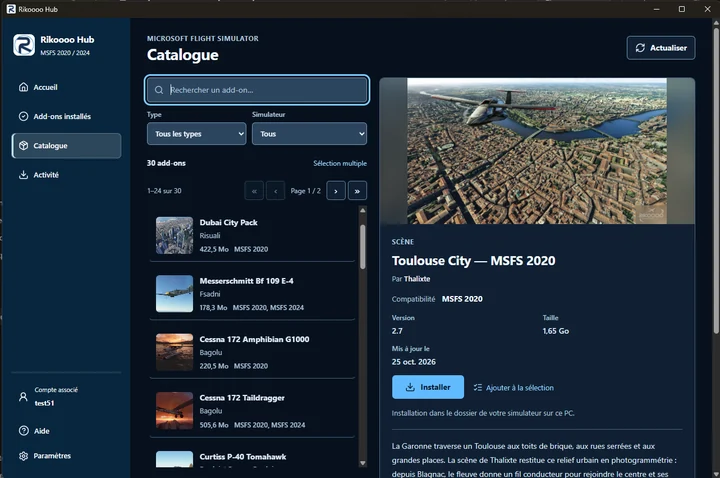
Rikoooo Hub: from the catalogue to installation in MSFS 2020 and 2024
Rikoooo Hub is the Windows application we’re preparing alongside the new website. It will let you browse the MSFS catalogue and install add-ons offered through the Hub, handling the download, archive extraction and placement of files.
Read more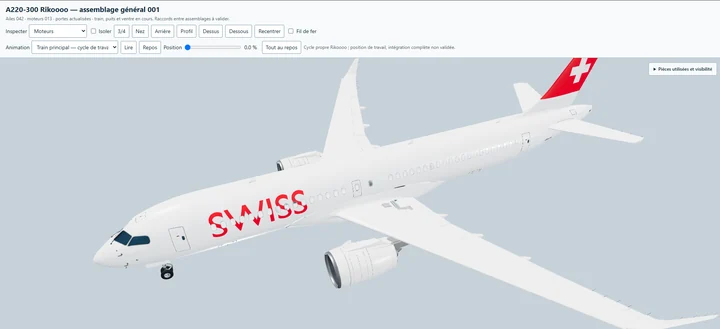
An Airbus A220-300 by Rikoooo, freeware for MSFS 2020 and MSFS 2024
We’re developing our own Airbus A220-300, with a 3D model, virtual cockpit, textures and sounds created by Rikoooo. The aircraft will be available free of charge and compatible with both Microsoft Flight Simulator 2020 and Microsoft Flight Simulator 2024.
Read moreFlight simulation
Releases, updates and news from specialist flight simulation publications.
1–10 of 10 headlines
-
This free mod fixes the MSFS 2024 menus simmers have complained about since launch
If there’s one complaint that has followed Microsoft Flight Simulator 2024 since launch, it’s the menus. Long threads on the official forums have asked Asobo to rework the aircraft selection screen, bring back the mouse-friendly feel of MSFS 2020 and cut the animations that make everything feel slo…
Read article
Content supplied in the RSS feed from MSFS Addons; the article may be abridged.
Read at MSFS AddonsIf there’s one complaint that has followed Microsoft Flight Simulator 2024 since launch, it’s the menus. Long threads on the official forums have asked Asobo to rework the aircraft selection screen, bring back the mouse-friendly feel of MSFS 2020 and cut the animations that make everything feel slower than it should. Two years in, a lot of simmers still wait for a 3D aircraft preview to load before they can even pick a livery.
Now there’s a freeware app that promises to “fix the MSFS UI for you.” Simple UI, by Flightsim.to creator Hyno, has passed 10,000 downloads in about three weeks and holds a very high rating. Let’s check it out!
The developer says Simple UI makes the MSFS 2024 menus faster, cleaner and less game-like while keeping the sim’s own look. And the scope is narrow on purpose. It only touches the menus, nothing runs in flight, and no sim files are modified. Every feature can also be switched off individually in the app.
The biggest change is aircraft selection. Instead of the large stock tiles, you get a full-screen gallery that scrolls down or a compact list showing aircraft, variant and maker side by side. If you have a big hangar, this is where the time savings show up. The default tiles are still one click away if you miss them.
Next to the aircraft list sits a setup panel with the variant, the livery (with thumbnails and a search box) and the identification fields. There’s no 3D model to wait for, and Fuel & payload and Mass & balance are a click away. One neat touch is that Simple UI reads the registration from the livery’s files or name and fills in the tail number automatically, updating it each time you change livery or variant.
Favorites are the other headline feature, and they’re a long-standing community request. You can heart aircraft in the gallery and liveries in the setup panel, and they show up as tiles on the Free Flight screen, most recently used first. One click loads the aircraft, livery and tail number together. People have been asking for something like this for years!
Weather and time get the same treatment, with live, preset or custom weather plus the time of day in a single bar. Live weather includes a slider for the past 24 hours, there are one-click options for Now, Dawn, Day, Dusk and Night, and your last choice comes back the next time you start the sim. Menu animations are also cut to a fraction of their usual length, and images appear as soon as they load, without fade-ins.
It’s a small tool, but it covers the parts of the sim we click through before every single flight, which probably explains why it’s becoming so popular.
Simple UI is MSFS 2024 only and it’s available for free on Flightsim.to.


-
Imaginesim’s VIDP Delhi is now available for MSFS 2020 and 2024
Flying into India in Microsoft Flight Simulator has meant settling for default airports at some of the busiest hubs on the planet. That changed in August, when DhruvSim released its Indira Gandhi International scenery and turned India’s busiest airport into a proper long-haul destination. Now, thre…
Read article
Content supplied in the RSS feed from MSFS Addons; the article may be abridged.
Read at MSFS AddonsFlying into India in Microsoft Flight Simulator has meant settling for default airports at some of the busiest hubs on the planet. That changed in August, when DhruvSim released its Indira Gandhi International scenery and turned India’s busiest airport into a proper long-haul destination. Now, three months later, Delhi has a second option, and it comes from a studio that has been modeling this airport since the FS2004 days.
Imaginesim has released VIDP Delhi for MSFS 2020 and MSFS 2024. The developer first teased the project back in April with a preview of Terminal 1, and it’s now available directly from the imaginesim store.
Delhi isn’t new territory for the studio. Imaginesim released VIDP for FS2004 and FSX back in 2012, followed later by a Prepar3D version. The airport has changed a lot since then. Terminal 1, used mostly by low-cost domestic carriers, was expanded and largely rebuilt in recent years, which is what the developer chose to show first in its earlier preview.
In its press release, imaginesim presents VIDP as India’s largest and busiest airport, handling 79 million passengers and over a million tonnes of cargo a year, and the main gateway into the subcontinent for the major world airlines.
The scenery covers the full 23 square kilometer airport, with three terminals and four runways. According to imaginesim, the package includes custom ground textures and runways, terminal, cargo and hangar buildings, interior terminal modeling and hundreds of airport vehicles. The developer also highlights:
- Custom SafeGate visual docking guidance and interactive jetways with animations
- 3D approach lighting, full ILS navigation and complete taxiway and runway signage
- An aircraft parking map made for the airport, with accurate ramp parking
- Hand-placed custom autogen and night lighting effects
- Configuration through imaginesim’s Operations Center GUI
- LOD optimization that the developer says keeps performance smooth even with complex airliner cockpits and dense AI traffic
Imaginesim also says the scenery was tested and approved by real-life airline pilots.
VIDP Delhi costs £23.99 on the imaginesim store, which lists separate versions for MSFS 2020 and MSFS 2024. Until November 15, buyers can also get one other airport from the imaginesim range at half price. Imaginesim says customers should email its sales team after purchase to claim the offer.


-
iniBuilds turns its airports into a private jet network with Global FBOs for MSFS 2024
When iniBuilds released that Global Jet teaser last week, the aircraft wasn’t the only thing that caught our eye. The FBO it was parked next to looked like a rock star’s mansion, with a large bar and a two-story chandelier. Now we know why so much effort went into it. The building is a separate pro…
Read article
Content supplied in the RSS feed from MSFS Addons; the article may be abridged.
Read at MSFS AddonsWhen iniBuilds released that Global Jet teaser last week, the aircraft wasn’t the only thing that caught our eye. The FBO it was parked next to looked like a rock star’s mansion, with a large bar and a two-story chandelier. Now we know why so much effort went into it. The building is a separate product.
The developer has announced the iniBuilds Global FBOs for Microsoft Flight Simulator 2024. It adds a dedicated Fixed Base Operator terminal, the private side of an airport where business jet passengers skip the main terminal, to selected airports in the iniBuilds scenery collection. iniBuilds says each FBO comes with a fully modeled building and interior, its own aircraft parking, custom apron infrastructure, ground markings and taxiway connections.
It’s not a new airport. It’s an extra feature for airports you may already own, and it gives iniBuilds a way to link its catalog together around its first business jet.
A private terminal that plugs into your existing airports
So how will you get this into your sim? Everything goes through iniManager. Once the Global FBOs are in your library, you go to a compatible airport you own, select “Install FBO”, and iniManager adds the building, parking positions, taxiway connections and the rest of the infrastructure to that scenery.
There is one important condition. The Global FBOs product doesn’t include any airports. You need to own a compatible iniBuilds airport for each location you want, and you can buy missing airports directly from iniManager.
That’s also why the custom taxiway connections are possible. Because iniBuilds controls both the airport and the FBO, it says each one was integrated into its airport’s layout with its own apron and taxiways.
Ten airports at launch
iniBuilds lists ten FBO locations at launch, and the list is subject to change as there are more airports planned for later:
- Dubai International Airport (OMDB)
- John F. Kennedy International Airport, New York (KJFK)
- Hamad International Airport, Doha (OTHH)
- London Heathrow Airport (EGLL)
- Innsbruck Airport (LOWI)
- Ibiza Airport (LEIB)
- Chicago O’Hare International Airport (KORD)
- Palm Springs International Airport (KPSP)
- Dallas Fort Worth International Airport (KDFW)
- Hong Kong International Airport (VHHH)
Built with the Global Jet in mind
iniBuilds doesn’t hide the connection. The announcement names the upcoming Global Jet as a natural fit for the FBOs, and the developer says the idea is to let you build your own corporate flight network across its airports, flying between FBOs instead of departing from the main terminal.
Business jets have had a strong run in MSFS 2024 recently, from the FlightFX Hawker 800XP to the FSReborn Phenom 300E and Contrail’s Falcon 50. The FBOs aren’t tied to any aircraft, though. iniBuilds says the apron parking is for business and general aviation aircraft in general, so the jet you already own will work too.
iniBuilds isn’t quite the first to bring this idea to MSFS 2024. When FSReborn launched its Phenom 300E in May, one of the big features was an FBO system that ships with the aircraft. FSReborn’s approach is to let you place one of several FBO buildings, in different sizes, at any airport you choose through an in-sim utility, and build a small network of your own around your favorite city pairs.
iniBuilds takes the opposite route. Its FBOs aren’t tied to an aircraft, but they’re tied to its own airports. You can’t drop one at your local field, but at the ten supported locations the developer says the building, apron, taxiways and markings were built into the airport layout by the same team that made the scenery. FSReborn gives you more freedom, and iniBuilds offers a more integrated result at fewer places.
A restaurant, a gym, and a trophy room
Inside, each iniBuilds FBO has a restaurant, bar, games room, gym and lounge areas, with custom furniture and props, plus custom sounds and music in different rooms. The developer says the aim is to give you more than a place to park. These are interiors you’re meant to walk around in, not just look at through the window.
The most unusual touch is in the basement. iniBuilds has added a Trophy Room that displays collectible mementos for the iniBuilds scenery products you own, and the display grows as your collection does. It’s a small extra, but a fun reward for longtime iniBuilds customers, and a nice reason to come back to the building after the first visit.
Coming soon
The announcement doesn’t include a price or a release date yet. The iniManager page iniBuilds shared with us lists a version 1.0.0 already, so it may not be far away. Since installation is handled entirely by iniManager, this looks like a PC product for iniBuilds store customers for now. The developer hasn’t said anything about the in-sim Marketplace or consoles.
You can read the full announcement on the iniBuilds forum.


-
iniBuilds takes us inside Paris Charles de Gaulle with first look at Terminal 1 interiors
When iniBuilds announced Paris Charles de Gaulle back in August, there wasn’t a lot to look at. The developer had a research plan, a call for help from people who know the airport, and very little in the way of in-sim screenshots. That made it hard to judge how its version of CDG would stack up aga…
Read article
Content supplied in the RSS feed from MSFS Addons; the article may be abridged.
Read at MSFS AddonsWhen iniBuilds announced Paris Charles de Gaulle back in August, there wasn’t a lot to look at. The developer had a research plan, a call for help from people who know the airport, and very little in the way of in-sim screenshots. That made it hard to judge how its version of CDG would stack up against the projects already in the works. A couple of months later, the details are starting to fill in.
iniBuilds has shared a new batch of previews for Paris Charles de Gaulle (LFPG) for Microsoft Flight Simulator 2024, and this time the focus is firmly on the parts of the airport you don’t usually see from the flight deck. The set covers “the iconic Terminal 1 and its detailed interiors” along with the surrounding hotels, the cargo facilities and the airport’s night lighting.
A closer look at CDG’s landside
The interiors are the main event here. The screenshots take us inside the terminal buildings, with seating areas, shops, gate signage and jet bridge corridors all on show. Outside, the previews move to the hotels near the terminals and the FedEx cargo complex, all shown at dusk or at night.
And then there’s Terminal 1 itself. The circular concrete building is probably the most recognizable piece of architecture at CDG, and iniBuilds closes the set with a night shot of its facade lit up with the colors of the french flag. When the project was announced, the developer said a lot of its early research was going into the architectural differences between the terminal areas, which have grown in very different styles since the airport opened in 1974.
A two-horse race for Paris
These previews also arrive in the middle of one of the more interesting scenery contests in MSFS right now. When we mapped out the battle for Paris in January, three developers were working on CDG. Aerosoft’s project has been suspended since June, and right after iniBuilds’ announcement, azrsim cancelled its version and threw its support behind iniBuilds.
That leaves Pilot Experience Sim. PESIM, which first revealed its CDG plans back in October 2024, said it was disappointed to see a partner (iniBuilds sells PESIM’s sceneries on its own store) compete head-on, but confirmed that development continues. The two projects are taking different routes. PESIM is building for both MSFS 2020 and 2024 and points to its own on-site access in France, while iniBuilds is developing CDG exclusively for MSFS 2024 and has been crowdsourcing references from crews, ground handlers and airport staff, much like it did for Manchester.
Interestingly, both projects are aiming for a release on Q4 2026. iniBuilds hasn’t given a release date or pricing in its own announcements, though.


-
StrataSim Designs lets you decide how the MSFS 2024 atmosphere looks with StrataFx
You probably know StrataSim Designs’ previous work with StrataWx, a piece of software we enjoyed quite a bit and that has continued to improve and evolve since its launch back in June. But yesterday, the team brought us another program from the same family of products, StrataFx. Using the words of …
Read article
Content supplied in the RSS feed from MSFS Addons; the article may be abridged.
Read at MSFS AddonsYou probably know StrataSim Designs’ previous work with StrataWx, a piece of software we enjoyed quite a bit and that has continued to improve and evolve since its launch back in June. But yesterday, the team brought us another program from the same family of products, StrataFx. Using the words of their own press release, this is a new desktop application for Microsoft Flight Simulator 2024 that shapes how the simulator “renders the atmosphere: the colour of the sky, how light scatters through the air, how high that scattering reaches, and how haze gathers toward the horizon”.
You’ve probably already heard about another program doing just this, but we’ll talk about that in a moment.

No, this isn’t ReShade or a filter. StrataFx doesn’t paint color over a rendered image; it tweaks the values MSFS 2024’s own renderer uses to draw the sky color, light and particle scattering, depending on atmospheric conditions. And this is a dynamic adjustment, performed from dawn until dusk, but also in sunny or overcast conditions, since StrataFx reads the sun’s elevation, the local time and the visibility from the simulator. So a sunny, clear morning will certainly look a lot different from an overcast, moist afternoon, and a simple “snapshot” provided by one of many ReShade tools just doesn’t work well in all conditions.
But StrataFx still gives you control over what you see. Much like StrataWx, the new software allows you to adjust the visual settings, even to nine decimal places, and not just with sliders, but by actually typing in the numbers. There are 32 controls in three major groups: atmosphere, environment light and tone, and weather depiction. You can even export your preferences into a file, ready to share with another pilot. And if you feel that you’ve gone a bit too far, or just wish to revert all changes, you can either restore or simply close the app, and everything goes back to the exact values MSFS 2024 was using before.

Another important aspect of this software is its respect for the original MSFS 2024 values. Each time the simulator itself updates, StrataFx doesn’t apply any changes until the new build has been checked. Also, those who already own StrataWx will want to know that StrataFx can connect with it when both are running on the same machine, so the adaptive themes follow the weather StrataWx is generating. They are actually designed to work together, but you are not required to own both, since they don’t share a license and can work independently from each other.
StrataSim Designs’ new StrataFx is now available in Early Access via their own store, the StrataSim Shop the team opened to other developers last month. The software costs $19.99, currently on sale for $18.99, and StrataWx owners can get it for $16.99 once they sign in. It uses the same StrataSim Manager software already used by StrataWx.
Remember this is Early Access software, so the current build will remain in an experimental state as it develops. If you don’t want to deal with bugs or the usual development woes, it’s perhaps better to wait for the final version.

Reading all of the above, you might remember there’s another program that makes most of these atmospheric changes. Indeed, we’ve seen REX Atmos Core do pretty much the same to MSFS 2024’s atmosphere since its release in August 2025, and it has kept receiving updates, such as its Technical Update 1.0.
Although the two products do seem to compete, StrataFx appears to be a bit more dynamic and automated, something Rex has promised over time but never actually delivered. Rex Atmos Core continues to work as completely manual “snapshots” for the environmental changes it can create and some users continue to wait for further development. Meanwhile, StrataFx may very well be a possible replacement. We’ll have to wait and see.

-
Gaya’s Vienna rebuild for MSFS 2024 is almost ready, with a release date coming soon
It’s not every day that a flight sim developer mentions Grand Theft Auto in a release update. But that’s exactly what Gaya Simulations did today, alongside a fresh batch of screenshots from its rebuilt Vienna International Airport for Microsoft Flight Simulator 2024. The headline is simple: after a…
Read article
Content supplied in the RSS feed from MSFS Addons; the article may be abridged.
Read at MSFS AddonsIt’s not every day that a flight sim developer mentions Grand Theft Auto in a release update. But that’s exactly what Gaya Simulations did today, alongside a fresh batch of screenshots from its rebuilt Vienna International Airport for Microsoft Flight Simulator 2024. The headline is simple: after a quiet few weeks, the studio says LOWW is almost ready.
According to Gaya, the silence was on purpose. The team says it wanted to wait until it could show the airport at a level that reflects its final quality, and that it is now adding the last details and doing a lot of optimization work. Gaya adds that the release campaign and the date announcement are coming “very soon.”
A project that keeps growing
Gaya first confirmed a Vienna “Version 2” back in February, at the same time it made its return to standalone products official. Then, in August, the studio turned that into a full rebuild from zero, now called LOWW Vienna Airport: Reboot, with every terminal, texture and material recreated specifically for MSFS 2024. In October, Gaya shared a set of closeups and said the scenery was being built with high-quality LODs and optimization in mind.
Today’s previews pull the camera back again. We get a look at the apron from above, the airport’s distinctive control tower from several angles, and closer views of the terminals and jet bridges. It’s a nice mix of the big picture and smaller details, which is a good way to show where the project stands.
It’s also worth remembering what this airport means to the studio. The original LOWW arrived for MSFS 2020 in August 2020, during the sim’s first weeks, and it was one of the earliest major third-party hubs available. Six years later, many simmers are still flying into that version in MSFS 2024.
So, what does Grand Theft Auto have to do with an Austrian airport? Rockstar’s GTA VI launches on November 19 for PlayStation 5 and Xbox Series X|S. It’s widely expected to be one of the biggest entertainment launches in years, and many studios across the games industry have planned their schedules around it.
Gaya didn’t say whether that means releasing Vienna before GTA 6 or waiting until the dust settles, only that the game is a factor in its timing. Either way, it’s a reminder that flight sim developers compete for the same evenings, wallets and Xbox storage space as everyone else.

A busy few months for Gaya
Vienna isn’t the only thing on Gaya’s plate. The studio confirmed Madrid-Barajas for MSFS 2024 in September, and a separate team focused on smaller airports released Santa Barbara (KSBA) at the end of October. Gaya also built five of the airports included in the recent World Update for Poland and the Baltics. Before all that, Corfu launched in June.
Vienna, however, remains the flagship, and the studio has always said it leads the way among its large-airport projects.
Still waiting on the key details
A few of the most important questions are still open. Gaya hasn’t announced pricing yet, and there’s still no word on whether owners of the original Vienna will get any kind of upgrade discount. When the project was still a “Version 2,” it was expected to follow the free-update model of the 2022 overhaul, but a ground-up rebuild is a different proposition. We also don’t know yet whether the scenery will show the airport as it stands today or include the Terminal 3 Southern Expansion, which Vienna Airport expects to open in 2027.
Hopefully, the release campaign Gaya is promising will answer all of that. We’ll be keeping an eye on it!


-
IndiaFoxtEcho’s F-35 gets a surprise 1.5.0 update with a radar tracking fix before the 2.0 overhaul
This is a bit of a surprise update, since IndiaFoxtEcho had already mentioned that the 1.4.6 version would be the last “1.X” before the major planned overhaul to version 2.0. That update was already a big one, bringing over some of the features planned for 2.X along with many new liveries. But here…
Read article
Content supplied in the RSS feed from MSFS Addons; the article may be abridged.
Read at MSFS AddonsThis is a bit of a surprise update, since IndiaFoxtEcho had already mentioned that the 1.4.6 version would be the last “1.X” before the major planned overhaul to version 2.0. That update was already a big one, bringing over some of the features planned for 2.X along with many new liveries. But here we have the new version 1.5.0 for their Lockheed Martin F-35 Lightning II. This new update was released now due to some “nasty bugs” and some “minor inaccuracies” that still needed to be rectified.
IndiaFoxtEcho had already identified issues in their fleet (including the F-35) caused by the famous “drag problems” introduced to Microsoft Flight Simulator 2024 with Sim Update 7. Ironically, these were made worse with the attempted correction brought by Sim Update 7.1, although the developer described the effect on the F-35 itself as minimal. But since yesterday, those drag changes have been reverted by Sim Update 7.2, so that particular crisis was averted.
One of the major bugs this patch attempts to resolve involves the radar: if a target was lost, it would still be declared valid, which is incorrect since the plane would no longer be tracking that contact. On Xbox, missing HOTAS functionalities were added, namely the “XY-Cursor” and “Insert” commands, as well as “target selection.” Finally, there are some livery corrections for the “Ace of Spades” paintjob, and two new “Low Viz” liveries were added, including one for the “Fighting Bengals.”
More on what’s new in the changelog below:

Changelog – IndiaFoxtEcho F-35 Lightning II version 1.5.0
External model
- F-35B fixed minor mapping warpage on rudder inner surfaces
- F-35B minor adjustments to wheelchocks
Mission Systems
- solved bug causing target to be declared valid even if track is lost
Miscellaneous
- Fixed minor typos in configuration files
XBox
- Solved multiple bugs in HOTAS XY-Cursor interactions
Liveries
- fixed configuration error in F-35B VMFA-533 ED-06 livery
- fixed several minor color mismatch issues in lift fan art on multiple liveries
- fixed minor mistakes in F-35B VMFA-231 CG-19 livery
- added F-35B VMFA-231 CG-88 low viz livery
- added F-35B VMFA-224 WK-06 low viz livery
The IndiaFoxtEcho F-35 Lightning II version 1.5.0 is available through the Microsoft Flight Simulator Marketplace (in-game), where you can manually update it via the “My Library” page, or it will be updated automatically if you stream it. If you bought it from the third-party flight simulation stores simMarket and Orbx Direct, you will need to go to these platforms and select to update the aircraft in the corresponding menus.

-
Miltech’s U-2 teaser powers up the cockpit and ends on a date: 13 November
If you’ve been waiting for Miltech Simulations’ U-2, this one is for you. The developer has just posted a short teaser on its social channels. It doesn’t show a single exterior shot or name the aircraft. But it ends on something more interesting than either: a date. The clip is 36 seconds long and …
Read article
Content supplied in the RSS feed from MSFS Addons; the article may be abridged.
Read at MSFS AddonsIf you’ve been waiting for Miltech Simulations’ U-2, this one is for you. The developer has just posted a short teaser on its social channels. It doesn’t show a single exterior shot or name the aircraft. But it ends on something more interesting than either: a date.
The clip is 36 seconds long and very dark. It’s a cold cockpit coming to life under red night lighting. Near the end, the center display goes blank and shows 13/11/26, which reads as 13 November 2026, exactly one week from today. Miltech hasn’t said whether that’s a release date, a reveal or a livestream. Still, a date on screen is a very clear hint.
A cockpit coming to life
The video opens with thin red lines on black, then it moves to slow close-ups of a lit autopilot panel, before pulling back to show the full front panel.
That wider shot is where the clues are. There are three large portrait displays, a keypad at the upper left and a control yoke at the bottom instead of a stick. That layout matches the glass cockpit of the modernized U-2S, the variant Miltech says will launch first. The center display then runs through its start-up checks: color bars, an alignment grid, text tests and finally a “C MFD POWER ON BIT” page.
The aircraft isn’t named in the clip. Given the cockpit and Miltech’s recent updates, though, it’s hard to see what else it could be.
Miltech first announced the U-2 back in March 2024. At the time, the developer expected it to launch that same year. A few weeks later, new images and details followed. Miltech talked about modelling the aircraft’s famously difficult handling, including flying in the “coffin corner” (the narrow band at high altitude between stalling and going too fast) and the tricky landings, with a chase car calling out altitudes over the radio.
That 2024 target came and went while the studio shipped other projects. Those included the M2K-C fighter jet and the MH-60 together with the Mission Hub, a collaboration with Blackbird Simulations. Early this year, Miltech also announced the Bo 105.
Things picked up again at FSimUK last month. As we reported in October, the U-2 was in beta, and Miltech said it would release “as soon as the Beta is completed.” That beta is now apparently nearly done.
What’s planned for launch
Based on what Miltech shared at FSimUK, the first release is the U-2S. It comes with simulated ASARS-2 radar and SYERS camera sensors, a datalink portal and between five and eight missions. It also includes three sceneries: RAF Akrotiri in Cyprus, Groom Lake and RAF Fairford in the UK. The Dodge Charger chase cars, a real U-2 tradition, are included too, with radio calls during landing.

Miltech plans a free follow-up update about three to four weeks later. It adds the late-1960s U-2R with its analog cockpit, NASA’s civilian ER-2 research aircraft, five to ten more missions and chase cars to match each era. The U-2S will cost $36.99 at launch, rising to $39.99 once the U-2R and ER-2 arrive. It launches on PC first, with consoles to follow.
Few add-ons, if any, cover this kind of aircraft in MSFS 2024. A high-altitude reconnaissance plane with sensor simulation and missions is quite different from the airliners and GA aircraft that make up most releases.
We’ll know on 13 November whether the date is a release, a trailer or a livestream. Until then, the teaser is mostly atmosphere, but the attention to start-up details is encouraging for a developer that has said a lot about simulating the aircraft’s systems and handling. We’ll update you as soon as Miltech confirms what’s coming.

-
MSFS 2024 Sim Update 7.2 is out, and it takes drag back to where it was before SU7
Have you lost track of where the MSFS 2024 drag saga currently stands? Nobody blames you. In a little over three weeks, the flight model went from too little drag, to a fix, to complaints from some developers that their aircraft now had too much. Today, Microsoft and Asobo are closing that chapter …
Read article
Content supplied in the RSS feed from MSFS Addons; the article may be abridged.
Read at MSFS AddonsHave you lost track of where the MSFS 2024 drag saga currently stands? Nobody blames you. In a little over three weeks, the flight model went from too little drag, to a fix, to complaints from some developers that their aircraft now had too much. Today, Microsoft and Asobo are closing that chapter in the simplest way available: by putting the drag calculations back to how they worked before Sim Update 7. Sim Update 7.2, version 1.9.24.0, is now out on the public release channel.
Sim Update 7 arrived on October 13 with the National Championship Air Races as its headline feature. Within a day, though, simmers were reporting that aircraft were flying faster than expected and struggling to slow down.
Asobo moved quickly. The Sim Update 7.1 beta reached testers on October 16, and a week later Sim Update 7.1 went out to everyone with a correction for the reduced drag.
But that wasn’t quite the end of it. Just two days later, IndiaFoxtEcho warned about new drag-related issues with its supersonic fleet. The developer described the effect as minimal on the F-14 Tomcat and F-35 Lightning II and measurable but small on the Tornado, while the Eurofighter Typhoon was left unusable. Over on the official forums, a thread about third-party fighter jets accelerating too slowly after 7.1 had also been gathering replies.
Back to the pre-SU7 drag model
According to the release notes, Sim Update 7.2 reverts a change to the drag simulation calculations to the pre-SU7 version. Microsoft says this is to ensure backwards compatibility with certain third-party add-on aircraft. The change first appeared in the second 7.2 beta build, 1.9.23.0, on October 28, and has now made it to the public release.
The notes don’t name specific aircraft or explain the technical side, so we can’t say exactly which add-ons were affected and how. In principle, though, aircraft should now fly with the same drag they had before October 13.
Cold engine starts and helicopters
The other notable fix concerns aircraft that use bleed air starters. Microsoft lists the 737 and the F/A-18 as examples, and says these aircraft could sometimes fail to start their engines when the air temperature was set quite low.
Helicopter pilots also get the fix that first showed up in the initial 7.2 beta build. With the Turbulence setting in Assistances set to Realistic, helicopters could experience excessive rotor RPM and unexpected lift, and Microsoft says that’s now resolved.
There’s also a UI fix for the in-flight Camera menu, where values weren’t being read or set correctly.
For PS5 players and developers
The rest of the list is more specialized. On PS5, BMP files used by XML gauges now load correctly, and a WASM networking function that returned an incorrectly formatted value on the console has been fixed. Both are the kind of issue players never see directly, but they can affect how add-ons behave on the platform.
Developers also get a fix for a crash when custom SimConnect events with numerical IDs were used with F:KeyEvent, along with a correction for the SimObject Profiler in DevMode, which was randomly using the wrong camera angles for exterior profiling.
Before your next flight
As with every sim update, Microsoft reminds PC users that outdated packages in the Community folder can affect performance and behavior. If you run into stability problems or long loading times, move your Community packages to another folder and relaunch the sim. Our guide on how to install add-ons in MSFS 2024 covers where that folder lives.
You can follow every patch, along with what’s coming next, on our MSFS 2024 updates page. At the time of writing, no date has been given for Sim Update 8.


-
TFDi Design’s MD-11 gets a separate tiller axis and dozens of fixes in update 1.1.37
It’s quite possible you sometimes forget that the TFDi Design McDonnell Douglas MD-11 is one of the best classic long-haulers out there. The team mostly keeps to themselves, working on their current projects but occasionally dropping a few updates for their big airliner. It’s been a busy year for t…
Read article
Content supplied in the RSS feed from MSFS Addons; the article may be abridged.
Read at MSFS AddonsIt’s quite possible you sometimes forget that the TFDi Design McDonnell Douglas MD-11 is one of the best classic long-haulers out there. The team mostly keeps to themselves, working on their current projects but occasionally dropping a few updates for their big airliner. It’s been a busy year for the tri-jet, though. The MD-11 “Definitive Edition” brought a major overhaul and MSFS 2024 support in January, and just last month it became the first fully shared, persistent aircraft on the Tailstrike network.
This is a team that prefers a more discreet approach to fixes, favoring bigger updates over many smaller patches. Today, we just got one more of those updates, and the list is quite considerable.
The new version 1.1.37 aims to fix a big array of bugs and errors, mostly small items. As highlights, the team added functionality to the APU GEN button, as well as a new option to separate the tiller axis from the rudder axis if you so choose. In terms of fixes, there’s an important correction to the IRS alignment in quick align mode, the repeated CAWS altitude alerts were fixed and, in MSFS 2024, that incredibly small heat blur effect from the engines was also corrected. But there is much more in terms of fixes, so read the full changelog below. This new version also aims to address stability in the Marketplace and Xbox version.

Changelog – TFDi Design MD-11 version 1.1.37
- ADDED – APU GEN button functionality
- ADDED – New EIS export variables
- ADDED – Separate tiller/rudder nose wheel steering
- FIXED – Repeated CAWS altitude alerts
- FIXED – IRS quick align not working as intended
- FIXED – Gear and flap damage/limit speeds (according to the simulator)
- FIXED – [FS24] Very small heat blur effect
- FIXED – Rolling engine animations being too smooth
- FIXED – FMS SPEED not resetting properly on second flight with manually entered V2
- FIXED – HOLD SPD not respected by FMS/AP
- FIXED – Automatic pitch trim referencing yoke position instead of elevator
- FIXED – LSAS causing deadzone/counter-input when hand flying
- FIXED – PROG page not showing time/distance/fuel at arbitrary flight plan point
- FIXED – IRS align position never returning to GNS POS
- FIXED – APU GEN failures not tripping the system off
- FIXED – APU turning off in ready to start state
- FIXED – SLAT EXT text appearing too early on SD
- FIXED – Missing ACTIVATE SEC requirements
- FIXED – Inability to exit STANDBY on MCDU 3
- FIXED – NEW DEST behavior
- FIXED – All EAD alerts being resettable
- FIXED – Incorrect DUMP TO GW default value on F variants
- FIXED – Cargo fire agent timers not resetting with maintenance/reset
- FIXED – Gear indicator lights not factoring in manual gear handle
- CHANGED – DEU export variables now respect the EIS source knob
- CHANGED – Added workaround for WASM memory mismanagement bug
In order to update the TFDi Design MD-11 to version 1.1.37, if you purchased it via the official TFDi Design Store or any other third-party store, all you need to do is run the MD-11 Install Manager. If you acquired the aircraft via Microsoft’s in-game Marketplace, you know what to do. You can update it via the corresponding library or, if you have it streamed, it should already be updated on your next flight.


Sources for these headlines
Headlines from publishers’ RSS feeds, refreshed regularly. Full articles remain on their respective websites.